This tutorial should allow you to plan, transfer and Navigate a simple route.
Navigation on a Garmin Edge 205/305 is you riding to a compass direction pointing to the next waypoint. It differs from Do Course which is a previously ridden or planned Course or track.
http://www.marengo-ltd.com/map2/index.php?route=194
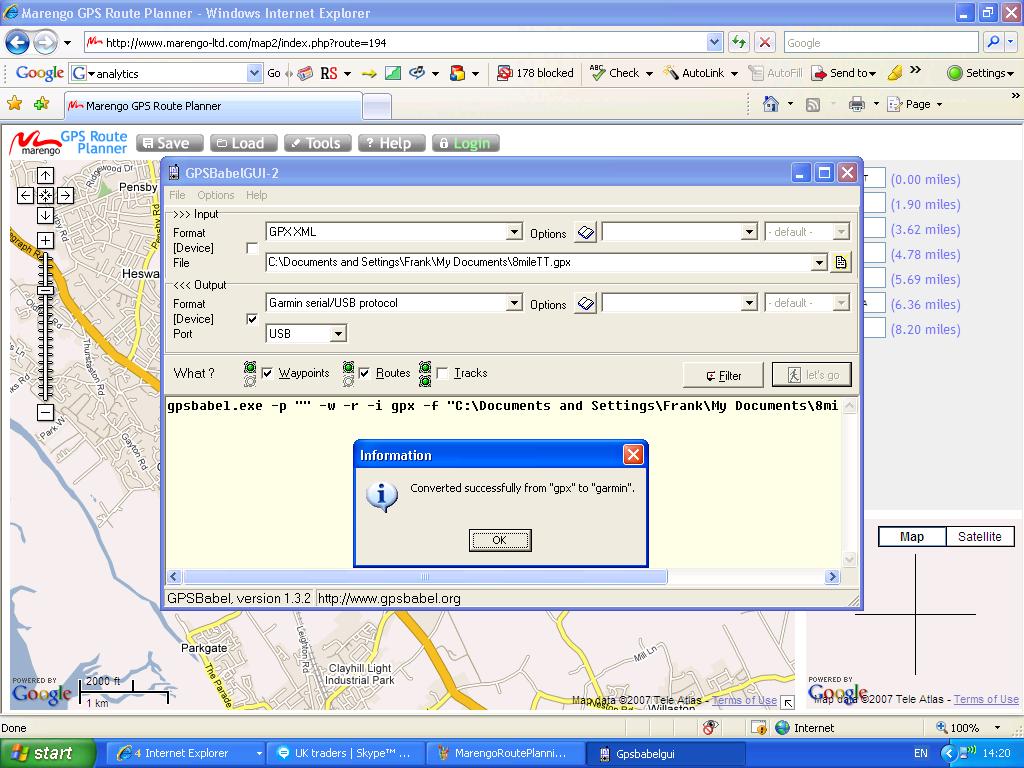
The Marengo planning software is easy enough to use and if you follow the convention of naming your Waypoints as the turndirection when you are planning your route you’ll be rewarded with a bleep and a countdown and distance timer 10 seconds before the turn. Some of the other route planning sites don’t allow the naming of the waypoints so you would be stuck with the WP01 WP02 numbering system.
By naming the waypoints as the turn direction it gives you an instant indication of your next direction change. It helps if you know your left from your right.
Example LT01 is Waypoint 1 Left Turn.
RT02 is Waypoint 2 Right Turn.
RL03 is Waypoint 3 Right then Left turn (a dogleg).
LR04 is Waypoint 4 Left then Right turn (the other dogs leg)
SA05 is Waypoint 5 Straight Across
BL06 is Waypoint 6 Bear Left ( usefull at a fork in the road that may not be a junction)
BR07 is Wapoint 7 Bear Right.
You get the drift, keep it simple and the turn will be instinctive. It also gives you time to shout out the turn direction to fellow riders. Don’t forget by Navigating a Route you get a 10 second time and distance countdown to the turn.
I save the route as a GPX file with a Z prefix so you know the file will allways appear at the end of list of your Documents folder. Using the Marengo Save as GPX option I’d save it to My Documents as Z8mileTT.gpx.
The next section deals with transfering the Route into the Edge 205/305 using GPSBabel. You should have downloaded this software from the link on the Garmin Edge page. Run GPSbabel.
On the >>>Input box of GPSBabel select GPX XML on the pulldown menu next to Format.
The File path in my case is: C:\Documents and Settings\My Documents\Z8mileTT.gpx
Next the Outut box settings
In the <<
Next to What tick Waypoints and Routes
Next connect up your Garmin Edge 205/305 it should have no Routes and no Waypoints in it. If it has delete them now. Deleting just the Route doesn’t delete the Waypoints you need to go into Waypoints and select Delete All. That done it is time to download the Route into the Edge.
Click the Lets Go box and you should rewarded with:
gpsbabel.exe -p “” -w -r -i gpx -f “C:\Documents and Settings\My Documents\Z8mileTT.gpx” -o garmin -F usb:
On opening up the Navigation, Routes on your Edge the 8mileTT route should be in there.
Ride to near the start location highlight the route press enter on the Edge and select Navigate.
Press the Start/Stop button and your on your way. You can toggle between the various display modes and to find the best one for you. When riding an unknown route the compass is handy. Map mode comes into it’s own when you get off course. Use the down arrow to reduce the map scale and and see where the nearest waypoint is.
Courses are an entirely different thing on the Edge, you do a course which can be 13000 trackpoints. It doesn’t give you the bleep when the turn (waypoint) comes up, you do however follow the exact course you have ridden before and get the benefit of the virtual rider. (maybe another tutorial coming up)
There is a marked difference between doing a Route and a Course. On a Route you are navigating to the next Waypoint, when you approach that waypoint the Garmin Edge 205/305 will bleep and change screen mode. It gives you a 10 second countown and a distance reading to the waypoint. It’s great to place these waypoints at roadjunctions and name the turn direction.
On a Course, once you have selected Do Course and are on the Course nothing much happens until you are off Course. Then the Garmin Edge will warn you that you are off course. I think the warning sensitivity is set to about 25 yards. Once back on course the Garmin Edge will bleep Course Found.
You can save your ride as a Course on the Garmin Edge without any software by going into the History and saving it as a Course, it’s that simple. Map mode is used more heavily when doing a course as you will be monitoring the track.
This is my first go at this so if something is not too clear let me know. Once you have done one the second is easy.
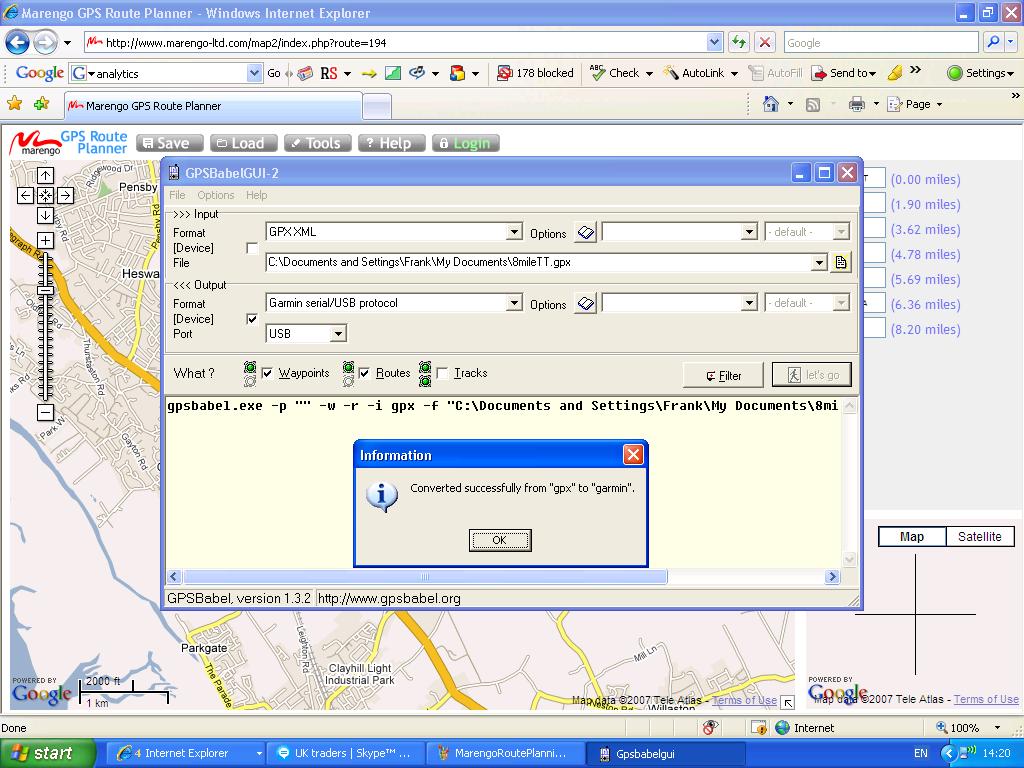
GPSBabel screenshot thumbnail, double click twice to enlarge to fullscreen.
Screenshots added 13 Dec 07
“Double click twice” added 24 Apr 08
 Frank Kinlan's Blog
Hi Frank,
An excellent site you have. I have just received my 305 today. I have followed your tutorial and had a slight problem. Apart from me not selecting the Device checkbox in the output section, I found no route transfered, unless I ticked Routes. I had at first just ticked Waypoints.
gpsbabel.exe -p “” -w -r -i gpx -f “C:\Documents and Settings\gpsbabel_files\12Miler.gpx” -o garmin -F usb:
This has the extra switch -r, when compared with your output.
Best wishes Graham
Hi Frank, I too am extremely pleased to have found your site as I’ve been struggling to upload routes to my new 305. I’m followed all your steps which were really clear, but have got an error message when I’ve done the final step to upload the route from gps babel. It’s saying Setup device interfaces not ready, [ERROR] Get_Time: unknown date/time protocol. GARMIN: Can’t init usb. Error running gpsbabel: process exited unsuccesfully with code 1. Any advice on what’s not working? I bought the 305 second-hand and had to buy a new usb lead – could this be faulty? Any advice welcomed. Thanks.
Hi Frank, I too am extremely grateful for the info on your site. I’ve been struggling to upload routes onto my new 305 without success. I’ve followed all of your instructions which were really clear, but I think there’s some problem with the computer recognising the device via the usb. When I clicked on let’s go, the message I got was ‘set up device interfaces not ready… GARMIN: can’t init usb . I’ve installed the USB drivers so don’t think it’s that, but the same happens when I try and get software updates via WebUpdater and when I’ve tried to upload routes via another system. The message from these has been ‘you may need to set interface option on GPS to Garmin or Host’, but I don’t know how to do this. Any advice really welcome. Just so want to get up and running and try out some new routes on my new Garmin!
Hi Vicky, it sounds like a driver problem, a 305 uses a different file format to a 705, which can be seen directly from file explorer on windows.
Likewise Webupdater, it’s designed for a 705 and it’s file format. I’ll try my 305 with what I currently have installed and get back to you.
Can you upload rides to TrainingCenter or GarminConnect?. If you can’t it’s something more fundamental.
Thanks for the feedback Graham,
your right I missed the route switch off the output section.
I’d also missed it out in the What section.
I’ve altered the text to reflect this.
I’ve been having a great time with the 305 on the TLI roadraces. I press start on the finish line and I get a lap time everytime I cross it. Enjoy your 305.
Regards,
Frank.
Thanks for the instructions! This also works for my Forerunner 301.
The text above is missing a part. Where it says:
Next the Output box settings
In the
Oh, it doesn’t like the use of the “greater than” signs, so it is chopping out text, thinking it is HTML markup!
–Bill
Hi,
great site ,
I am interested in getting an edge 305 , but wondered if it can give you a britisg grid ref ,
could you clear this up .
regards
Dave
Hi Dave, an Edge 305 doesn’t give you a NGR but saves the location as a Lat/Longitude. You can’t see this data on the Edge either except in a diag mode. An NGR can be displayed if you use OS based mapping software, or just Google it. The Edge 305 is not a map based device, if you want NGR and maps try looking at the Garmin Etrex range. Try the demo versions first. Also an Edge 205 gives you the same features without heartrate or cadence and is priced at the lower end of the range if you look hard enough.
Regards
Frank.
FANTASTIC – you’ve increased the power and usability of my 205 tenfold. I’m combining my personalized bike trips with known geocaching waypoints and having an absolute blast. thank you very much.
Thanks David, as you can gather I’ve been having a great time too.I don’t think Garmin realise what they’ve got with this device. I am getting a lot of traffic for the Garmin pages. The manual doesn’t really explain the features like Routes too clearly which is why a lot of people are coming to the site.
Regards,
Frank.
Hi
the tutorials great, just managed to get up routes for my mountain biking using OS Explorer maps 1:25000 exporting in GPX XML format and then using GPSBabel to upload to garmin edge 205 absolutely fantastic thanks a lot Offas Dyke and moel famau routes will now be a breeze
kind regards
Neil
Help. why can I only get 15 waypoints into my 305? I do already have some in it, don’t know where they came from as it is new. I can’t “delete all waypoints” as Frank suggests – do you do this on the Garmin or through GPS Babel. I like the Garmin, small, backlight and bleep is good but if I can’t get it to load about 70 Waypoints to make a route to ride it’s going on e-bay offers?
P.S> I like GPSBabel the idea of labeling your waypoints with the turn direction is neat, saves on waypoints, the other method I have used is to put a WP about 100M from the turn, gives extra confidence but doubles up.
Oh no……… found out how to do a full reset from the Garmin web site and it all works now *!*!!!*** numpty
Aidan, you don’t need to do a full reset. Deleting the route does not delete the waypoints for the route. You have to go into Waypoints and Delete All.
Neil, upload your rides on to MotionBased. I’ve had a look at some of the rides at Coed Y Brennin and they look tough. A chap I work with has ridden them so looking at the data on the player meant something to him. I don’t know how the Topo GB maps compare but the Garmin Metro series would be useless offroad as would Google.
Hi Frank.
At last – someone who explains the route planning for the 305 properly!
I did a double take when looking at the Marengo map you have – I grew up there and know your route far too well.
Thanks for the comment Kevin they are all welcome, Garmin really do need to educate new user better about the capabilities of the device. The manual and help pages just tell you about the function and little more, until you have that eureka moment the Edge is little more than a Cycle computer.
I continue to bump into lots of people through this site.
I and others owe a lot to Google, it’s great great to share routes and rides with others without needing expensive mapping software.
Surfers just want to click on a link and see a ride.
I now live on the Brimstage Time Trial route so you may be seeing a few more of them on the site. I still see Garmin Routes playing a strong role in the site as the new Garmin 705 still only has 100 waypoints.
Regards,
Frank.
Hi Frank,
I, like many others who have done so already, wanted to congratulate you on a fantastic site. I have an Edge 305 and love it but have frustrated myself with not using its full functionality. Your website and guide is superb. I plan to follow your instructions and start using it properly. I’m hoping to find some Routes for Perth, Western Australia if anyone knows of any.
Regards,
Stuart
Stuart, have a look at MotionBased and do some searches. There must be at least a couple on there. I’ve over 100 rides on MotionBased and adding to it all the time.
Most of the time I am just logging other peoples rides but the Edge comes into it’s own when riding unknown events like Audaxes.
Thanks for the comment by the way, the site gets hits from all over the world thanks to Google. I’ve had 32 visitors from Australia over the last month from 7 cities all looking at various things that I’ve written about. Country count for the month is 66 so it’s getting to be quite cosmopolitan.
Regards,
Frank.
I’m trying to get this to work on a Mac and having no joy. When I export to gpx I get a binary file that appears on the desktop as a Microsoft Excel binary file (of just 4K) running this through GPSBabel+ yields nothing that can be recognised by Training Centre (it needs a tcx file) running on a Mac with OSX 10.4.1, nor can I export it direct to my Edge305. Id love to get this to work because there’s no route planning software that seems to be compatible with Macs.
Any tips? Apart from buy a PC!
Sorry, Frank – I wasn’t paying atention. Forget that last post. Everything works absolutely perfectly – I was looking in ‘Courses’ (under Training) not whereas I should have been looking in ‘Routes’ (under Navigation). Trial run on 10mile commute into central London worked perfectly, and I could even find a few sneaky shortcuts! Cheers.
No problem Joe, glad to see it works on a Mac. There you go Route Planning Tutorial PC and Mac compatible.
Regards,
Frank.
Hi Frank,
Does your garmin ever fail to give you the alerts before turning? I have a route on there which I’m able to start navigating but the garmin is not giving me the alerts so I’m permanently on the map page watching where I should go next. The first route I did, did show up the alerts but the two subsequent routes have not. Not sure what I have done differently. Do you have any ideas?
Further, when I go to delete routes or waypoints, I go into Navigate, Find, I then have the option to List all, Nearest or Delete all. I’m sure that this used to say to Delete route or delete waypoints? Am I trying to delete routes/waypoints in the wrong place?
Thanks for a great site – it really is so helpful.
Thanks in advance,
Karen
Karen, sorry for the delay but I had a site outage when your comment arrived. The only problem I have had is if the start and finish points are so close to each other that the Edge thinks you have finished the Route as soon as you have started it.
This can be cured by stopping the route and restarting it a little further on. The Edge then picks up on the next waypoint.
You are doing the right thing by deleting all waypoints.
Hi Frank, Thanks for your reply – sounds logical. I’ll give it a try when I go out tomrrow.
Thanks again
Karen
I hope garmin are paying you, Frank! I editing my route a bit so that the start/finish waypoints weren’t as close together and didn’t have the problem. Pity my route building skills aren’t as good as your advice – I plotted a route going over private land (!) so had to take a 7 mile detour relying on the map view to get me back to the point I wanted to be.
Thanks again – you were spot on.
Thanks Karen, it’s a steep learning curve. Had a look at your blog and was going to leave a comment but forgot my password. Keep it up your off to a good start.
Regards,
Frank.
Just got my Garmon 305 yesterday, brilliant. I had read you website before I bought it to double check it did what I wanted. You do a good site. My question is about Courses. I ride a series of courses all against the clock. Currently I use lap timing to record intervals along the route to check progress. Can you create course with waypoints on that can trigger a new lap each time? It seems to infer you can. I saved my first ride with all the lap timings but when converted to a course thay all went. I tried using the training centre to add points but too crude. I used Marengo to recreate the route and the waypoints and then uploaded to my 305 and this is fine but now I want to make it into a course. Is it possible? Another small query, on the Garmin 305 it shows accumualted times at each new lap but they do not transfer over is this me or just an odd feature? Thanks for all the wonderful advice. I would never been able to get this far so quick without you site.
David, thanks for the feedback. Any ride can be saved as a Course in Garmin Training Centre. I’ve never used the Training side of the Edge. Andy Walsh is the expert I would refer to on this subject as he is the Birkenhead North End club champion and he uses the training facilities.
Once the waypoints are set up you will be given a lap time once you pass them again. At least that is what happens when I pass a previous waypoint or stop start point. I never press the lap button. Now when I did the TLI roadrace series once I pressed start on the start finish line it gave me a laptime each time I crossed the start finish line. I was blown away, I might have been off the back but I had all this data that no one else had.
Mind blowing stuff.
Regards,
Frank
This is an excellent resource which will help me a lot with my 305. I have a problem: I tried uploading a route onto my 305 after deleting all the courses and routes but keep coming up with a memory is full message. I see you say that all trackpoints/waypoints have to be deleted. I can’t find out how to do this. I’ve gone through the options but nothing lets me do this. btw are there any books out there?
Ian, Delete the route then in Navigation press Find and select Delete All. Then List All to see if there are any points left in there.
If you don’t delete everything you can get very confused when trying to mavigate a route you left in the Edge.
The books generally refer to other Garmin walking products. They do not tell you about Garmin Edge Routes and they don’t tell you about Courses. A Course is a ride you have previously ridden so in effect you are racing against yourself.
Hi Frank, thanks for all the info on the 305 edge, been thinking of getting one for a while, but after reading this picked mine up this today.
Ok Phil thanks for the info. I guess that will mean at least four of us will all be bleeping at the same time next weekend on the Audax.
Use GPSBabel to export Ray,s route into your Edge. You don’t need to use Marrengo just yet.
Hi Frank
OK – I managed to delete all the waypoints but I tried using tracklogs to upload the course/route (can’t remember which) but it breaks a 17 mile road journey with not many turns, into 4 portions. It seems I have to recognise when the 305 gets to the end of a portion and to then start navigationg from the next part. What am I doing wrong?
Tracklogs doesn’t support garmin Courses. You Navigate a ROUTE which can have up to 100 waypoints but you Follow a COURSE which can have 13,000 trackpoints in it.
A route gives you bleeps and turn directions. A Coures only warns you when you go off it.
Clear your history while you are at it. Try using the tutorial and Marengo, it’s free and it works.
Thanks for this…
This have been a great help… I can’t believe Garmin have made it so hard to use a GPS for navigation….
Regards
Marc
Frank
Thank for the advice on how to create routes. This is my prime use for the 205. I already have a full mapping Sat Nav attached ot the bike but the battery at 3 hours max in a real issue. After loading a route on the Garmin I was able ot do a 5 hour ride yesterday no probs. Two issues:
Is there a way to delete Waypoints in one go rather than one by one?
I am going to be doing a long tour later this year (following the TdF for 2 weeks including lots of our own rides) and only having 100 Waypoints will be an issue. Do you have any ideas on how to maximise usage (re-loading other routes preferably) without access to a computer and not having the ability to pre-ride the courses (and therefore not able to create ‘Courses’ as i believe pre-riding is a necessity to create Courses).
Thanks
Dominic
P.S – I have lost 12kgs over the last 6 months (now 83kgs) so whilst not in your league of weight loss I dol know how good it feels not to drag that extra weight up hills and also the amazed look on people faces who have not seen me for a few months. Well done on your major health improvements.
Dominic
Just use Navigation/Find/Delete All
Not having a computer is going to be a big problem.
One way to create a course without a computer is to drive the route with your Edge logging the route. Then go into Training/Courses and create one from your History you’ve generated.
The hundred Waypoint problem is why turns are used as Waypoints.
When Navigating a Route the compass comes into it’s own as it is always pointing to the next Waypoint.
Thanks for the comment about the weightloss. I know what you mean about dragging it up hills, I purposly avoided hills like the plague at the start. Lots don’t recognise me but I’ve kept it off for a year now and don’t intend to put it back on.
Seems to be some debate on the subject of courses so let me clarify. TrackLogs v3 DOES support the Garmin GPS courses. We take Naismith models and our elevation data and generate virtual timing information for your course then send it all up to the Edge or Forerunner devices. You get the full 16,000 point capacity, you don’t have to pre-travel the trip and you get proper terrain aware partners.
We can’t monitor all forum threads so apologies if we don’t respond further on this thread, mail our suppor desk if you’re unsure about using TrackLogs with an Edge.
TrackLogs Support
http://www.tracklogs.co.uk
Thanks for the info TrackLogs Support. A lot of Edge users have trouble with being told that the Edge is a training device with no navigation facilities.
A Garmin crs does not exist on other Garmin devices so there needs to be more education on Garmin devices.
Hi Frank – great page and I can see why so many people have looked.
I may be going over old ground, but if you upload routes onto an Edge, are you limited to a maximum of 100 waypoints full stop? I have a 605 on order which allows additional memory (MicroSD card).
I am doing a three day ride in a few weeks and want to load up three separate day routes, each of which are likely to have more than 100 waypoints each – do you know whether this will be possible or is my only option to convert the routes to courses and follow these?
Any help you can give would be appreciated.
Keith.
PS. The website http://www.GPSies.com looks to be a good mapping and file conversion tool if you’ve not seen it.
Keith,
I’ve a similar question on the New 705 Page. I’m looking into it.
I’ve got a saved ride as “SD HWK200” which is the recent Audax “HWK200” saved to the SD card. I don’t see why you can’t have multiple stored routes of 100 waypoints stored on the SD card.
A 2Gb SD card is going to take some filling.
I’ve visited a few of the sites but tend to stick with what I know and what has worked for me.
Regards,
Frank.
Frank
Hi again. I have found a way to plan a Course without it being pre-ridden and thought I would share it with you and any others interested. The bonus with this is that it follows roads and overcomes the 100 Waypoint limit. I also think it will be better for MTB tracks. The downside is that it does not warn of turns, however if in the country (doing an Audax or similar) then the roads are relatively few and far between so you are likely to look at the Edge when coming to a junction anyway. Also, in the city where there are more roads it also gives an exact place where the turn is rather than the less precise Waypoint (as that Waypoint is just a click on a map with potential for human error whereas the follow roads should be a little more precise).
Instructions
Use a ‘follow-road’ mapping resource that will allow courses to be saved as GPX files (I use ‘Map My Ride’ (http://www.mapmyride.com/). Save as a GPX (note with Map My Ride you need to first save the ride then try saving again a second time before it gives the GPX option). Then convert to a Course with GPX2CRS (http://www.niniu.com/Garmin/Gpx2Crs.zip.) – but you will first need .Net Framework 2.0 which can be downloaded for free from Microsoft.
Then import the Course (File, Import) into the course section of Training Centre and then load onto the Edge using the buttons that look like a TV with an arrow at the left hand side.
You now have a Course which follows the roads (of course the Edge does not show the map/roads) and you just follow the arrow as usual. Training Centre may load all of your courses onto the Edge but you can then delete those you don’t want. You can check the course is loaded okay by going into ‘Training, Courses’, highlighting the specific Course and choosing ‘map’ so you can see the outline. Then it is just a case of choosing ‘Do Course’. If the course then does not show up properly it may be because of scale. Try using the down button on the right hand side of the Edge and it will zoom out (I found that the whole course was the size of a dot sitting under the arrow).
It is early days for this as I only used it so far to walk to the pub but it knew exactly where I was and I can see that I would have no trouble in the country using it on the bike. I note though that it showed the routes as lines and I am not sure if this means it is eating up a lot of the available 13,000 Course points but this can be adjusted if necessary when converting GPX2CRS.
The major benefit is that I can now go away for a weekend or even maybe a week with Courses and Routes pre-planned and loaded without the Waypoint restriction.
Hope this is of use and helps someone get more use from their Edge. Feel free to incporporate this instruction in a separate page if you wish. I am just happy to share the info.
hi thanks for this really useful, one question though. What do I need to specify the output format / file as in gpsbabel so I can get the final into the edge??
I’ve not yet got a 605/705 yet (can’t decide which to get & where to get it from), intended mainly for on road routes. I’ve therefore not been able to check it out by actually riding a created course, but, my best success for route planning so far has been with http://www.routeyou.com (free to register) which is google maps based & follows roads
You pick 2 waypoints & it calculates the actual route, sometimes you need to go back and make the sections shorter or it routes you along a road you don’t want to go. Once you’ve created the route & “submitted” it (which can be a private route) you can then download a GPX, put it through GPX2CRS & import it to Training Centre (complete with elevation/gradient data). USinbg the “Viewing in Google Earth” option show a pretty good match with the roads – just a couple of instances where they deviate very slightly around junctions & bends.
If you’re interested in RouteYou check it out or have a look at the Horwich to Hoghton loop (the only one so far) in the Cycle Lancashire group which is a close approximation of a 30 mile route I rode yesterday – http://www.routeyou.com/route/view/24681/horwich-to-hoghton-loop.en
Out of interest – is the road mapping detail in the training centre always as poor (I’ve inly got A roads & motorways showing at the moment, or does it get improved maps once you have a Garmin device & maps to link with it?
Mark click on the GPSBabel.jpg until it blows up to full screensize. They are the settings I use.
Rick thanks for the link. Once you buy a Garmin map it upgrades the TrainingCentre map and makes it a really useful tool. I’m starting to use it to try and improve my time trialing. I can see on the map where I’m slow and loosing time.
I’ve got a lot of data on the TrianingCentre and it’s priceless to me.
frank, thanks. Tried exactly what you have said including the correct settings for output, I press lets go and it highlights its converted successfully from gpx to garmin, yet nothing appears in my edge? Any idea why, whats missing????
Mark, you have to Navigate it it under the Courses in the Training section. Hope this helps. Steep learning curve on any Edge.
actually frank, I tried using the marengo site with your process and it works fine. I think the problem is that the routes my friends have given me were on bike toaster and I have tried to follow your process on these…. final question I promise.. are you aware of me needing to do different settings on gps babel so I can use their routes??
Frank – A quick update
In the end I went for the 605 Road Navigation package which arrived yesterday. Tried a short course (3 mile or so scenic route to school pickup) created in RouteYou & fettled as above and it all seemed to work OK. Didn’t have time to try going off course to see what it did.
One comment on the package is that the maps come preloaded on a micro SD card & there doesn’t seem to be any way (at least not that I’ve found so far) to load them on the PC so I’ve still got the crappy maps in Training Center. At the moment it doesn’t matter too much but it would be nice to see the roads to add turn points, etc., without having to flip over to Google Earth & then trying to figure out exactly where they need to be.
As you’ve already said – a steep learning curve to get the best out of it & so much not documented properly.
Frank
It was all going so well until…I was following your instructions above to the letter, but then realised there is some info missing.
Your instructions are as follows:
On the >>>Input box of GPSBabel select GPX XML on the pulldown menu next to Format.
The File path in my case is: C:\Documents and Settings\My Documents\Z8mileTT.gpx
Next the Outut box settings
In the
Oh dear – my comment did not appear in full. I’ll try again:
Your instructions are as follows:
On the >>>Input box of GPSBabel select GPX XML on the pulldown menu next to Format.
The File path in my case is: C:\Documents and Settings\My Documents\Z8mileTT.gpx
Next the Outut box settings
In the
Sorry Frank – this is getting stranger by the minute!!!
All I want to know is, what put in the ‘Output’ section, drop-downs etc
Many thanks
Mike
Mike double click on the GPSBabel.jpg untill it is fullscreen.
Tick the box and USB comes up. Output should look like the screenshot.
I too have been disappointed with the Edge 305 in terms of its route following capability until last week. Many of the newer Google maps mash-up sites that are targeted at cyclists now have an option to create a Garmin course file from the route you plot. I used http://www.mapmyride.com, mainly as it has a new beta version that has contours, so I could pick out the roads with decent climbs. Last weekend I plotted a 70 mile route over minor roads completely new to me and successfully followed it. Once you hit the “Do course” option (again, delete all the other courses you may have to free up memory), you just used the Map mode and make sure the triangle stays on the black course line. We had 3 minor wrong terms, but each were spotted after less than 20 metres of going wrong. I have written up a guide on a blog at:
http://etapevirgins2008.blogspot.com/2008/04/how-to-upload-course-files-to-your.html
I,m about to buy the 305 or a Garmin eTrex H
Im not sure, what I want is a tom,tom like turning setup.
I set the waypoints upload them and i get some indication the distance before the turn, would the 205/305 do this?
Is the turn a graphic or text?
Paul, depends where you place your waypoints. I place them at the junction as the 305 gives you a 10 second countdown as it approaches the Waypoint as well as a countdown in feet.
It comes up with a text (your waypoint Number which you have renamed as your turn direction)and a compass heading.
An etrex H is probably similar to a 205. I can’t comment about the bleeps and countdown to the turns as I haven’t used one. It is basic but it is a lot cheaper than what I paid for my 305.
The 305 Bleep is enough for me. Your still going to need a map of some sort whether third party, Garmin or Google to see your routes and rides.
A Garmin map is needed for Any Garmin mapping GPS.
Does anyone know how to get an Edge 305 to display the status page (includes temperature) I remember having come across the page on startup when I had pressed another button as well as the on button.
Bob, press and hold enter then the on button.
i’ve got a 305 today and its get did a couple orute atfer following your helpful instruction.
the bit i could not workout was the training center can you undate the maps to a more detailed one and also whetre can i find an off road map soure to put on the 305 thank you macky
Macky, you need a Garmin map to update your TrainingCentre maps. You are not going to get very far with any Garmin product if you are offroad. In the UK we use Ordnance Survey Maps and the electonic versions that you may have on a PC will be able to transfer a Course to a Edge 305.
The problem is that nearly all the electronic versions of the maps are not detailed enough for the trails you want to ride.
Our Ordnance Survey maps at 1:50,000 do not list footpaths or cyclepaths and it is a need that needs to be redressed at some stage.
Try doing a search on MotionBased for your area.
You can\’t upload a map to a 305 only a Route (Waypoints) or a Course
(Trackpoints).
Routes are suitable for road riding, Courses are suitable for offroading.
I hope this helps.
Regards,
Frank.
thanks for you help frank i got a os landranger for my area, but as you say not detailed enough i’ve solved my uploading course problem by updating my traing centre thank great site
Dear Mr. Kinlan, I am intrigued by this topic. Are you saying that if I follow the instructions as you have listed them in your Edge 305 Tutorial (and I don’t jack something up) I will be able to upload a map of some type to my 305 that I can follow as a prearranged route for a bike trip??? I know that seems like a silly question and I wish that I could be a better representative from “the Colonies”, but I had always thought the 305 did not have the ability to display a map. If my new understanding is correct and the 305 does have the ability to display an uploaded map, this is indeed a very good thing. I’m looking forward to printing out and following the tutorial. Thanx from across the pond.
Dennis, your right the Edge 305 doesn’t have any ablitity to upload any maps. It is the new Edge 605/705 that has maps.
You can follow a pre planned Route which is a series of Waypoints.
When you “Navigate ” your “Route” you are actually riding from Waypoint to Waypoint, no map is involved.
Thanx Mr. Kinlan. Apparently there are a few holes in my understanding starting with some terminology clarification. Waypoints? Guess I need to learn more before jump into this project.
Thanks once again.
Dear Mr. Kinlan, Well, I did it (I think). In a weeks time and with your help I was able to map out a 38 mile route using Marengo, converted the map using GPSBabel, and uploaded my map to my Edge 305. I know at least ‘something’ is there because the file name appears under Routes and it’s the only one present. Now, all I have to do is ride the route and see if it beeps at the Waypoints. Now, how do I get the beep portion turned on again? 🙂
Thanx,
Dennis
Good going Dennis. It’s under Routes as you know, up or down arrow and then enter to select it. Another box comes up Select navigate and your away. If things go wrong, Under Navigation a stop route Icon appears. You only get the Compass when you are Navigating a Route.
Under Settings, General, Tones I have Key and Message Selected. It can be turned off but you don’t want to do that.
Don’t forget to press Start at the beginning of your ride or it won’t log a thing, It’ll still be doing the Route but you won’t be able to upload it.
Regards,
Frank.
Dear Mr. Kinlan, Took my 305 out for its 32 mile ‘maiden’ voyage this morning. It operated flawlessly – exactly as you said! I received an audible notification just prior to reaching each waypoint and I could see my current location on the route. Frankly, I was pretty happy with the results and some of my bike friends who have 305’s were VERY interested in my new discovery. So, Mr. Kinlin, my hat’s off to you for your assistance with this project. Now, do you know of a way to replace the crap maps in the Garmin Training Center with maps having a little better worth and value?
Thanx again,
Dennis
Dennis, that’s a great result. For your next Route make sure you delete All the Waypoints from your Edge or you will come unstuck just like I did the first time.
To upgrade the Basemap in the TrainingCentre you need a CD or DVD Garmin Map of your local area. Once installed it will be selectable in the TrainingCentre. It really does make a Big difference to the way you view your ride.
I bought mine of Ebay as they are a version or two behind the latest maps but still function OK. They were a LOT LOT cheaper than current maps. DO NOT BUY an Upgrade as they require the orginal map and a key. Your Garmin Map will be compatible with the new 705 when and if you get one.
Regards,
Frank.
Glad to have been some help.
Frank
I know you’ve answered this many times and seem bored with it …… but………..deleting way points – navigate,find at this point i don’t get an option to delete all as soon as i press find it lists all way points and i have to dselete them individually – where am i going wrong?
Finally mapping with 305 tho, thanks to your help
Glenn it’s under Navigation/Find with three options List All, Nearest and Delete All. Then it comes up with another box asking if you really want to delete all locations. Yes/No
Seeing as it is not that clear I’ll redo the page with some more pictures of the 305. It’ll brighten up the page.
Dear Mr. Kinlan, Yes I’m back and sorry to bother you once more. I will be riding a road route this weekend that parts of it don’t appear on a map. Hence I can’t plot a complete route prior to riding. However, if I understand your explainations, I should be able to ‘record’ a course as I make this ride and once finished, I now have a course that I can upload / save for future use. Since the roads propagated faster than the map updates, the course will show up as running through nowhere. However, I should be able to use this same route in the future, True? Or did I lose you back at “sorry to bother you”?
Sincerely,
Dennis Lindsey
http://www8.garmin.com/support/collection.jsp?product=010-00447-00
this is a download update which allows earlier 305 to delete all way points and more.
I spent ages trying!
Hope this helps.
Cheers
Glenn
Dennis, you’ve got it. Your saved ride can become a Course to ride again. It is a similar situation for Mountain bikers no roads and very few tracks once you get off the beaten path.
It still shown up on a Google map, it’s just that there is no road there. You could always try the Sattelite view.
Glenn, thanks for the link.
Love your website – I’m sure it’s providing a great service to a lot of cyclists (overweight or not). I live in London and have just succeeded in transferring GPX files to my Edge 305. Thanks for the tutorials. One word of advice: the Motion-Based website recommends the RouteYou mapping site for course-building. It didn’t work for me and I’ve now subscribed to Marengo which worked first time. Am now off to ride the course I made! Keep up your good work. I admire your enthusiasm!
Ben
Ben for some reason your post ended up in the Spinning at Europa Pools page. I’ll try and get it sorted.
Garmin have signaled the end of MotionBased with GarminConnect but I don’t think it is dead just yet as the user base is massive.
The site is evolving just like I am, lots of interest in the 705 now.
With the site being two years old now I’m starting to look forward to the next year.
Hopefully putting something back into what I have taken from others be it the CTC or the Lifestyle and Weight management Course.
Every comment gets a reply even the odd nutcase I manage to upset.
Regards,
Frank.
Ben (I think – even though comment 74 says “Frank says…” at the top)
I think I’ve listed it before (but can’t immediately see it) but I found getting a course into my 605 from RouteYou worked fine using this method.
* Create route in RouteYou & export as a GPX.
* Convert GPX to CRS using Gpx2Crs utility.
* Use training center to import course, add coursepoints if desired (turn early warnings, etc) – I use the facility to view in Google Earth quite a bit here as I only have the basemap because I bought the SD card map.
* Finally use TC to upload the course into my 605.
Rick
Frank,
My wife has had a 305 for over a year and never used it fully, apart from climbing, cadence and cycle stats etc.
Oh, if only this were so easy! first attempt has seen me plan a route on the basic marengo programme. After 165km and 72 waypoints I find it doesn’t let you save it as a gpx file – only as text, which I have put in a word document. I can even reload it – wow – but it is not compatible with gpsbabel. I have now logged onto marengo map2 – but how can i input the type 1 waypoints when this only accepts gpx now? Don’t you just love technology? Any renaming/copy hints would be appreciated so I don’t need a 2 hour route replan.
Cheers, Nick
For Nick H. – I just went though learning how to do this and I developed a tutorial for myself. If you want, I will send it to you via file attachment. Shoot me an email and I’ll be glad to help you. My email address is: James.Lindsey@vr.fldoe.org
Also, one thing I found helpful in the beginning was to generate a very short route consisting of just a few waypoints. That way, you have less time invested should the wheels fall off the cart so to speak.
For Mr. Kinlan – Can I store more than one Route on my 305 at the same time? I thought I had read somewhere that approach was problematic but can’t seem to find the source of the information.
Sincerely,
Dennis Lindsey
Nick, use Save As to save it as a .GPX file I use Notepad and have no problems with GPSBabel with a 305. A 705 yes, but not a 305.
Update your TrainingCentre to the lastest version as it cures the Type 1 waypoint problem.
You can’t plan a Route on TrainingCentre so it has to be Marrengo.
Dennis, you can have multiple Routes but the total number of Waypoints is 100.
Got it! Thank you Sir.
Dennis
Hi there,
You might want to try this map site: map.netkvik.dk (it is in English). The “Click a route” feature beats anything I have seen so far. And with the “Export” function you can export a KML track file that is optimized for bicycling. Easy to convert to the format you need at http://www.gpsies.com.
Carl
Thanks for the link Carl. I just exported the Brimstage TT and viewed it on Google earth. It’s like having your own tracking helicopter behind you. WordPress is Google maps compatible so that is why I’ve stuck with it.
Frank.
What a fantastic tutorial! It’s exactly what I’ve been looking for. I’m now probably go out and buy an edge 205, now that i know they’re capeable of this.
Could you please tell me, if I’m following a route that i’ve planned at home on the pc, can the edge 205 still record where I’m going, as if i hadn’t planned a route?
I hope to hear from you soon.
Thanks again.
David.
David, all you need to do is press Start at the beggining of a ride and everything is logged. Coursepoints don’t have the 100 waypoint limit. Whatever device you get your on to a winner.
Regards,
Frank.
Hi Frank,
This is an excellent site by another Garmin Edge fan. Where would Garmin be without forums and websites like this.. indeed the manuals are not very complete.
In case you didn’t know already, you might be interested in the http://www.CourseMapper.com site..
I have specifically created it for Edge and Forerunner 205/305 users to create simple maps (YES maps!) making use of the Course functionality. (Though it also works with other track based GPS devices).
Recently I have added a CourseCompacter functionality that compacts courses and activities by deleting not required points.This enables people to store more courses (and MapCourses as i call them) to their device.
Hope you like my tool,
And keep up the good work!
Rgds,
Henk
Henk that is a fine site you have there. Maps on a 305 was a dream.
I’ll post a link in the sidebar.
I really like the open street cycle maps option as they have the roads I ride on.
I’ll give it a try this evening.
Regards,
Frank.
Hi Frank,
I wrote a couple of weeks ago and you helped me over which Edge – well the beast has arrived and after taking all evening it’s ( 305 ) now fired up and weather willing will be tested tomorrow. Thanks a million for your hard work with this – what a steep learning curve. Took several gos and frustratingly I do not know why it worked in the end and not before….trial and error methinks..
A couple of points – in marengo the google maps appear to only to accept waypoints connected by straight lines – as the crow flies as it were – whereas Google maps themselves allow you to follow roads and tracks, filling in automatically, meaning that you have to put in less waypoints – however it seems I cannot save the Google maps in a form that is then easily downloadable into the 305; have I missed something here??
If I understand your forum there are several different ways of creating routes/courses the maps, and by using Gpsbabel they can then be downloaded to the 305, ridden and then uploaded to the TC for analysis; is there any file format that will not work that you are aware of ?? – sorry if I have missed something you have already covered.
What do you think will happen to all the downloaded rides on the motionbased site – not sure I will invest in the full programme if they will pull the plug soon – is there not a UK based site that can take them?
Lastly, why don’t Garmin simply allow their TC site to connect to Google to allow maps to be created, saved and then – for a fee – to be available to all? Naive I know but why try to compete with the power of Google Maps.
Frank, thanks once again
IAN
Ian, Marengo only does Routes as it uses Waypoints. The other sites and programs generate Courses. The software that puts waypoints in automaticaly is quickly going to use up your 100 waypoints.
They should use Trackpoints of which there are 13000.
Reread the difference between a Route and a Course.
Edge 705 is .TCX format which Babel doesn’t support yet.
Motionbased is going to become Garmin Connect Plus for $40 a year.
TC can export a map to Google for others to view.
Regards,
Frank.
Just wanted to say thanks for taking the time to put this together Frank! I have found it very useful and the 305 would not be nearly as complete a device to me without the waypoint creating and downloading functionality.
Thanks again and keep enjoying your riding
Andrew
Thanks Andrew, I’ll be writing another tutorial about CoursePoints and the 305 using Bikeroutetoaster. It’s worth looking at CoursePoints as there is no 100 waypoint limit.
Frank.
Frank,
“I’ll be writing another tutorial about CoursePoints and the 305 using Bikeroutetoaster. It’s worth looking at CoursePoints as there is no 100 waypoint limit.”
What’s the latest? Other investigations & hints indicate there is a real limit …..
Cheers,
Mark
Hello Frank,
Very informative site you have here 😉
I am the happy owner of a Edge 305, routes working perfectly, using GPSbabel on a Linux installation.
One question: if I have a route in following waypoints order:
WP_START – WP01 – WP02 – WP03 – WP04 – WP_STOP
I now start navigating this route, I am not yet near the WP_START, and the first waypoint I pass is the WP02… will the Edge 305 pick up the route from that point and expect the next destination point to be WP03?
…and again if I picked up the route at WP02, missed WP03, but passes WP04, will the WP04 be picked up and now expecting next waypoint to be WP_STOP?
It is a little unclear to me, but I can of course give it a try out there 😉
Keep up the good work,
Brgds Harry Matthiesen Jensen
Denmark
Hi Frank,
I’ll join many others in congratulating you on your excellent website. I have a Garmin 305 and 705 and often come here for advice, in fact I’m converting all my rides to courses on your advice. Works well, but one question, apologies if I’ve missed the answer somewhere.
I plot my courses using BRT, then download to Training Centre where I add my coursepoints (left, rights etc). Then I ride it to test. I often find small anomalies, like the auto-routing sending me round one-way systems etc. I’ve not found a good way of correcting the courses yet. Do you know of any way to easily edit courses (keeping all my course-points etc)? Anyone else have this problem?
many thanks for any help,
Doug
*** Creating a Garmin Edge 205 course using BikeRouteToaster …
1/. Open http://www.bikeroutetoaster.com/Course.aspx
2/. Go to the Map tab
3/. Select “Track Point”, “Use Auto Routing” and “Add Course Points at Junctions”. These are the defaults
4/. Click on the map to create a course
5/. Go to Summary tab
6/. In the Download box enter a course name. At this stage you can tick “Add Course Point Warnings” and enter a “Warning Distance” and “Warning Prefix”.
With “Add Course Point Warnings” NOT ticked, when you download the course you’ve created you will get hundreds of “track points” (there is no track
point limit in the Garmin Edge) and a single “course point” for each road junction. A track point is created every so often long a road but a course
point is only created at junctions. If you tick “Add Course Point Warnings” an EXTRA course point is inserted before the junction to warn you
in advance. If you accept the default of 200 meters for the “Warning Distance”, then the extra course point is added 200m from the junction.
You need to be careful here as ticking “Add Course Point Warnings” will create twice as many course points and the Garmin Edge will only allow 100 of
them.
I find it useful to to add the letter W in the “Warning Prefix” box so you know its a warning course point and not the actual course point at the
junction.
7/. Still in the Download box, click “tcx” on the download “To File” line. This will save the course to your PC/laptop.
8/. Click “tcx” on the download “To Garmin GPS” line. This will save the course to the Garmin. Make sure the Garmin is connected to the USB port.
To make this work you need to download the Garmin web browser plugin.
All being well the course is now saved under Courses on the Garmin. However, the download to the Garmin will fail if there are more than 100 course
points. At this stage you can either repeat step 6 above with “Add Course Point Warnings” NOT ticked or you can edit the course as described in
the next section.
*** Editing a course in Garmin Training Centre …
1/. Open the Garmin Training Centre software that comes with the Garmin (latest version also on Garmin website)
2/. Click File->Import->Courses and choose the “tcx” file you saved in step 7 above
3/. Click the Courses tab and click on the course you imported. You will see all the course points.
4/. You can now remove course points (highlight and press delete key). I find removing “Straight” course points is the first step as they are not
really needed. If you still have more than 100 course points then remove some of the warning course points which will start with W or the actual
junction course points if you want to keep the warning.
5/. Once you have less than 100 course points right click on the course name and choose the export option to save the edited course to your PC/laptop
6/. Click the “Send to Device” button to send the edited course to your Garmin Edge.
This is a better approach than using routes in the Navigate section of the Garmin as this only navigates via a straight line between
track points (locations) that you have entered manually or via sites like http://www.marengo-ltd.com/map.
Hope this helps.
Doug, sorry for not getting back to you earlier but things have been very hectic following the BBC article. Why not let BRT add the CoursePoints for you.
See Ed’s post about “creating a course on BRT”.
Auto routing sounds like a setting problem. I’m assuming you are riding it as a Course in the Training section. Routes and Waypoints still have a place as the bleep and countdown to the turn is missing from Coursepoints. Hence BRT needs warnings as it places the turn directly on the junction.
Nice explanation Ed, thanks for posting it.
No problem Frank. I’m glad it was useful.
I have one other nugget of useful information (hopefully!). The Garmin Training Centre exports courses or history as TCX files. Bike Route Toaster will only load GPX files. To convert TCX to GPX there is a very useful tool called “TCX Converter” at http://www.teambikeolympo.it/TCXConverter . The tool is free but you can make a PayPal donation if you want. I’ve tried it and it works well. You can copy your latest ride history from the Garmin Edge to Garmin Training Centre, save it to your PC/laptop as a TCX file, convert the file to GPX and load it into BRT to see were you’ve been in Google Maps. TCX Converter also supports the Garmin communicator plugin so you can get history directly from the Garmin Edge and cut out the Garmin Training Centre step. I haven’t tried this yet!
In response 95 I mentioned about adding warning course points using BRT (under step 6 of “Creating a Garmin Edge 205 course using BikeRouteToaster”). I’ve since decided that these are not necessary and can be confusing. The Garmin Edge has a distance and time countdown to each course point so you just need to keep an eye on it.
If you go off course by 50 yards or so then the Garmin will bleep to let you know so getting back on course is very easy. If you do go past, say, a left turn and have to come back, the Garmin won’t tell you to turn right. Also, it will have moved on to showing the NEXT coursepoint after the left turn rather than staying on the left turn coursepoint which can be a bit confusing the first time it happens.
Since my posting in response 95 I’ve decided that warning course points are not necessary when using BRT. The Garmin Edge has a time and distance countdown to the next course point and will bleep if you go 50 yards or so past a course point.
Great site Frank, you have put in a lot of work and I hope I have as much fun as you seem to. I have not been able to read everything in detail so forgive me if this has already been discussed. I am about to get a bike through Cyclesheme and was considering either the Edge 205 or 305 as an accesory. I already use a Garmin Etrex Legend for cycle routes. Do you think that not having maps on the Edge would be something I would miss? I notice that when actually cycling I am only looking for turn indications so perhaps not. Any other pros or cons would be useful.
Thanks Rhett. I never really tinraed by HR either and am beginning to wonder if I should or keep doing what I did before. I guess it would be good to take your suggestion about running hard but I would have to find someone to do it with since it’s really hard for me to run hard over an extended period of time by myself. I know at the end of some of my 800s I’m in the high 150s, but on an average I’m in the low 150s that’s running hard but certainly not all out.I appreciate your feedback and am open to anything else you can contribute.
Thanks Niall, I think you’d miss the maps, I’ve hardly used the 305 since I’ve upgraded to the 705. I’d buy a barmount for your Etrex and think about a 605 or 705.
A 305 is quite expensive for what it is so if you do go on to buy one don’t overpay as it is not now a current model. I saw 305s for £50 in PCWorld when the 705 came out.
A 305,705 will give you Heartrate, Cadence and gradient in realtime that a 205,605 doesn’t. Gradient comes in very useful once you start riding hilly terrain.
Thanks for the advice.
Hi Frank,
A very interesting site you have produced.
I find your instructions on the Garmin 305 more useful than anything i have been able to obtain from retailers of the product…
I have never made progress with the 305, except to use it as a computer without the navigation.
Two questions if I may:
1. To download routes to the 305, must I have the software on my computer. ( I have swapped laptops and don’t have the disc with me).
2. I will probably upgrade from the 305 this year, what would you go for?
I ride long distance events, brevets so battery life is important to me.
Many thanks
John
Hi John, you don’t need any software just use GPSbabel.
Battery life is improved on the 705 at 15 hrs and I haven’t had any problems on 200 km Audaxes. I made a usb charger for the 305 as I had problems towards the end of a ride.
Charging needs to be done on the bike while riding as there is not enough time in controls or a cafe.
The 705 is more suited to Courses due to it having maps.
Anything more than 200km is going to be trouble for either a 305 or a 705 as they both use internal Li-ion batteries.
You could also try riding a saved ride as a Course to see what the difference is. I haven’t yet worked out if there is a 100 Coursepoint limit in the 305 yet as it’s a bit of a problem in the 705.
Regards,
Frank.
Hi Frank, I’ve followed your advice for numerous rides but have never said thanks! Sorry! I use the paid-for version of Marengo because it’s the only one I found that allows you to name the waypoints in the way you suggest.
Biggest thing I used this method for was to plan a 200-miles-in-2-days charity ride in Southern Ireland, from Cork to Galway. Limit on waypoints meant I couldn’t download both days at once, but we had support trucks carrying our luggage so I got a cheap eee PC with GPS babel on it (bloody linux meant that wasn’t easy, but got there in the end!). I tried convincing all the riders they should get a GPS but only about 10% took my advice, however they all raved about just how easy it was to follow their Garmin (they had a mix of Edge 205/305/705 and one Forerunner, all worked the same) and how much more relaxed/enjoyable that made the ride. Though apparently my paper maps/route cards were also pretty good, with one person saying I should do it for a living!
Battery life wasn’t an issue but for a charger on long rides, Kensington make a very nice portable battery pack that doesn’t weigh too much and is a neat fit in a tri-bag. See http://snurl.com/jyzrf also available in PC world.
Thanks again!
Hi there frank,
i am the proud owner of an Edge 305 and was very interested to see that i could upload gpx conversions via GPSBabel.
I did all that you suggest and got the comment that the conversion was OK but when i went into navigation and routes I could not find any routes. Your help would be appreciated.
thanks
Max
Hi Frank – great site! I’ve found a load of OS coordinates for a route on the South Downs but wondering whether you can advise on how to convert them to data that I can upload to my 305? Thanks
Hi Chris, its been a while since I used this. http://www.gpsvisualizer.com/convert_input
Make sure you use the right format for latitude and longitude and you’ll be fine.
Regards,
Frank.
Hi Frank – Following your advice I used Marengo with great success on an Edge 205. I’ve now upgraded to an Edge 705 with the routeable map on SD Card. Unfortunately the 705 keeps trying to come up with it’s own little detours and routes between waypoints rather than just letting me keep heading in the direction I want and only worrying about it when I get to the next waypoint. Hope that makes sense! Is there anyway of turning off the auto-routing other than pulling the SD-card?
Just for completeness… I’ve posted some more info on the 705 page under comment #466. Ta.
Hi Frank,
Thanks for this site,it’s got me going with my 705 edge,however I do still have some problems. If you can help it would be most appreciated…
My 705 is up and running I’ve managed to download some courses i made on mapmyride. However my edge does not recognise gpx format only tcx. Is this normal. Also I have bought a SD micro card, downloaded files onto it( it appears as a seperate mass storage device although it is inside the edge)But does not appear in COURSES on the edge.
Regards
Chris H.
Hi Chris, a Route is totally different to a Course an resides in a different folder. I’m in the middle of trying to rescue my 705from the scrapheap so can’t go into detail at the moment.
Regards,
Frank.
Frank
I wonder if you can help me, I am struggling with the GPS Babel bit, I have used Marengo to save the route, have exported it as .gpx filetype and kicked off GPSBabel. I have sorted the input bit out,ticked the waypoints and routes bit in “what” but there is no “lets go” lit up. I have tried copying your line in gpsbabel.exe -p “” -w -r -i gpx -f “C:\Documents and Settings\My Documents\Z8mileTT.gpx” -o garmin -F usb: and changed the Z8mileTT to my filename and then the “lets go” lights up, I then clicked lets go and got a warning that GPSBabel couldn’t convert the file due to the filename, directory name or volume label syntax is incorrect.
Where am I going wrong ??? Do I need to set the output format to GPX XML or leave it as comma seperated values ? Help !!!!!!!!!!!!!!!
Thanks mate
Sean
Sean, I haven’t done a Route for a year or two now and will have to redo a Route to see if everything is the same as when I started. I’ll get back to you later as the lastest SKY kit is in the shops and I’m off out to get some.
Regards,
Frank
Sean, it went in OK. Output format is Garmin serial/USB protocol. Make sure the format box is ticked and USB is selected.
The page could do with a rewrite as GPSBabel is now at version 2.
This is what it came up with in the output box.
gpsbabel.exe -p “” -w -r -i gpx -f “C:\Documents and Settings\Frank\My Documents\BrimTT.gpx” -o garmin -F usb:
Regards,
Frank.
hi, once i create a course i like to ride it and try and beat myself with the virtual partner. when i do the course the second time will the virtual partner do the same as i did in the previous ride, so if i sprinted the virtual partner would sprint in the second ride when i try to beat it?
also when i create a course and beat my previous time will the time overwrite the last time set if i beat it.
Hi Kirk, if you beat your virtual partner on the Course you will have to save that ride as a new Course to race against the improved time. Otherwise you will just be riding against your first Course time again.
hi, is it possible to change the distance ahead to time ahead
and also if i do workouts it treats the whole workout as a lap instead of a lap every mile.
why
Hi Kirk, you need to play around with the settings/datafields/courses/ Time to Point.
Try it out on a simple Course first. Use Coursepoints or GPX waypoints.
Never done a workout in nearly 4 years.
Hi Frank, really appreciate your help with this, I have a Garmin Edge 705 and it has started recording my route as straight lines when uploading my ride and also the average speed is in thousands of MPH! everthing else is fine – suggestions? Thanks mark
Hi Frank,
Thanks for this site, it’s great. I am doing my tracks through google earth as KML, then convert to GPX on:
http://www.gpsies.com/convert.do#
and it´s working.
Tomas from Slovakia 🙂
Hello frank,
Is it possible to have your 305 edge backlight turn on during the way point warning?
hello Frank,
Is it possible to have your backlight turn on during the way point warning? Thanks.
Hi John, haven’t used my 305 for a few years now but the backlight did come on.
Look under display backlight timer. It should come on at every way point. It might be tied in with the sunrise/sunset setting as it worked great on an Audax that finished in the dark.
Regards,
Frank.
Hi – thanks for a great tutorial which is really easy to follow. I’ve uploaded the route as you suggested to my Garmin Forerunner 305 and in general it works really well.
My only problem is that instead of announcing the name of the turn that I have come (e.g. SA05) it just says “turn approaching”. The only way that I can see the name of the turn is on the map screen, which isn’t that easy to read. Is there a way of changing this?
I must show my thanks to the writer for bailing me out of this type of dilemma. After looking out through the search engines and seeing views which are not productive, I thought my life was well over. Living devoid of the strategies to the difficulties you have solved by way of your main report is a serious case, as well as those that might have adversely damaged my entire career if I had not noticed your blog post. Your personal ability and kindness in taking care of the whole lot was priceless. I don\\\\\\\\\\\\\\\’t know what I would have done if I hadn\\\\\\\\\\\\\\\’t discovered such a stuff like this. I can also at this time look ahead to my future. Thanks for your time very much for this impressive and amazing guide. I will not hesitate to refer your web site to any person who needs tips about this subject.
this message comes up when ever i try to start a down loaded ride ” only 100 points can be used for follow road navigation” even though only a couple of points have been used, any ideas?
Hi nikki, you need to delete the points you have accumulated on previous rides. The 100 waypoint/coursepoint limit was cumulative on the 305 from memory and you needed a cleared device to download a long ride into.
Hope this helps,
Regards,
Frank.
Thanks for the guidelines shared on the blog. Yet another thing I would like to convey is that fat loss is not all about going on a dietary fad and trying to shed as much weight as you\’re able in a few months. The most effective way to shed weight is by consuming it slowly and gradually and right after some basic points which can provide help to make the most from a attempt to drop some weight. You may recognize and already be following many of these tips, nevertheless reinforcing know-how never does any damage.
Thank you for sharing your info. I really appreciate your
efforts and I am waiting for your further post thank you once again.
fantastic post, very informative. I’m wondering why the
other specialists of this sector don’t realize this.
You should continue your writing. I’m confident, you’ve a huge readers’ base already!