It’s largely down to the user manual being a list of functions and not a step by step about the settings you need to get you from A to B, via C but avoiding D to Z.
It’s the cheapest option for the first time user, for existing users with a map and a couple of sensors a straight no frills purchase is the way to go.
The 705 is no longer a current device, still good but no longer in production.
See the Dummies Guide to the 705 for how many comments and problems it’s had. Hundreds!!!!
The Edge 800 is a different device, overlays like OS maps over the routable Garmin Navigator maps. No Waypoints anymore. Trust me you have not made the wrong choice, you don’t downgrade to Windows 95 do you.
Using just the PCbasemap will give you a heap of problems depending on your settings.
- Edge 800
- Bike mount
- AC charger
- USB cable
- Quick start manual
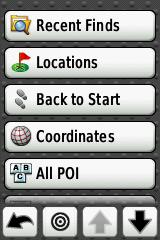

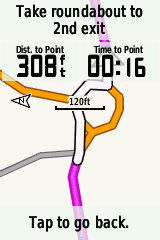

This feature is usable on any Edge with a Garmin Routable Map.
Update 19 May 2012.
USB Drivers software version 2.3
http://www8.garmin.com/support/agree.jsp?id=931
Ability to download other peoples rides straight into your Edge with the Garmin Communicator plugin (above).
If you share the odd Course or ride on the likes of Twitter, Facebook etc it looks great but misses out all the datafields that you see in the likes of TrainingCenter.


Editing Screens
From the Garmin site.
Question: What pages have configurable data fields on the Edge 800? Answer:
- Power on your device
- Select MENU
- Select Settings (wrench icon)
- Select Bike Settings
- Select Training Pages
- Select the page you would like to customize1
- If present, check Enabled to enable the page
- Select desired number of fields
- If present, touch the green checkmark
- Select a data field to change2
- Repeat step 10 for all fields
- Touch Back (arrow pointing to the left, in left corner) to return to Training Pages
- Repeat steps 6-12 as needed for each page
Your Edge 800 will now display your desired data fields.
Or in Pictures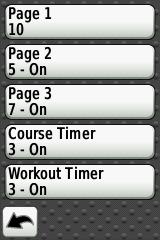
The important thing to note once you’ve selected Page 1 in this instance is the Green Tick/Checkmark . Select this and you and should be able to edit all your fields.

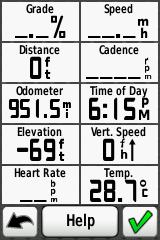
Once you see the above screen select the field you want to edit and another selection box will comeup. There are a lot of options at this point and it’s going to take some experimenting to find out what works for you.
If you’ve any eyesight problems reduce the number of fields on display.
Sqinting at your Edge while riding is dangerous to yourself and others.
There is a natural urge to follow someone with a GPS as it takes the load of route finding off a following rider. As with car GPS,s any errors can lead you up the garden path.
The Garmin Answer above is a bit too simplistic in it’s repeat steps 6 to 12, there are multiple pages to play with depending on what you want out of the Edge 800. It’s a totally different ballgame once you get into riding a Course as a multitude of Course and Coursepoint options are available providing you’ve progammed them in. Which brings us on to Routing.
Editing Screens Quick Method
Thanks to AndyL for this comment:
I just discovered another way to change a single field on a screen without having to go through all the menus.
If you touch one of the fields (e.g. bpm) for about three seconds, the field is highlighted and then the system goes into the page to select where you select what you want to be shown.
Great tip from AndyL, thanks again.
Routing
Basic Routeplanning is now available on the Garminconnect website. (September 2011)
Thanks to Cullen from RidewithGPS.COM for coming back to me with excellent article on Edge800 routing options. See below.
Also has a link to FREE GARMIN OSM MAPS and instruction on how to put them on an SD card.
Hey Frank, so I took some more time to further document things – here is what I have so far. It’s rough with no screen shots, but it has all the info on GPX Routes, GPX Tracks, GPXX files as well as TCX. TCX files, with Virtual Partner off, Turn Guidance on and Off Course Warnings set to on is the clear winner for the Edge 800.
Edge 800 instructions
Riding a TCX Course
Below is a TCX Course created with RidwithGPS.com , it’s nothing fancy just my ride to the Eureka Cafe.

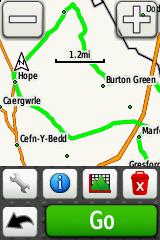
It has CoursePoints for the turns so you get the bleep on the turns. Off Course warnings are on, this was tested on the blue spur you see on Brimstage Lane. Off course warning came on after about 75 yards. It is a different bleep to a turn bleep.
To check your settings press the spanner/wrench button on the Course screen(above).
Set them as below. These settings work.
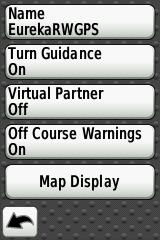
Click on Map Display and turn Coursepoints to On. I also altered the Color at this point.
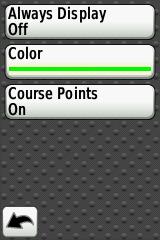
Return to the Course Screen, select Go and you should be on your way.
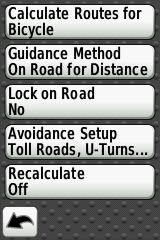
From what I’ve seen on a few Courses , Turn Guidance needs to be turned on and Coursepoints need to be set to On. These settings give turn guidance and a warning if you go off Course. The turn guidance will come up even if you are on one of the data screens. These setting gave an Automotive GPS feel to riding a pre-planned Course.
Stop Press
Spanner/Wrench/System/Routing/Recalculate Should be set to OFF
Route Planning Websites
Update September 2011.
GarminConnect now has a basic Course planning feature. It has been a long time coming and doesn’t feature some of the bells and whistles of the other sites.
At first glance you have to enable Turn Directions with the wrench Icon when doing the Course.
Essential because Garmin,s MapSource is pretty useless for Edge devices , doesn’t recognise any of your TCX files, can’t save as a TCX course etc.
I’ll list the ones I’ve used.
RideWithGPS.com Edge 800 friendly site now with a subscription service.
Good explanation of the various routing formats. Posted the Setting reccomended above. Could go far.
BikeRouteToaster.com Good site with options to route at the side of the road and Warning CoursePoints before the actual junction. This is handy as autoplacing of Coursepoints can be a little late when your approaching at speed. OSM overlays that are handy for Cycleroutes. Ie offroad.
Bikehike.co.uk Google and OSMcycle maps plus Ordnance Survey planning side box.
Supports Garmin Edge 800 .FIT format.
Workouts
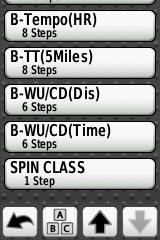
Largely underused but you can add your own as shown below, in my case Spin Class.Again selecting a Workout gives you more Pages of custom fields to play with, in this case I want heartrate and calories.
Don’t start me on calorie counting as it’s still hopeless. 3rd generation product and it’s still wrong. I don’t know what it’s like on the Forerunner devices but it should be better.

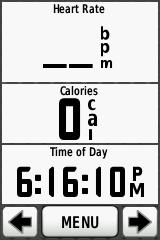 After my latest ride of a 50 mile Course the Edge 800 managed to get confused and turned it into 5000 miles. The odometer reading also increased by 5000 miles too. Luckily the odometer mileage is editable.
Maps
Take a look at ScarletFires website for Map comparisons.
http://www.scarletfire.co.uk/category/cycling/mapping-cycling/
Free OSM Maps
Follow the instructions on the Mappomatic link to the letter and you’ll be fine .
Note you can only have one gmapsupp.img
http://mapomatic.co.uk/garmin-maps-download/
In the UK the cycle map includes all the NCR routes so you’ll see the route number on the Edge as you ride along it.
The UK map takes up about 53 mb so s cheap 2Gb card should be fine. I’ll be posting a few more screenshots up in due course.
The above instructions from Mapomatic worked fine for me,first time.
Also on TalkyToaster
http://talkytoaster.info/ukmaps.htm
This video on youtube explains how to install the OSM maps.
Well worth watching.
http://www.youtube.com/watch?v=Ytly-dyXOcI
Mac Users
Thanks to Rick for posting the following comment that will be of interest to all the Mac users out there.
Frank,
I just found your very helpful guide. Nice job. Thanks.
Here’s a tidbit that I’ve discovered during the two months I’ve had the unit.
The unit (Software Version 2.2) does not always play well with my iMac (1.25 GHz Power PC – OSX 10.5.8 and 10.4.11) when connected to GTC. The unit will upload activities fine, but, after ejecting the unit and disconnecting, it freezes during restart. This requires a hard reset (hold lap/reset, start/stop and power button until unit shuts off and comes back on – be patient) which resets all data to factory settings including removing all recorded activities and added courses. The work around I use is to upload activities data to Garmin Connect (http://connect.garmin.com/ click on the “upload” button), once uploaded, click on “export” in the bar above the map and then click on “TCX file.” In GTC import the TCX file(s) you just exported (File>Import). The files will now appear in GTC under MyActivities/History.
Somewhat of a pain, but less so than reconfiguring all the pages and reloading courses.
Ride safe.
The more I use the 800 the more I find, options nested really deep in the 800. I’ve yet to find any use for the old waypoints and still don’t know the Course point limit. I’ve some more screenshots to upload for the OSM mapping.
Nearly a year on and I’m still finding new features and updates.
Displaying Average Speed
Already covered above but here is a text reply to a question.
Hi Chris, here goes Wrench Icon / Training pages/ Timer then User Defined you should see 5 pages. Page 1 (mine has 10 boxes)
Select Green tick box.
Scroll down to Speed and select Average
The same goes for any data you want to change.
Altering displays really comes into it’s own when you start to ride a Course.
Heartrate Monitor
The Edge 800 will sync up with a Garmin HRM with out going through the sync process for the ANT+ plus sensors such as Cadence, below. You just need to edit your display to show it.
Cadence Sensors
I’ve had a couple of issues with the GSC10 cadence sensor, mainly not logging rides. For a newcomer you need to find out how to pair it with your 800.
Spanner or Wrench/bike settings/Bike1/Ant+Speed/Cadence/Bike Sensors/Sensor Detail/Sensor type 800 next to the sensor Press the white reset button on the GSC10 with a pen or some thing and it should start flashing red or green. Rotate the crank, and it should pair with the 800. For a GSC10 it should appear under Spd/Cad and have a 4 digit device ID, make a note of it.
When you rescan it for any reason it should not be Zero.
Hold your 8
Hi Geoff, there is a similar comment in the ” Dummies guide”. I had trouble with my cadence sensor so took the battery out. A 40 mile ride would show up as 10 and so on. You can have up to 5 bikes now each with a different profile under Spanner/bike settings/Bike1/Ant+Speed/Cadence/Bike Sensors/Sensor Detail/Sensor type Select Cadence and you should get speed off the GPS and not the wheel magnet. There is an option for Spd/Cad and also Speed and Cadence they are not the same thing. Garmin GSC 10 comes up as Spd/Cad.
Your Odometer gets set to zero when you enter a new Bike.
2. Install a new battery backwards for 5 seconds to reset the device.
3. Install the battery normally and re-connect to the E800.In my case, cadence came back but speed did not, Garmin was kind enough to send a replacement GSC10. Kudos to them and their support.
Course Points
The old Edge 705 had a limit of 100 CoursePoints the Edge800 now has 200 Coursepoints ,confirmed by Garmins reply to John below. It should not be a problem most of the time but certain Course planning sites give the option of add Coursepoints before the junction. Thus halving the number you have to play with. Note Saved Locations also eat into the 200 Coursepoints.
Sent: 30 May 2012 16:24
To: ******, John
Subject: Re: What is the maximum number of course points you can add to a course (KMM25228537I15977L0KM)
Dear John ******,
Thank you for contacting Garmin Europe.
I am happy to help you, in total you can save up to 200 waypoints/ favorites and locations on the Edge 800. This is a total amount for the memory of the device so if you had no waypoints/ favorites or locations saved on your device you could save 200 within a route.
If there is anything else I can help you with then please let me know.
Alternatively you can search for a solution here: http://www.garmin.co.uk/support
Kind regards,
Emma Switzer
Garmin Europe
Locking the Display
Hi Frank
Probably a daft question – Is there a way of disabling the screen so that when riding off-rode for instance the unit can be stored in a camelback – i’ve tried and the setings etc. all get jumbled as the screen gets touched inside the pack!
Hope this makes sense!
Len
Hi Len, power up. Select the screen you wish to stay locked on and press the power button for about 1 second. A screen should come up with a red Lock Icon at the bottom of it. Select this Icon and your screen will be locked. Unlock is the reverse.
It’s also a good way to scan for the accessories too, I must put that in the guide.
Regards,
Frank.
Quick route to scanning for accessories
See above.
Hold Power button for 1 second, no longer or you will switch the 800 off.
Select the pedal (cadence) of heart (heartrate) Icon and rescan. It’s as simple as that.
Note, it depends on which Bicycle of the 5 that you are currently logged as riding. This could explain some cadence sensor problems. Wrong bike equals wrong cadence sensor.
How to simulate a Waypoint
The Edge 800 no longer has waypoints but you can simulate a Waypoint by setting up a location. If you’ve come from another device that used gpx files this might be a workaround.
It will be a slide show of screenshots to be uploaded this evening.
The more you delve into the 800 the more you find.
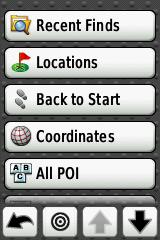

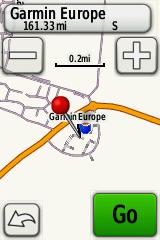
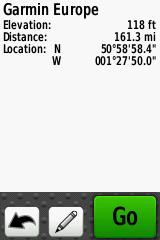
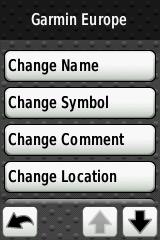

Images will be deleted when and if I can get the slideshow to work.
Repairing Garmin .FIT Files
Nothing more annoying than having your ride data corrupted,try the following link.
http://www.fitfilerepairtool.info/
Still finding new features all the time, found another layer of options on Courses the other day. (May 2012)
If at the end of all this you are still having problems get in touch with Garmin.
https://support.garmin.com/support/searchSupport/escalateForm.faces
The FAQ pages may answer some of the more basic questions, but because it’s a complicated device your particular problem may not be in there.
Ejecting a Garmin Edge 800 from a Mac Book Pro
QHow does one eject the Garmin edge 800 from a mac book pro?
A Thanks to Howard for this reply.
click on Finder, and under Devices you should see Garmin (and possibly something separate for the map). Right click on it, and one of the options should be “eject garmin”, which you should do. It sometimes takes a few seconds. Once done, do the same for your map, if that was also there. I then wait maybe 10, 15 seconds and then disconnect the garmin (if I do it immediately it sometimes says not properly ejected, so I learned to wait a few secs ).
Repairing a broken case mount.
Here’s a link on how to repair a case that the lugs have snapped off on.
http://fastfreddyfour.blogspot.fr/2012/07/repairing-garmin-edge-500.html
It’s worth a try if you can’t stomach the Garmin fixed price repair.
Another option would be to bond it to the bracket.
My Recent Problems
Another re occurrence of the GSC10 Cadence sensor auto-pausing, running at 1/3rd speed and generally driving me to distraction. Had to turn it off mid ride and use GPS speed. 2nd Bike different GSC10.
Routing and turn signals on OSM maps is not up to Garmin standard and doesn’t always work. Not too big a problem as you get what you pay for.
How to use your Garmin Edge elevation screen to climb hills more effectively.
Hills are the marmite of cycling. Some love them, others will do anything to avoid them. Here’s a technique anyone can use to gain a psychological advantage when climbing hills, using a Garmin edge GPS.
I’ve known a few cyclists who fall into the “hill haters” camp. One thing they all seem to have in common is a sense of frustration that leads them to attack the climb too vigorously. Running out of steam way too early, they’re often forced to get off and push.
Less is more. Obviously the ability to find a sustainable pace is crucial, but to maximise an effort up a hill, it helps to know what’s ahead so you can pace yourself. On familiar climbs, this will be obvious, but what about an unfamiliar route, such as taking part in a sportive event out of your area, or even a local club ride which includes some sections you’re not too familiar with?
Here’s a great way to use your Garmin edge to help you up those hills.
You’ll need two things:
- A gpx file of the route you’ll be following
- The elevation screen needs to be enabled and set up appropriately.
To enable the elevation screen,
hit Menu > Spanner > Bike Settings > Training Pages > Elevation > [set to ON
 Frank Kinlan's Blog
Good start on the 800, Frank. With regards to Calorie burn, I always thought that the 705 greatly exagerated this aspect. The 800 on the other hand appears closer (within 10%) to the reported calorie burn on the Tacx Fortius (TTS ver 3.4). Have done a few rides now and there is defintely more cosnistency. Note – experiment carried out wearing 2 x HRM bands.
Hi Brocky, thanks for the input. I’ve never been obsessed with the calorie counting of anything Garmin related due to the fact that it counts calories freewheeling downhill. My Cadence sensor issues seem to have been fixed with a new GSC10 battery.
I’m still between a rock and a hard place with regards to anything Route or Course planning as the Garmin site is so poor. I’m bumping into people repeatadly, who have problems with the most basic of functions. (705 never mind 800)
I would like to create a cycling route on a web site (www.ridewithgps.com) and upload the route to the Edge 800. Can this be done and how?
Hi Dave, providing you’ve Garmin Communicator installed the Route should upload with no problems. RidewithGPS.com is new to me but I’ll be trying it out in the next few days. Looks good at first glance.
A few additional comments which I hope will save future users of the Edge 800 the many many hours I have wasted on getting the blasted thing to work, especially for Mac users and those who bought the City Navigator map separately via a download.
1. The Edge 800 only connects to a Mac if it is switched off before connecting. This is counter-intuitive but I have come to realise that the techies who designed the 800 have a mind of their own.
2. If you do download the City Navigator, you need an SD card. Silly me, I thought it would just download onto the device itself but there is insufficient space on the internal memory of the 800 to take City Navigator so you will need to buy a Micro SD card separately.
3. When you do copy City Navigator off your PC / Mac onto the SD card you must first create a directory ‘Garmin’ on the SD card to take the files. Then, if you have a Mac, you need to call the support line at Garmin and they will guide you through a bizarre process that includes emptying the ‘Trash’ directory on the Mac. This is clearly becoming a well worn path for the support guys.
4. Thanks for guidance on displaying the data fields above. I have the heart rate monitor which the Edge recognised but nowhere was the heart rate displayed. I thought the device was wrong but the instructions in the quick start manual (Page 11 ‘Customising your data fields’) are just plain wrong (confirmed by another call to the Garmin support desk). This drove me to the point of distraction.
5. The GSC10 wasn’t recognised at all until you move the wheels – why don’t they just make this clear up front.
I’m sure I will find many more problems as I start using the device for what it’s meant for, instead of an intellectual challenge to get it to work in the first place. I haven’t had so much fun with quirky, poorly documented, software since the daily PC crashes of the early 1990s.
So I thought that a Good-Friday 30 min job would be to change from my 705 to a 800 but I’m wrong and now I’m going for a ride.
I can’t even ‘see’ the machine or the SD disk in my Finder window (Mac OS). I tried turning it off before connection but no icons appear (on my 705 I get 2, one for the GPS the other fort the disk). Any suggestions? I’ve tried the WebUpdater but it simply says that I have nothing connected. I’m not sure I have the correct driver but I don’t know where to find the latest for the Mac OS.
Do you have any suggestions?
Steve, your Edge is locked up. It happened to my 705. You’ll need to do a hard reset and loose all your data. To save your ride fire up your Edge and save your History as a Course. One other possibility is that you need to add a new device on TrainingCenter.
Steve
What size of Micro SD card do you need to accommodate the City Navigator maps?
Richard
4GB You can’t just copy someones card as there is an unlock code that links it to the card serial number.
Regards,
Frank.
Thanks for that Steve, I’ll paste your comment to the page. Had a .fit file error that would not allow an update to TrainingCenter, so that needs to go on too.
Regards,
Frank.
Frank,
Your blog looks like what I’ve been looking for!
I want to use my Edge 800 to navigate around courses that I’ve downloaded (course created in MemoryMap, downloaded as .tcx via BikeToaster); how do I get the Edge 800 to navigate me around my course? When I tried this all I got was it trying to use the built-in road atlas map, rather than the OS maps I’d enabled from the plug-in SD card that I’d bought with it, and so I got a blank screen (I’d disabled the built-in map) with the arrow head and the unit telling me where I was and what direction I was going in rather than it navigating me around my route. Any ideas?
Hey Frank, I’m one of the creators of ridewithgps – over the last couple of years I have steered our users toward your site in regards to getting the most of their respective Edge series GPS units. Thought I’d actually drop in and say hello! Glad to see Dave mentioning our service.
I am finally getting proper instructions setup for Edge series devices. I just did a test dog walk with my Edge 800 for some more data. Looks like the GPX Track is the best way to go 🙂 I’ll try a GPXX file a little later when the dog needs another jaunt.
Thanks for providing a great informational site!
Hi Cullen, I haven’t got around to finding out what the Waypoint and Coursepoint limit is on the 800. I think the newcomer is expecting turn by turn direction on a Course and it just doesn’t happen.
I’m still amazed that at the lack of documentation that comes with the 800 and the likes of Mapsource not supporting .TCX or is it .Fit?
Regards,
Frank
I’ll have to do that experiment as well. The GPX Track format is giving me turn by turn directions, though for some reason I can’t figure out, it isn’t actually beeping when I come up on a turn. I get a stylized map (arrow overlayed on the map itself) plus textual directions, but no sound.
GPXX files work, but don’t seem to be worthwhile – it won’t pickup when I am actually on the course, it continually tries to route me back to the beginning with the shortest possible path.
GPX Route files seem to do the same as GPXX.
I need to explore TCX again, but during my initial test it didn’t offer navigation, but beeps when encountering “coursepoints” (cuesheet entries from ridewithgps). I’ll share what I find so you can update your info 🙂
Hey Frank, so I took some more time to further document things – here is what I have so far. It’s rough with no screen shots, but it has all the info on GPX Routes, GPX Tracks, GPXX files as well as TCX. TCX files, with Virtual Partner off, Turn Guidance on and Off Course Warnings set to on is the clear winner for the Edge 800.
Edge 800 instructions
Thanks Cullen, that’s a great help, I’ll post the link into the body of the page. I could do with revisiting GPX Routes to see if the compass is still there from the 305 days.
Training Center v Garmin Connect
I used the Edge 800 on a couple of rides over the weekend and wanted to look at the exact route on Training Center (I hadn’t planned on using Garmin Connect). Unfortunately the City Navigator maps I use are not transportable onto Training Center and the built in map on Training Center doesn’t provide the detail I wanted. Another call to the Garmin support desk confirmed this and they directed me to use Garmin Connect instead (they were bemused – “why wouldn’t I want to use it?”). I gave in and loaded my rides onto Garmin Connect and finally I got what I was expecting – very impressive, especially in combination with Google Earth. Why they don’t make life easier for everyone by giving simple guidance instead of having people work it out for themselves.
Steve, it hasn’t always been the case and you can do more in TainingCenter. You can copy your City Navigator map over the PCbasemap.
I see they have updated the manual I’ll have to download it and have a look to see what’s new in it.
frankkinlan, I bought the 800 with the microSD/SD Card City Navigator Europe as indeed I did with the 705. Just reloaded the Garmin Training Center and tried again but still can’t see. Have done the hard reset in two ways (TLHC screen & etc and also via the “restore to factory settings” but still the drives do not mount on my Mac.
At a bit of a loss really
Steve, have a look at the 2.20 update section I pasted into the page last night. It mentions Mac timer problem.
I’ve got a new problem with it now Auto Pausing and not recording rides.
“Steve, have a look at the 2.20 update section I pasted into the page last night.”
Frank, I can’t see this anywhere I’m afraid. I am not certain that I have the right driver for the Mac OS 10.6.7 that I run and, moreover, I don’t seem to be able to locate it. Why can’t they send you a disk and a decent manual? BTW, I have found the .pdf of a newer, longer one.
Frank, I have just ascertained that I only have software version 2.10 installed. Since the volumes do not load, I cannot run the updater!
Not sure how to progress, again.
Frank, just received new unit today and found your site – all useful info.
I am wanting to use mine in France and the UK. Can you download details road maps for France similar to the navigator ones I bought with the unit.
Hi Mike go on to the Garmin site and see what’s on offer, I’m using City Navigator Europe which covers everything I’m likely to need. Also have a look at the OSM maps for the part of France your going to be riding in.
Frank,
I just found your very helpful guide. Nice job. Thanks.
Here’s a tidbit that I’ve discovered during the two months I’ve had the unit.
The unit (Software Version 2.2) does not always play well with my iMac (1.25 GHz Power PC – OSX 10.5.8 and 10.4.11) when connected to GTC. The unit will upload activities fine, but, after ejecting the unit and disconnecting, it freezes during restart. This requires a hard reset (hold lap/reset, start/stop and power button until unit shuts off and comes back on – be patient) which resets all data to factory settings including removing all recorded activities and added courses. The work around I use is to upload activities data to Garmin Connect (http://connect.garmin.com/ click on the “upload” button), once uploaded, click on “export” in the bar above the map and then click on “TCX file.” In GTC import the TCX file(s) you just exported (File>Import). The files will now appear in GTC under MyActivities/History.
Somewhat of a pain, but less so than reconfiguring all the pages and reloading courses.
Ride safe.
Thanks Rick , I’ll add your Comment to the guide.
Good afternoon Frank,
I have just aquired a 800 and having read the information on your site did so with some trepidation. The first thing I did when i had the item was to connect it to my computor and look for program updates and also down loaded the manual off the Garmin site. Took some finding.
Having entered all my personal details and bike information set off to set the bike up.
This worked fine working from the skimpy manual provided.
Comment is not happy with speed sensor sticking up so that if it was ever hit by a spoke it would most probably break. Thought of putting it below the chainstay, but then it will get a load of muck off the road. Interested in anyone elses solution to that one.
When I connect garmin to my computor it is not recognised by Gstart any idea of how to fix.
Garmin when charged off USB shows the amount of battery. However when connected directly to power supply. says it is fully charged…bizarre. and there does not appear to be anywhere to view the status of your battery.
History down loaded. Considering the amount of information on the screen what is downloaded is pretty skimpy. I have used ciclosports HAC 5 for some time and it gave me
Max altitude on the ride
Temperature max and min
Max % ascent/descent
Fat burn
Calculated watts max and average
Max cadence as well as average.
All of this must be available on the 800 to be downloaded to the history file.
Would be interested in other floks thought.
I live in the S of France and most of our rides can start in pretty cool weather early in the morning and by midday it can be in the middle 20’s and within 40km of here you can be over 1000M. The information is interesting when you compare rides later.
Yet to get a grip of routeplanning, but that can wait a bit. A great bit of kit however.
hi you should try downloading your rides to STRAVA on the web, there are loads of other bikers in s.france useing it… it’s cool
Hi Aiden It’s really taken off here too. Everyone competing for segment times. I imagine things on the classic cols must be going bonkers.
Regards,
Frank.
Thanks for the information so far. I’m struggling with my IT skills and the lack of clear instructions from Garmin.
I’ve managed to download a .gpx file to my 800 for an upcoming sportive, but I can’t work out how to turn one of my previous training rides into a route so that I can use it to compare my performance from week to week.
Can you advise?
Hi Ken, go into Courses, then Create new Course then select the course you want to create from your History. You could even schedule the Course in the Training section. You probably want to do this using TrainingCenter.
Well, that was straightforward enough, thanks. I’ll hopefully try it out tomorrow and see what happens. Thanks again.
Frank
Re: the Edge counting calories when going downhill.
You’re still burning cals going downhill, just as you burn cals while you’re sleeping. As long as your heart is beating, calories are being used. The amount of calories the body needs just to function on a basic level, let alone undertake prolonged strenuous exercise, is based on your basal metabolic rate (BMR).
If you’ve just slogged your way up a hill, your heart’s bound to be pounding away burning up cals. On the descent the body’s still going to be burning cals. Thus the 800 will record that fact.
As for the accuracy of the 800’s calorie counting abilities, I wouldn’t like to say. I’ll leave that for others to assess!
Excellent blog. Keep it up.
Frank
Re: the Edge counting calories when going downhill.
You’re still burning cals going downhill, just as you burn cals while you’re sleeping. As long as your heart is beating, calories are being used. The amount of calories the body needs just to function on a basic level, let alone undertake prolonged strenuous exercise, is based on your basal metabolic rate (BMR).
If you’ve just slogged your way up a hill, your heart’s bound to be pounding away burning up cals. On the descent the body’s still going to be burning cals. Thus the 800 will record that fact.
As for the accuracy of the 800’s calorie counting abilities, I wouldn’t like to say. I’ll leave that for others to assess!
Excellent blog. Keep it up.
Hi Frank,
Great site, i have downloaded the cycle map from Mapomatic but i can’t figure out what to do next, i don’t know how to unzip the file so that i can view the map on my laptop, any help would be much appreciated.
Geoff
Hi Geoff,
There is a Word file detailing the installation to Garmin MapSource, I followed this to the letter and it worked. You get the Map in MapSource and TrainingCenter. You need to copy the file to the Garmin directory. I’ll post some links to getting the files to work on your 800 in due course. The Contour map looks really good considering it’s free, loads of POI’s not on the normal Garmin maps.
Thanks for the guide. This is way easier than rtfm lol. You should also check out the Garmin Edge 800 Screen Protector from xoskins. I just had one installed and it is incredible. You can’t even see it on your edge. It hides fingerprints which is nice while you’re riding.
I did say my IT skills were pretty poor, didn’t I? I rode a Sportif in Belgium the other week and when it came to uploading my Garmin data I realised that I hadn’t ended my previous activity before starting the main ride. So, I had a short shake-down ride in the UK, then a straight line on the map all the way to Belgium, then the Sportif data. is there any way to edit out the begining of the activity to just leave the sportif data? Thanks for any suggestions. KenL
Is there any way to edit out part of an activity? I forgot to end an activity when I took my bike for a short test ride after fitting a new chain and cassette the other week. Two days later I rode a sportif in Belgium and the Garmin continued recording it as part of the same activity. Is there any way to edit out the test ride part and leave just the data for the sportif? At the moment it is showing a short ride in the UK, then a straight line all the way to belgium, then the Sportif route. Any suggestions would be appreciated.
Hi,
Just got an Edge 800. I’ve plotted routes with http://www.ridewithgps.com. Is it best to transfer them as GPX or TCX files and what is the best way to configure all the settings?
Thanks
I’ve stuck with TCX but a GPX course works I’m told. When you are going to ride the Course , select the Course but select the wrench Icon and turn, Turn Guidance: On, Off Course Warnings: On, Map Display: Course Points: ON
There are a lot more screens to configure that come in to play when you are riding a Course. Distance to next Coursepoint etc are useful. Start out doing a short local Course yourself rather than relying on someone elses. That way you know what to expect come the big event when all the setting up goes out the window.
That’s great – thanks. I wonder if you could help with one more thing?
First time out with the Garmin last night. Half way round i asked it to navigate back to the start of the route. The map correctly showed me where I was but I got no prompts as to where to turn. Any ideas?
Thanks
Rob
Rob, you won’t get any turn prompts if you are going back to start, just the pink line on the map. If you go off the Course you won’t get a warning either.
Frank.
Thanks again – my colour blindness has caused the problem here. Can you change the line colour?
Hi Frank
3 weeks after purchasing the 800 and I’m still getting to grips with it (blimey, it feels longer than that!!!). I haven’t had a bike GPS before so it’s taking some getting used to. Some of it is fairly intuitive, while some is a bit of a mystery. It’s certainly nowhere near as simple or intuitive as a car GPS. The absence of a detailed and comprehensive user’s manual is an absolute bloody disgrace for a device of this complexity – especially given the price of the damn thing! Garmin really ought to be thoroughly ashamed of themselves. The quick start manual isn’t worth the paper it’s printed on and, as you say, the user’s manual (which you have to download and print out yourself from the Garmin website- cheapskates) is little more than a list of features, rather than a detailed manual. Several of the features and settings aren’t even covered in the manual. Which brings me to the point of this post:
Have you any idea what the speed zone settings are for (Menu / spanner icon / Bike Settings / Speed Zones)? I can see what they are but what are they for? I would have thought they had something to do with the training features but aren’t sure. In Menu / Training / Alerts you can configure alerts to sound for just about every metric, including time, distance, calorie, heart rate, cadence and power – all of which can be set according to your personal needs. But nothing for speed zones.
I found this on the Garmin forums: https://forums.garmin.com/showthread.php?t=15991&highlight=speed+zones which sort of backs up my theory. Have you any thoughts on this?
Keep up the good work.
Ed
Ed
As far as I can tell, it seems to be linked to the Garmin Training Centre when/if you download your data. It has ranges for where you were in cycling levels. Seems a bit of a gimmick to me, I havent seen another use for it.
Clive
Thanks Clive. I’ve just had a look at GTC and see what you mean: a bit of a gimmick! Thanks for the reply – you gave me more than the owner’s manual!
Hi Frank,
Thank you for all the info and tips. I have a question though (please forgive me if the question has been asked already).
I created about 16 courses using MapSource and exported the courses to the GPS (and the maps that go with the courses to the SD card). When I look at the GPX file in text editor, all the courses are there.
However, when I turn on my Edge 800, only about 11 of 12 courses are available as .fit files and thus visible for the GPS unit.
I looked at the GPX file and validated it using XML validator and it seems to be OK. I have 75MB free on my Edge.
Any idea why this happens?
Thanks in advance,
Jan
Just found this on the Garmin forum, it seems exactly like what is happening to me:
https://forums.garmin.com/showthread.php?t=19330
Ed
As far as I can tell, it seems to be linked to the Garmin Training Centre when/if you download your data. It has ranges for where you were in cycling levels. Seems a bit of a gimmick to me, I havent seen another use for it.
TheWeeDrammer
Hello Frank,
I have just discovered your excellent blog about the Garmin Edge 800. I currently live in Cyprus (where the Garmin was brought), but am returning to the UK and was wondering what mapping I would need? I have looked at Wiggle who offer different types of mapping – but am unsure if all this is compatible with the Edge 800? I have narrowed the choice down to Garmin City Navigator Europe on a micro SD card, or Garmin Full UK & Ireland Maps on micro SD card, or All of Great Britain 1:50K (much more expensive!!). Not really sure the difference in these (apart from the price!) Also, would you suggest downloading the mapping directly from Garmin – there is plenty of space on my SD Card, as the Cyprus mapping hardly uses any space at all! Excellent site by the way.
Cheers
Graham
Hi Graham,
I’m currently using the free OSM UK map with contours from the Mapomatic link at the side of the page. If you look at the Cycling map this will show the NCR routes on the map and other shortcuts navigable by cycle.
You get a lot on City Navigator Europe, All of GB 1:50K is Ordnance Survey mapping as an overlay on the Garmin Full UK so you still get Garmin routing on an OS map.
1:50K is a reasonable option if you buy it as a bundle with your 800 but not if you have to buy it as a standalone.
As for which map it’s down to price, the cost of the SD card is negligible.
See how you get on with the OSM maps, they cost nothing.
Regards,
Frank.
I have a new 800 with europe maps installed. My problem is the navagation on the unit. Sitting at home I asked the unit to give me a route to a near by town (20 kms away). The route came back with a huge loop west east and south of the destination before turning north to arrive at the town. Total distance of 154 km’s. At a friends house (2kms from mine) we compared routes on his unit. Every time the 2 units gave differing routes as much as 100 kms more in some acses. The new route to the same town 20 kms away now worked on my unit ( direct route about 24 km’s in length) but both units gave a 150 km journey plus to a different town 20 kms away.
I bought the unit to help on my cycle touring. I can’t see how I can use it with such varying results. I have always had Garmin sat navs in my car and have always got on well with them. Am I doing something wrong.
If you select avoid major roads in the routing it will send you up the garden path. Try planning routes on the web bases sites and not using the inbuilt algorythms. Ride your own planned Courses then you’ve only got yourself to blame. It’s a steep learning curve but you need to do it and have confidence in the Course you have planned. It’s not helped by Garmins next to non existant manual.
Thats ok if you know where you will be going. On tour I know an end destination ( may be 1000-1200 km away usually) but want to be able to explore the towns and villages in between. stopping to use a laptop to plan a route to a hotel at 8pm in the rain isn’t really what I had in mind. I expected the 800 to do that for me and to be able to trust the results. Has everyone who has bought this unit just given up on the navigation side of it? Courses are great for training runs and sportives and I will use them I’m sure but why can’t Garmin get the navigation side to work when all their other sat nav’s work fine?
Dog, if you turn the routing from bicycle to car it will give you a more direct route. I have just purchased the 800 and tested on the way home from work. I was wondering why it was trying to take me through all the side roads and not direct. I did as above and it directed me the way I thought.
Hi guys, wonder if you could help. If I create a route in BaseCamp and transfer it to my Edge 800 via the inbuilt software it works fine – I get the navigation etc etc. However, no elevation profile on the Edge despite there being one visible on BaseCamp (when the Edge is connected up and it can use the SDcard OSM). If I create a ‘Course’ from a previous activity I of course get an elevation profile. I’ve scoured the web and am getting increasingly confused trying to use TCX, GPX and whatever else files. All I want is to plan a route in BaseCamp (if possible) and transfer it to my Edge 800 with navigation as it is and with an elevation profile. If I export a route as a TCX or GPX file then put it in the ‘Courses’ folder the Edge doesn’t recognise is, presumably as it needs the ‘.fit’ format. Am going slightly mad plugging in, unplugging, switching on and switching off the Edge all the time to see if anything works. Or do I have to use bikeroutetoaster and some kind of OSM hack to plot a map on their and somehow transfer it to the GPS? Any takers? Thanks! – Parag
Hi Parag, you may need to export it to the “New Files ” folder and let the Edge convert it to .fit format. I’ve yet to find a use for Basecamp. The tried and trusted webbased sites work as .tcx or .gpx have CoursePoints at junctions etc. Garmin should address these issues rather than leave it to third party sites.
Regards,
Frank.
Hi Parag
I always use Bike Route Toaster, as I find it easy to use and does what I want it to do.
If you’re confused about the various file types associated with the 800, have a look at this: http://ridewithgps.com/edge_800 This another of the popular route planners but I think BRT has just got the, ahem, edge.
Don’t copy new courses to the ‘courses’ folder of the unit; it must go in the ‘new files’ folder. Once it’s in there the 800 will automatically convert it to the fit format.
Not sure about your elevation problem.
Further to your elevation problem. Have you looked at or joined the Garmin forum? There’s a forum on there specifically for the 800: https://forums.garmin.com/forumdisplay.php?f=245
Thanks guys, have posted in the BaseCamp forum but in the meantime BRT sounds like the best bet although there’s no OS-mapping as far as I can tell?
No, there’s no OS mapping on BRT. However, as you’re probably aware, BRT utilises several different map sources, including Google maps and Open Street Maps (OSM) – the latter of which is available in street view and cycle route view. I really like the look of OSM street maps – I think they’re visually nice to work with. However, If you’re using the autoroute option on BRT, I’ve found it’s best to tick the ‘Google’ box under the ‘Auto Route’ > ‘Data’ options on the right. This is regardless of which map you choose to display. The reason is that different maps use slightly different ways of measuring/calculating their data. The overall result (ie the map itself) may look about the same but there will be differences in the background algorithms. This could present minor problems with the waypoint/course point/navigational settings. The best way of discovering these nuances is to devise a shortish route through a mixture of town and countryside roads using the various map displays and settings. Note, especially, where the course points occur (at junctions, roundabouts, turnings, etc. Not every turn will have a course point, depending on the mapping selected and the options chosen. Experimenting is the best way of seeing what works.
To give you some idea of the differences between the two map sources, try this:
In BRT, using the Google maps view, locate a hamlet called Alfrick near Malvern, Worcestershire (it’s easier if you locate it first using the search facility on the Google maps homepage). Next, in BRT, use the zoom facility until the post office and stores information comes into view. You should then be able to see a triangular section of road junction just above it. Now, with the autoroute option selected, start to create a route that starts say a few yards or so before the junction, on the road that approaches Alfrick from the east (right). Create the route to turn left at the triangular junction (heading towards ‘Upper House’). That’ll do for the time being, just a very short stretch that turns left at the junction. Now select the OSM ‘Street’ view. See how the triangular junction is not displayed and appears instead as a simple junction? See also how, in OSM, the route just cuts across until it rejoins the road? Now, delete the route and re-plot it but this time ensure that the ‘Data’ option under the ‘Autoroute’ heading is set to ‘OSM’ rather than ‘Google’. See how this different option results in BRT plotting a slightly different route because it uses OSM’s algorithms instead of Google’s? Use the ‘Satellite’ view and zoom right in to see how the junction looks in reality.
My experience of using BRT is that Google maps is pretty accurate – especially when you toggle between it and the satellite and hybrid views when creating a route. This is especially useful if you want to see the layout of junctions or to see where cycle paths/shortcuts are (you might have to disable autorouting to do this). As mentioned above, I’ve found that the autoroute option is more effective when Google data is used rather than OSM. As far as I can make out, the Google maps data option provides more navigational turning/course point warnings than the OSM option and Google maps are just a bit more accurate than OSM’s. As I said, try creating a short route using the various settings available to see what works best for you. It’s a bit of trial and error but at least it will make you more aware of what the different settings do.
I’ve got TrackLogs digital OS mapping (Landranger edition) installed on my PC. When I import a course to TrackLogs that has been created using Google maps in BRT, the result is pretty accurate. I’ve also created courses in TrackLogs and used them without problem on the 800. The only problem with the Landrangers is the lack of detail in urban areas. This is where Google maps comes into its own, as pretty much every street and lane is both shown and named.
I don’t know which maps you’ve got installed on your 800. I’ve got the full Garmin European City Navigator; these work absolutely fine with routes created using BRT and TrackLogs OS Landrangers.
There are ways of downloading the OSM maps and installing them on your 800 and using them as your default map. I think Frank explains how to do this somewhere on this blog (or it might be on his dummies guide to the 705). Failing that you can do a Google search of how to do it.
Apologies for the ramble! Hope some of it is of use/interest. Good luck!
Funny but this is what I have been trying to do all month long and I fell onto your letter and somehow feel less stupid, or at least have found someone as dumb as me. Whezn will Garmin make a program that is user friendly, i;e; for dummies?
Dear Ed,
Thanks for the detailed advice. I have exported a couple of map tiles of the City Navigator onto the Edge 800 but use the GB OS Landranger maps from the ‘Trail’ bundle as the main base-map on the Garmin. Will have a go with the OSM Street maps though, they do look good but I see your point about routing. I’ll stick to Google Maps routing for the time being anwyay. The Garmin App developer replied saying that they’d ‘look into it’ – so guess it’s not a problem they had previously been made aware of. In the meantime BRT’s routing abilities far surpass those of BaseCamp anyway which I increasingly think at the moment is mainly a pretty piece of fairly useless software unfortunately. Thanks for your help! – Parag
You’re welcome. If you haven’t already done so, you may want to have a look at the route planning capabilities of Ride with GPS (http://ridewithgps.com/). It’s pretty good but I don’t think it’s quite as good as BRT. One of the things that makes BRT that bit better is the ability to set turn warnings to sound/appear on the approach to a turn at a given distance of your choice. I emailed RWGPS about this and they told me it’s something they’re hoping to introduce at a future date.
Frank,
I’ve just been trying to use BRT for an audax I’m doing on Sunday and the website isn’t there any more!
Managed with Bikehike (after a 2 hour learning curve).
Do you know if BRT has been pulled?
Just finished Audax and now BRT is back ?????
Sorry for false alarm (but where did it go, or is it a network problem?)
Hi Frank.
Thanks for the really great page – it has come in very handy.
On Friday I tried to update my Edge 800 and when I switched it on next it came up with “System Software Missing” – basically it was now an expensive brick. I contacted Garmin and they send me a zip file which allowed me to fix the problem, so it is now back and working fine.
Just thought I would post this in case anyone else has a similar problem.
I don’t think these files are available on the web, so if anyone wants to host them I can send them a copy.
hi,I’ve encountered the same problem.Would you please send me this zip file to ywanght@gmail.com so that I can solve this? Thanks a lot.
hi, I’ve encountered the same problem. Would you please send me the zip file so that I can fix this problem? Thanks.
hi, I’ve encountered the same problem. Would you please send me the zip file so that I can fix this problem? Thanks.ywanght@gmail.com
Please could you send me the file that Garmin sent you as my 800 is bricked as well
Hi, is there a chance you still have that zip file? The same just happened to me over the weekend. I would be very grateful if you could help me.
I built a route on my computer and am travelling from point A to point B. How do I reverse the route for my return trip? E.G. Form B to A.
Thaks for any help.
Travel light go far
Dean
Hi Dean, go into Where To from the Menu Screen and you’ll see Back To Start, that should do it.
When running a route if I go to (Where To) I only have one option.
(Stop Course). All the options are no longer there when running a route.
After stopping the route I want to back track then I see the options of Locations, Back to Start, Coodinates All points and so on.
If i am going East to west on a route, and then want to return on the same route but on reverse I get one option (Stop Route).
Thanks for the help but it is not that easy an answer.
I believe itis something that was missed with the 800 Edge.
I can reverse my route on my Etrex CX but not the edge.
Travel light go far
Dean
Hello to all. I decided to purchase an Edge 800 but was tormented by the many bundles on offer and simply became confused.com. I then discovered this blog and feel I must congratulate you all on turning night into day and making ownership a pleasure and not a chore.
I decided on the perfomance bundle with the UK OS 1:50k as I both road and MTB. I am 50 yrs old, but feel like a small boy waiting for his favourite to arrive, as I really am that excited. I also take solace in the fact that should I have a drama, I simply need to ask on here, as the level of subject matter experts is astounding.
I tip my cap to you all.
Kind Regards
Jack
Thanks Jack, been running the site for a few years now a lot of the traffic is Garmin related but the other pages still get a look in.
Regards,
Frank.
I got the edge 800 as a present to help me finding my way around now I’m riding further then the area I know well. I’ve used a routeplanner for bikes to make several courses and loaded them into the Garmin. I’ve used it a few times and after some learning it is working correctly now.
But…
The names of the courses all start with the general direction and then the kilometers. I thought that they would be sorted alfabetically, making it easy to select a course going in the direction I want to go.
However, this is not so. It is sorted on the distance from the starting point and this is a bit different each course because the routeplanner doesn’t know my house/streetno. Is there a way to get all my courses sorted alfabetically?
so my Edge 800 arrived and because I had been trolling on here it took me no time at all to get it set up. I managed to create a course and download it onto my device and then download from my device back onto my Garmin account.
What a fantastic bit of kit and worth every penny IMO. It will certainly keep me entertained and help me train for my JOGLE in June 2012.
Fantastic Blog Frank your a Legend………
Frank,
Are there sites where one can download training programs that other people/trainers have already created for the Edge800? I’m not that creative in my workouts and I was hoping that someone would have already created workouts so I didn’t have to! Thanks.
Dan, try TrainingPeaks. They are not that hard to generate, I made one that just showed Heartrate and Calories for spinning classes. I only know 1 person that has actually used the Training side of ANY Edge.
For those considering a screen protector, take a look at the ones from atfolix (@folix). They have both clear and non-reflective (no fingerprints!) versions . It fits well and does not effect the touch screen operation, even while wearing full finger gloves. I have only had it installed for a couple of rides, but I will update and provide additional comments as necessary. It’s less expensive then other I have seen – $5.59, £3.59, or €4.11+ shipping from amazon. It ships direct from Germany – 5 days from order to receipt in Virginia, USA. I have no connection with the company or amazon.
Rick
Frank
I just discovered that unit software version 2.4 is available:
http://www8.garmin.com/support/download_details.jsp?id=5237#Instruct
Ride safe.
Rick
Thanks Rick, I’ve just upgraded.
Will have to do a test ride ASAP.
Regards,
Frank.
Hi there,
I have had the edge 800 bought as a birthday present, and what I want to use it for is, downloading routes onto the device for me to follow. Do I have to buy extra software/maps for this..? I have tried to download routes but have been unable to do this..? If anyone can tell me how to do this and where from would be much appreciated, as you can tell I am a total beginner with this device
Thanks
Chris
thanks
Chris
Hi Cris,
you really need a plugin map such as City Navigator or the OS map,they are normally bundled with the 800 at a good price. The OSM maps are free but best suited to a user with at least some experience. The basemap that is built into the 800 is really basic and is not suitable for cycling.
You can now plan Courses on GarminConnect.com, which is where you save your ride. You can also plan ride in the web bases sites I’ve listed on the side of the page. You should be able to ride a saved Course without a map but there would be no detail to look at.
It’s a steep learning curve initially but worth it in the end.
Start by going out and just saving a ride or two and uploading them to GarminConnect, just seeing where you have been on the map means your halfway there to downloading a Course into your 800.
Hope this helps,
Regards,
Frank.
HI Frank,
Thanks for the reply, I do a lot of mountain biking, trails etc and been out with the edge a few times now and saved my routes but as you say there is no detail on screen. The wife just bought me the edge with no additional bundles, i have seen some reviews on the GB Discoverer wondered if this is any good, I just want some kind of map so i can see where I am on the trails and also plot my own on them or download others.
Thanks again
chris
Chris, try this link below it’s the IOM and it’s free.
http://www.garmin.com/uk/maps/isle-of-man-map
I don’t think your going to see trails on a 1:50,000 map and the 1:25,000 are generally of the national parks.
You can make your own maps and there is a section on GarminConnect forums for it.Dave has done one for Llandegla MTB center using a pdf of the trail guide. It does need a fair bit of experience to get to that level.
I’m using the free map at the moment as it includes all the NCR routes.
GB Discoverer 1:50000 is about £50 as part of a bundle but a lot more separate.
Plotting Routes offroad is a bit more involved as there is no road to automatically route to and has to be done manually. It can be done though.
You can always save your rides as a Course for others to ride again.
Regards,
Frank.
I am a new owner of a Garmin edge 800.
I only have maps from USA since I bought there. I am from Chile and I need maps from Chile.
A friend of mine told me that now you can load the maps from google
Does anybody know how to do it or what are the alternative.
thanks for your patience
Alejandro Bañados
Hi Alejando,
apart from buying a card off Garmin the only other option is to download the free maps from
http://www.openstreetmap.org/
I use the UK version of the OSM maps and they work fine.
Santiago looks well catered for from what I can see.
The Basemap in the 800 will be of no use to you.
is it possible to load maps from google into the Garmin 800.
I am in Chile and the maps they sell here are not so good.
Hi
On your recommendation, I have just created a route which I want to export to my Garmin Edge 800.But when I click on export (gpx) it automatically brings up memory maps – which I would have to buy to use. Can you explain how I can do this without using memory maps (my Garmin has the full bundle of maps). i used to use Google maps then convert using googlemap cue sheet but for some reason I am not able to do this any more.
Many thanks
Sarah
Hi Sarah,
it looks like Google has associated .gpx with MemoryMap and not Garmin and GarminConnect. Try saving a GarminConnect ride as a Course on your 800.
Use one of the Courseplanning websites and not Google Maps. They are optimised for for the Edge series and you should get CoursePoints telling you which way to turn.
A GoogleMap cue sheet is not the best thing in the world.
Let me know how you get on.
Regards,
Frank.
Thanks. I tried finding a course on Garmin Connect but it doesn’t seem to want to give me one! (I just get the loading button whirring round for ever).
I have created a route on Ride with GPS but when it comes to exporting, nothing happens. Any other way to get a route on my lovely Garmin? (which, funnily enough, worked perfectly in the summer riding through France! )
I am feeling frustrated and incompetent – but very grateful for your help!
Sarah
Wow, superb weblog structure! How lengthy have you ever been running a blog for? you made blogging look easy. The full look of your web site is wonderful, let alone the content material!
What a lot of time trying to sort out a simple problem! Well, I have managed to export a course from Garmin Connect, but still having problems with RWGPS. When clicked on “export” GPX -or any of the others- a pop up window appears saying that it cannot open the file. I have already downloaded the communicator plug in so don’t know where to go next. Still waiting to hear from RWGPS…
I have re-read manual from Garmin but no help there. I have promised to lead a ride so would love the confidence of knowing that the Garmin will help me out!
Sarah
RWGPS doesn’t save using GarminCommunicator you have to do a file transfer to the 800. There is/was a guide on the site but I haven’t used it for a while.
Yes! I have finally cracked it! Created a route, exported it and then followed it. 100% successful and many thanks to Frank!
The trick was to manually put the saved file from downloads to my Garmin device – simple really, when you know how!
Glad it worked out in the end, it’s a steep learning curve but rewarding in the end. I’ll alter the Dummies Guide as it’s evolving all the time.
Regards,
Frank.
I just got the 800, my first bike gps, and this site is a great resource for figuring things out. I’ve been using rwgps for a couple of years, and just became a premium member for various reasons. One of the choices offered to premium members is downloading a route to the gps using what they call “garmin write.” Connect your garmin to your computer, view your route on rwgps, click on garmin write and your route is loaded to your garmin instantaneously. I lead a lot of rides for my bike club and being able to do this easily and quickly is fantastic.
Thanks for that Howard, I’ll have another look but first time users find it difficult when other sites are using GarminCommunicator to do the same thing.
Hi, very helpful blog. Was curious is it possible to display average moving speed on your screens? I cant find an option for this . It does show once file is uploaded to garmin connect but i defo cant see it on the deivce.
Thanks in advance
Hi Chris, here goes Wrench Icon / Training pages/ Timer then User Defined you should see 5 pages. Page 1 (mine has 10 boxes)
Select Green tick box.
Scroll down to Speed and select Average
The same goes for any data you want to change.
Altering displays really comes into it’s own when you start to ride a Course.
I’ll post this reply to the page for others to see.
Regards,
Frank.
Hi Frank..Hope you had a happy New Year.
I have an Edge 705 which my son wants to use. Never had a problem with it ..perhaps I am lucky!!
This leaves me to buy the 800. At the moment I have copied my City Navigator maps (installed on my PC),to the micro disk in the 705. To create a new course all I do is make the new course on the PC and copy it as a gpx to the 705 and we are away. In short does this work with the 800??
Hi Nick, as long as you have GarminCommunicator installed you shouldn’t have a problem. The file format is a little different, if you’ve the option use .tcx , gpx is fine though.
Regards,
Frank.
H-E-L-P I got a lovely Garmin Edge 800 for Christmas…..thing is I can’t get any maps – apart from the base one that’s already on it. Reading this site it seems it should have been bought with ‘a bundle’ and I need a ‘micro SD’ card to get them…. why can’t I just plug it in and get going? The ‘quick start’ manual makes no mention on any of this… why? is it some kind of secret? Can someone explain in very simple terms (I’m not very good at technical stuff) what on earth I have to do?
thank you Kate
Hi Kate, you can buy a map on a micro SD card from Garmin but it is cheaper if you buy it with the 800. You just plug it in and your ready to go.
You’ve bought a complex piece of kit with a list of functions for a manual with still no guide on how to use the thing.
If you can try the mappomatic link someone is supplying the FREE OSM maps that I use on a micro SD card for about £17 at last look.
If you can follow the instructions it’s just the price of a 2gb card.
Regards,
Frank.
Hi Frank. Thanks for a great site.
I shall be grateful for some advice. I live in Rossett between Wrexham and Chester. It seems you are local to me.
I am looking at buying the Edge 800. My main reason is for navigation purposes. I want to be able to upload routes in the UK and then be able to ride those routes without getting lost.
I would also like to get into competitive cycling therefore need the heart monitor and cadence device.
Will the Performance bundle be sufficient? Could I supplement this with a mapomatic free download map or do I have to buy the costlier City navigator bundle if I want good navigation and route uploads?
Do you know where I can get a good deal on the Edge 800?
Hi Raminder,
your in a better position than most Edge 800 buyers in that you’ve asked about the maps before the purchase.
If your going to ride in Europe at any stage in the next couple of years it has to be a European NT map bundle with all the add ons, HRM and Cad.
UK only, OS map bundle as it looks like an OS map but with NT GB underneath it.
Wait until you understand it more before going for the free OSM maps.
As for a deal you could try 3 local bikeshops, Vita Cycles, Eureka Cycles and the BikeFactory. If pushed they can get damn near to internet prices but you have to ask. 10% Discount min (for a clubrider)if you ask for it.
I’ve had the gangleon op, great site, I’ll give you a link.
Regards,
Frank.
Thanks Frank. I’ve bought the Maps and performance bundle as advised. Your site was a great help in deciding to go for the maps. I too mistakenly thought the base map would be OK – nearly bought just the performance bundle. Keep up the good work.
I hope your ganglion op went well.
I can get to meet a lot of friendly cyclists whose broken bones (mostly collar bones) I have had to fix with plate and screws.
Take care.
Raminder
I have read through this, and I sure wished I had read it when I first bought my 800. Very informative. I was wondering the best way to extend the battery life of the 800. It has lasted me about 12 hours at the longest. I am going to do a double century where I will need to have about 15-17 hours. Is there any extra battery pack or what do you suggest?
Hi Jim,
thanks for the comment. There is an external powerpack it looks like a re-branded Power Monkey product.
https://buy.garmin.com/shop/shop.do?pID=69043
It’s an easier option to charge on the move with the 800 as the port is rear facing.
It was a tight squeeze against an oversized stem on the 705.
I’ve played around with various home brew battery packs since the 305.
One thing to bear in mind is that charging is not instantaneous, the battery pack needs to be secure on the bar,stem or top tube.
Been there done that and had the battery pack bouncing down the road on a 200km Audax.
Regards,
Frank.
Hi, I love the site. Great ammounts of informatiom here. I received a gpx file from a local rider who has all of the “private trails” marked on it. I am trying to create a route based on some of his GPX file, and get it into my garmin 800 as a course. I have tried with bascamp with no luck.
I do have the garmin map for my area purchased if that helps
Any help is appreciated.
Hi Bobzilla, Garminconnect will allow you to import a .gpx file. TrainingCentre is computer based and seems to have fallen out of favour compared to web based sites but is good for comparing rides. Try some of the web based route planning sites, Garmin are sadly lacking when it comes to course planning and it’s getting beyond a joke now.
For offroad or MTB courses things are a bit different as it quite hard to plan a Course offroad and it tends to be a previous ridden ride.
You could always start off by saving some of your History as a Course, you can do this from the 800 screen.
Regards,
Frank.
Hi, Edge 800 Newbie question if I may – I was out for a ride for the first time in months at the weekend where I was deservedly dropped in the middle of nowhere. I had my new edge with me so I thought I would just use the “Where To” feature to take me to the village where I knew the group were heading for a cafe. The problem was, all I knew was the name of the village. Not the address, coordinates, the nearest town or it’s Post Code. For the life of me I couldn’t find a way to use the edge to say, please take me to this village. The feature doesn’t appear to let you just search for names of “villages”. Please can anyone tell me how is this done?
Hi Pete,
You won’t see any POI’s at all if your still on the basemap. Even the free OSM maps have thousands of POI,s.
One method is to go on to the map screen, scroll around the map until you find where you want to go and mark it with the red pin.
I’ve a couple of locations marked like this but never got around to Navigating to them. I’ll try adding a new one, but I’m not sure if my OSM map is routable. A routable map should give you turn directions just like a normal Car GPS.
It’s a good point and wants adding to the guide.
Regards,
Frank.
Frank,
A quick question, regarding the 800. I currently have a 205, with a bike mount for it on each of my bikes. Obviously this allows me to transfer the 205 to whichever bike I want to use.
Does the 800 have the same mount? I think 305s fitted the 205 mount, is the 800 the same? These mounts are unreasonably expensive.
Thanks
Rob
Hi Rob, It’s a different mount but not prone to breaking like the old mount.
It was first used on the Garmin Edge 500 and use O rings rather than cable or zip ties.
No problem,
Frank.
HI,
Great page for any newbie purchasing this excellent product. Following your clear instructions had me up and running in no time.
Interesting problem discovered today. Was out for a ride with the missus who has a 705 with HM monitor and cadence sensor. When I rode within range of her devices they were discovered by my 800. Had similar experiences with my 705 but never caused a problem if I didn’t accept the option to pair the (other person’s) devices. With my 800 it seems to interfere with the data reporting. The speed was way down at 3-4 mph and after riding 10 miles only 2 miles showed up in the distance. Soon as I am out of range the dat reports correctly. I have yet to pair my unit with my own HRM and Cadence senor (awaiting delivery of new ones).
Any ideas?
Cheers and keep up the good work.
Hi Paul, I’ve had a similar problem but it was with my own Cadence sensor. New batteries didn’t seem to cure it but I’ve updated the software since then. Heard a story about a Powertap hub sending a Ant+ turbo trainer crazy too. Dataloss was driving me nuts at the time, I’ll investigate.
Interestingly there is no Course transfer facility on the 800, or not that I have found.
No Waypoints either.
Regards,
Frank.
EDGE 800 Looses its Bike wheel size custom settings.
Every time after i connect my Edge 800 to my Mac to download exercises the wheel size of all the bikes change to ridiculously large number resulting in speed reports on the Edge saying that I am doing 240KPH on my road bike.
How can I stop this from happening?
Nick B.
Hi Nick,
I was hoping for another Mac user to jump in as I don’t have a Mac.
I’ve just been out on a ride on another bike but with the cadence sensor well set up. It went well.
Wheel size is Automatic and I’m on the V2.40 software as I had problems with 2.20.
Give Nick some help here if you can.
Regards,
Frank.
Nick,
Are you transferring a ride recorded on the 800 to the mac? Or are you transferring a route that you created on one of the route maker websites to the 800?
Rick S
I only use the 800 to record training sessions, so I am transferring a ride which has been recorded.The wheel circumference did not change when I transferred my last ride, so perhaps it is intermittent or there is something else causing the wheel circumference to change?
Nick,
I don’t have an answer to your specific problem. I have experienced some changed settings on the 800 after uploading rides directly to GTC. However, my Mac is somewhat long in the tooth, and cannot run the most recent versions of OSX or GTC which I think is part of my problem. I have not experienced any changes to the 800 settings after uploading rides to Garmin Connect. If you want to use GTC for your training rides, you can save uploaded GC rides as a GTX or TCX file and import the saved file into GTC.
Rick
Hi Frank
Just got this at the weekend and I’ve managed to use the Edge 800 just to record my route and then I’ve uploaded the info to Garmin Connect. However, I have the OS navigation bundle as I do alot of mtb rides but have noticed that when the info is uploaded it only shows a road map and not the OS route. How (or is it possible) do I see my route off-road?
Cheers
Len
Hi Len,
click on “satellite” view. there is also a terrain option which is similar to OS.
Some of the other Course planning sites allow other mapping modes such as OS maps.
Regards,
Frank.
I have the 750 and one annoying limitation of thast device is that you can store as many courses as you wish on it but you can only actually see the first 49. Does the 800 have the same limitation?
I am still thinking of upgrading from the 750 to the 800 but only if the number of courses visible on the 800 is significantly up on the 49 you can see on the 750… Can anyone answer this post? On the 750, ou can store as many courses as you wish on it but you can only actually see the first 49 when you list the courses using \training \couses on the menu.
Has anyone had experience of more than 49 course
This unit is driving me to distraction. I have drawn out a dozen or so routes in Garmin connect, RWGPS & Map my ride, and sometimes – and it doesn’t matter which site, nor type of file – only sometimes do I get clear turn instructions on the unit. The rest of the time it just shows where I am, and that’s about as useful as a chocolate fireguard. I’ve also tried all the solutions on this most useful site, set turn guidance to on, off course warnings on, and even spoken to Garmin support. Apparently though I have a cadence rate of 177, which isn’t bad for a 56 year old, although I suspect there’s something wrong there too, because I only do about 12mph!
My advice it to avoid this unit until Garmin sort themselves out with some proper instructions.
Frank – great work here; thanks on behalf of all of us.
I’m able to get my Edge 800 to most of what I want it to. I have quite a few activities stored. I notice that they are on the device, not on the 4Gbcard. Do you know when the device will chose to use the card?
I ask because it takes a long time for me to use the “Upload new activities” option on Garmin Connect – I assume this is because there are lots to look at now. Is the easy answer just to take the old ones off and store them on a PC for archive purposes?
Jim – just been on a 70 mile road rise with turn by turn Nav from the device – I used Courses part of Carmin Connect – worked a treat.
Hi Frank,
I have been creating waypoints in basecamp with a proximity alert on them and then copied them into the route i have made in basecamp as well. After selecting “send to” I have sent it to my edge 800 unit. The course is listed on the unit and navigates well with the turn points etc but none of the custom waypoints display and none of the proximity alerts work. Any ideas.
By the way, great site with heaps of useful info. Cheers Grant
Hi Frank,
Same problem here.
I have a file with courses and waypoints.
I can see the courses on the EDGE, but no waypoints, although these waypoints are loaded onto the EDGE 800 as they are shown one by one when selected in the locations list.
Hi Philippe,
as far as I know there are No waypoints on a Garmin Edge 800, I don’t know why as they date back to the earliest devices.
Coursepoints which should be unlimited seem to get truncated and screw up with turn directions on the long ride.
.TCX format is not the be and endall of Garmin formats. It is an unresolved matter, until we complain nothing will be done.
Hi, whenever i approach a change in direction on my route the garmin changes the display view to a more zoomed out view and gives me excess directions that i dont need and says i need to tap the screen to go back, do you know how to switch this off? its really annoying.
Cheers
Hi, My Edge 8 seems to have lost the ability to search via postcode. This was a handy extra when using the Edge for car journeys. Used to be able to search for shops and POI but these seem to have disappeared as well. No problems locating satellites – so not a GPS satellite problem, just looks like some of the menu under ‘Where To’ have vanished! Any help gratefully appreciated. Graham
can’t figure this one out. I got an edge 800 late Nov. 2011, bought a premium subscription w/ridewithgps (had used the freebie for years) and was able to use their “garmin write” just fine, gave 3 sets of beeps (varying distances) prior to turns, w/street names. For the last month it does not work as it did before, now get just one beep just prior to turn and no street names, just direction (e.g.: north). Plotted courses with Garmin Connect and loaded routes to the gps, same result. Settings are the same as before, as everyone suggested. Anyone have a clue what’s up???
Wow Frank – you are one busy man and thank you. I read through the entire list of questions and other than your mention of buying maps from Garmin and off you go, I didn’t see anything that addressed my stunningly basic (stupid?) question. I can’t see a map screen at all on my 800. I downloaded the France map from Garmin to an empty SD inserted in the 800 (and checked that there was a directory called Garmin by putting the SD in my PC – and that seems to confirm that the map made it to the SD card). I even did it twice. I still see no maps at all on the 800. I bought the unit in Canada and put the SD of N America, that came with the 800, in it and still nothing. It’s got to be something incredibly obvious that I’m missing. I got everything else set up, I just have NO maps appearing on the 800 notwithstanding the insertion of the SD cards.
Hi Frank,
I bought a Garmin Edge 800 last week and took it out for my first ride at the weekend. I downloaded a course from the Ridewithgps website. As the start point was 3 miles from my home I selected ‘navigate to start of course’. However, when I got to the start it wouldn’t start the course and kept saying I was off route and just taking me round in circles. I stopped the route and restarted, turned the device off. but nothing worked? is there something in settings I dont know about? is there something I need to do when I find the start? thanks so much.
Hi Jess, I don’t normally navigate to the start with a Course it’s too damn complicated. If you can trust the Course when you are riding it that’s 99% of the battle. It depends on a lot of things, the map, is it routable? and the compatability of the route planning software. From the early days you shouldn’t start and finish at the same point, leave a gap as the Garmin thinks you’ve finished as soon as you’ve started.
Keep things simple to start with, if you can plan your own rides rather than use someone elses gpx it helps when things go wrong.
Coursepoints seem to be the heart of the 800 so they need to be enabled on the 800 and the route planning software.
Sorry for the delay, there has been a bereavement in the family.
regards,
Frank.
I have been using my 800 for about a year now and your site has been a big help (especially to get the turn by turn working) but one thing continues to escape me. On courses screen, select course and then it shows a picture of the course. There is only plus and minus to zoom, there is no multi direction arrow button like you have once you are into the course. Why not? Or am I missing something? I’ve had several similar courses that I needed to both navigate and zoom to see exactly which course I had or to check a turn etc. The map page itself has it so the unit is obviously capable of doing it so what’s the trick? Thanks again for all your help!
I just discovered another way to change a single field on a screen wtthout having to go through all the menus.
If you touch one of the fields (e.g. bpm) for about three seconds, the field is highlighted and then the system goes into the page to select where you select what you want to be shown.
Thanks for that top tip Andy, I’ll paste it to the page.
AndyL: Thanks for this (and also Frank for creating the blog). I kept wondering why my custom page kept changing its fields when I put my 800 in my pocket without switching it off. Now I know! 🙂
Hello,
i create a ride on ridewithgps and eport the gpx to my edge800’s “new files” folder. When starting a course i do not get turn by turn navigation by default. I always need to press the wrench (before GO) and set the turn by turn guidance to “on”. Can thi be set by default?
Hello,
i create a ride on ridewithgps and eport the gpx to my edge800’s “new files” folder. When starting a course i do not get turn by turn navigation by default. I always need to press the wrench (before GO) and set the turn by turn guidance to “on”. Can thi be set by default?
Hello – I have had my Edge 800 for over a year and have recorded lots of my rides, enjoyed admiring my uploaded rides and stats on the lap top, and telling people what time sunset is and other useful information, whiist out riding, but until reading your blog I had assumed that my abject failure to wrestle the technology in to complete submission was entirely my own fault, as I have not been able to work out how to find my way from unknown A to unknown B using the Edge, which was what I bought the decorative expensive device for, complete with maps, in the first place.
On Thursday I want to ride from Bristol to Cheltenham race course and back. I would like to pre set the course in my Edge. So reading the above is my best plan to subscribe to “ridewithgps”, create the ride in this software, then export the gpx to the Edge, ensuring that I change all the course settings, as instructed above, and Bob will be my Aunty?
Hi Catherine,
most interesting comment I think I’ve had, cross dressing Bob swinging it in the tie breaker.
It’s a bit late in the day for a step by step guide but at least your not doing LEJOG in the next half hour.
Any of the Course planning sites should do. Leave it on the map screen and just follow the pink line.
Turn directions will come with experience. The art is planning a nice route not just getting from A to B.
Warning if Off Course is probably the most important setting at this time along with a decent map scale. A couple of hundred feet a unit is probably best.
Have a good ride and don’t get lost.
Regards,
Frank.
Hi Frank
I have returned from the races- Chepstow, not Cheltenham, as originally indicated, and I am very pleased to report that Bob is happy to be my Aunty, without too much of a struggle.
Last night I went on “ridewithgps.com” free app & accepted the mapped route provided, which I set by using starting & finishing post codes.
I found the “ridewithgps” “what format to use” instructions for Garmin Edge 800 intelligible and so exported a TPX file and then copied it from my laptop to the Garmin New Files folder.
Before setting out I checked and adjusted my Garmin’s settings- using “Off Road” and set out and although I went off and on course a couple of times accidentally , I followed the course religiously and got to the races without mishap.
What I need to do now:
1. Find a route mapping web-site which offers “UK bike friendly” routes as the standard suggested routes from “A” To “B
2. Learn how to/ make time to plot my own routes, rather than just accept the suggested routes from “A” To “B
3. Work out if it is possible to increase the size of the text on the Garmin screen, so I can read the road/ route details more easily whilst wearing sun glasses but not wearing reading glasses!
Thank you for setting me on the correct route to getting the best navigational results from my Garmin Edge 800 – I had presumed that my Edge navigational features should work without resort to any external web-sites, but clearly not.
PS Today was brilliant- a ride over the First Severn Crossing in glorious spring sunshine must be what cycling is all about.
Catherine
Catherine, glad to see you made it. Regarding the text size, you have to select less boxes on the screen. There are multiple screens, so you can have different data on each screen. There is a lot of data dedicated to following a Course such as time to next Coursepoint, distance to next coursepoint etc.
All this will come in time. Use a site that uses the Garmin Communicator plugin. This will download the Course straight into the 800 without a file transfer.
Learning how to plot a Course will allow you to take the quiet scenic routes rather than a computer algorithm.
Regards,
Frank.
Question:
Since MapMyRide no longer supports CRS routes, I cannot dowload a GPX or a TCX course and annot convert a CRS to GPx or TCX. I think that the computer has registery issue and will not read the GPX or TCX files. SO, what do you recommend to fix this problem. I am forced to use either GPX or TCX, unless there is still a way to map CRS courses
Thanks
Hi Bill,
I’ll look into the various sites as I haven’t used them for a while. I used to use Course Converter but have stuck to TCX downloads on the 800.
Regards,
Frank.
Hi Frank
Been using the Edge 800 since Jan but yesterday was the first time I’ve followed a route that I have uploaded – an Audax on Sunday – Went to menu then courses clicked the course and pressed GO – no problems and followed the course – very good. However, after a while I wanted to look at data ie. distance traveled, speed etc. but the display was blank and no data ie. dist, Odo. have been recorded for the ride!!!! Any thoughts? Am I supposed to hit GO and then go to the usual display and start the timer? why doesn’t it do this automatically – or have I missed something?
Cheers
Len
Hi Len, you need to press Start as well. If you don’t stop the Course it can remain dormant in the background, until you pick the Course up again. this happened to me on Sunday. Yes hit Go and start the timer.
It will ask you if you want to Start after it detects motion after powering up but depending on your settings it may only ask you the once.
You won’t make the same mistake a second time.
Regards,
Frank.
This site has saved my sanity more than once,and saved my 800 from being launched into the nearest field a few times too!
I’ve stuck with it though & am now very happy to track my miles & make my own routes.
I’m now taking a step into the unknown.I’ve bought an City Navigator NT SD card of France & plan to cycle to Paris.The route is plotted and the map is showing on the screen however it’s covered in icons for restauarnts, banks, hotels etc which block the view of the roads. Is there a way to turn these off? Ive been up and down my settings menu & can’t find anything.
Hi Robin, Try Settings/ Map/ Map Visibility / Custom. This will allow you to play with text sizes etc. I’m still looking around for the POI file.
I,m using the OSM map that has the POI’s but it’s not intrusive. You only see them on the highest zoom modes.
Regarding your map problem, hang fire. SD card maps generally remain on the card. The first thing your Garmin is going to do is delete your existing map so back it up.
One option would be to rename one of the files to gmapbmap.img so it thinks it’s the basemap.
I’ve had multiple maps installed in the past but that was with Mapinstall, they were CD or OSM maps not SD card versions.
Regards,
Frank.
And as an extra is it possible to save both UK & Europe maps on the same SD card? In the Garmin folder file they both have the same name.Before I possibly ruin my SD card, can I do it by renaming one of the files???
If you have bought the SD card with the maps on, then you should be able to copy & rename the file, and put them all on a bigger card, and select which map you want to use in the settings.
holla
ik heb een software update willen uitvoeren maar blijkbaar gaat dit niet omdat er te weinig geheugen beschikbaar is. ik heb ook al een tijd problemen met mijn hartslag meter,ik krijg geen gegevens meer op de edge en als er dan toch gegevens opkomen zijn deze verkeerd.dit is al mijn derde hartslag meter steeds vervangen onder garantie. de vorige keer heb ik zelfs een volledig nieuw toestel gekregen maar steeds heb ik problemen.
ik vandaag geprobeerd om via mapinstall een map te installeren en dit lukt ook niet ? ik heb een geheugen kaart van 2gb zitten maar ik kan gaan kaarten installeren .
kan je mij helpen.
holla
I want to perform a software update but apparently this is not because there is not enough memory is available. I also have a time problem with my heart rate meters, I get no data on the edge and if some data emerge, these verkeerd.dit is already my third pulse meter always replaced under warranty. the last time I even got a brand new unit but still I have problems.
Today I tried to MapInstall through a folder to install and this works too? I have a 2gb memory card but I can go sit install maps.
can you help me.
Thanks
Please could you advise mne how to delete some maps from my internal memory but not all maps that are on the memoru, also how much space is in the internal memory and what does an average ride of 100km take up?
tHKS FOR THE HELP
Hello, I want to make a ride from A to B (160km – 100miles?) with my Edge 800. I want to use only bikepaths. I have a routable OSM map active – http://www.openfietsmap.nl
What I can do is:
1. plan a route with a software or a route-planning site, put the GPX on my Edge
2. Take my Edge 800 and put in an address in “where to”, rely 100% on the Edge800 & routable map
Did you ever tried the second method, and what are your experience with it?
Thx, Johan
So I stuck in the MicroSD card per your instructions. Was something supposed to happen?
Hi Frank,
Apologies if you’ve already covered this – I’ve not read all the comments above.
For my 705 I bought the maps for Australia & NZ – a 175Mb file. Now that I’m using the 800 that file is clearly too big (annoying as it cost me a pretty penny!). Problem being I’ve now moved to Aus and the most basic international map on the device is, well, utterly useless!
You don’t happen to know of a Mapomatic equivalent for other regions per chance?
Cheers,
Rich
I sometimes can get power numbers from my edge 800. I only have a duo trap on my bike. How is Garmin calcing my power output?
Hi Tom,
due to Garmin using the Ant+ format I guess the transmission of the data isn’t exclusive. It may be transmitting compatible data but may not be calibrated. Powertap for free springs to mind, not 100% accurate but relative if you analyse things.
I’ve reports of Garmin Edge users having auto-pause issues during races. I’ve had them in the past but these guys are relying on the likes of cadence etc and it shouldn’t be happening to them.
Regards,
Frank.
Hi Frank, great blog. Want to upload some routes I’ve planned on Ride With GPS, had some conflicting advice – GPX Track or TCX the best format? Want turn by turn guidance as am riding in a totally new place..
Cheers
Hi,
GPX with Turns turned on, or TCX with CoursePoints. Better to plan your own Route/Course, it’s a learning curve but you know you can rely on your own routes. A fair few just rely on Google Maps for the routing and it is an absolute nightmare, looks good on a site but is utterly useless for riding directions.
I’ll try and revisit some of the sites as things change. With TCX you can just follow the pink line but with basic planning and settings you won’t get turn direction.
Somedays I wish I could go back to 100 Waypoints, at least they worked and you didn’t need a map. Did multiple 200km Audaxes on a 305 without the need for a routesheet. Keep the compass pointing straight ahead and you couldn’t go wrong.
Regards,
Frank.
Thanks, I’ll try it on my first ride out tomorrow. If all else fails and I get lost I’ll have to rely on my basic Spanish!
Cheers
Rob
Hi Im really interested in buying a Edge 800 for routing along with the fitness info. I have a forerunner 610 already. Im torn between buying the basic kit or the navigator map package. I have a road bike and mtb so would use on both, also have a gsc10 on the road bike. Could anyone provide advice on open source mapping compared with the Gamrin UK navigator map.
Hi Sarah,
there are some really good deals out there if you buy the map as part of a “bundle”, you just have to buy the right one for your needs.
The OSM cycle maps are in some instances better than the Garmin maps in that they include cyclepaths that are not on the City Navigator maps.
I personally wouldn’t buy City Navigator UK as it’s in all the cheapest Garmin kit.
It’s a choice then between:-
Garmin UK OS Maps 1:50,000 (routable and giving you the off road coverage)
Garmin City Navigator Europe, a lot of mapping for the money. Ideal for a training camp or European Sportive.
OSM maps includes NCR cyclpaths, free, most of the route planning sites now include the OSM overlay for planning routes.
Doesn’t go out of date and you can add to it. Know a 10 ft shortcut thats not on the map, add it to the map for others.
By enlarge this has mostly been done by others but it depends on your area.
I’m using OSM in the UK, if I was to cycle in Europe I’d opt for City Navigator purely for the POI’s, such as cash machines or hospitals.
More importantly learn how to plan a “Course”, I’m getting more and more feedback about not being able to plan a ride and just leaving it up to others.
Regards,
Frank.
Thanks for the info Frank, ive taken the plunge and got one with a discoverer map ! ive got my sensor installed and my basic settings done. Now to learn how to do the courses!! just want the rain to stop, thanks for the advice……. im sure i will ask for more
Hi there I was thinking of buying the Garmin 800 Edge and was just wondering what sort of sd card I would need? I’m doing a 130 mile bike ride for charity so would only need a basic route which I could download onto card. Please help! Thanks.
Hi Peter, the map resides on the microSD card. If you buy a preloaded map it’s all done for you. There is more than enough memory in the 800 for any Route you may ride. You do need to purchase a map with the 800 as the basemap is useless and will get you into trouble.
Don’t leave it to the last minute, it’s a complicated device and a steep learning curve if it’s your first cycling GPS.
Regards,
Frank.
Frank. Just found this page. Brilliant. Wish I’d found it weeks ago when I got the 800. I am not computer savvy – want to plan a turn by turn route on a map then download it into the Edge but not sure how. I have a 4GB mini disc in the Garmin which also has Europe maps on it, but I’ve noticed the navigation on the Garmin doesn’t always take me the shortest route. Any chance of a link to more info on this for the LAYMAN ?
Thanks for all info thus far on here.
Martin
Hi Martin,
you need to try some of the Course planning sites, save it to your Garmin and ride it as a “Course”. Turn directions tend to rely on CoursePoints, these are built in to most Garmin devices. The shortest route will depend on your routing settings, such as “Avoid busy Roads”.
I’ll be writing some new “Dummies guides” in the near future and it would make sense to break it down into simpler sections such as “Dummies Guide to Garmin Edge 800 Course Planning”.
Regards,
Frank.
Thanks. I am only using the Garmin site for course planning (& downloading to the 800). Maybe Garmin doesn’t offer specific road avoidance options? Pls tell me where the “find” option is hidden. Thanks
Frank, I have had an Edge 800 almost as long as you and have been very pleased with it. However everytime I plug it in now it says “The USB cable is connected to the wrong adaptor”. It even says this when I connect it to the charger. I have reloaded drivers etc but can get no where. Google only reveals people with same problem. Any ideas?
Hi Chris, I’ve not heard of that one before. Try another mini USB cable, I’ve had a few cable related problems, if it’s still in warranty get on to Garmin as soon a possible.
The Garmin Warranty service is very good but outside the warranty it can be a bit expensive as it tends to be fixed price.
Can you see the Garmin as a drive when connected to your computer?
Hi Frank I have lost my city navigator maps (UK&Ireland)while attempting to put a course onto my 800. Any point in going to garmin support or do I just get out the plastic card again .Thank you
Before you contact Garmin have a look for gmapsupp.img and gmapsupp.unl .img is a couple of gigabytes .unl is 25 bytes long.
The map is locked to that card with the unlock file so if you do manage to recover the file it has to go on the same card.
If there is no trace of the files contact Garmin, they are really good to legitimate customers. This is where you find out if your Garmin is a legitimate device or grey import.
Regards,
Frank.
Frank, Thanks for that, I tried three computers, loads of software, device settings etc to no avail – never thought of a different cable!
Hi Frank, I’m Umberto from Italy. Since two days ago i’ve this problem : to connect to the pc usb port i’ve to push ( before connecting) the EDGE 800 LAP/RESET button then connect to pc usb port and keep pushing the LAP/RESET button for 10 seconds until the pc identifies the EDGE 800. If i don’t do this I can’t upload my activities in GARMIN.connect. What can i do?
Thanks a lot in advance for your help.
Hi Umberto,
are you using the Window 7 ?. I’ve had a few problems with the company PC which has no access rights to GarminCommunicator not seeing my EDGE 800.
I suspect a problem with the cache with Windows 7 and or Chrome as I clear my cache on Chrome with CTRL/Shift/Del as well as unplugging and plugging the USB port. It still seems to be out of sync with the EDGE 800.
This was also a problem on a Edge 705 so I think it more of a Windows related problem than specific to your or for that matter my Edge 800.
A new driver may be required for Windows 7.
Regards,
Frank.
Hi, just completed 350 mile. ride and found the 800 quite frustrating, I have city navigator europe installed and used mapmyride to set up some routes, the problems i encountered were getting to start of route and using where to function. I put ferry port in and it said 5 miles, it actually took me through all back streets on 11 mile route, another time i put chester city in it said 10 miles and decided to take me up and down every hill and 19 miles when main road was only 12, what settings do i have wrong? all the extra miles is not amusing when youve done 90 miles. Car routing wants to take motorway and bike route seems to take longest possible route
Hi Steve, using the in built navigation algorythms, it is very dependent on your settings. Avoiding Busy Roads will take you around the houses. Avoiding ferries when you want to go to one is another.
I can only suggest learning how to plot and ride a Course this will give you confidence in Course planning and riding what you’ve planned.
If you go off Course it will give you a bleep. If things don’t go to plan then use the Find function to get you out of a bit of bother.
A GPS is never going to be a substitute for good riding routes, but it has helped a lot of others follow somebody elses.
The “Dummies guide to Edge 800 Course planning ” is begining to take shape and the idea is to use all forms of online aids to plan that ride.
Regards,
Frank.
Oooooh – “FIND”. What’s that? Where’s that? Sounds like it could’ve dug me out of a hole a few times. I’ve been zooming out in search of the course I’ve strayed from. I also haven’t come across the option to avoid busy roads?
Hi, Frank. I’m using Windows XP Professional. That’s it!
Hi i am due to go cycling in Cyprus next week but have realised that my City Navigator Europe NT does not appear to cover Cyprus? i have looked on the Garmin web sites and googled but can not appear to find Cyprus anywhere? i was really looking forward to taking my edge 800
Hope you can point me in the right direction?
Many thanks Andy
http://www.sunshinechallnege.org
Hi Andy, at such short notice I’d try http://www.openstreetmap.org/ Cyprus appears to be well covered.
I’ve been using the UK OSM maps to good effect. They probably won’t autoroute you like a Garmin map but its
a small price to pay on a free map.
Regards,
Frank.
Thanks to DodgyD for coming up with http://www.cymps.com/ for Cyprus maps for a Garmin.
Thanks Dave.
Frank,
Any chance of some pointers in how to find the section where you choose ferries or not, major roads or not and the “FIND ME” button? Am using the Garmin site to plot a course- can neither see these things on the site nor on the device itself??
Hi Martin, Switch on. Wrench Icon/System/Rounting to avoid Toll Roads etc. There is a button that looks like a bullseye on the “Where to” button on the Menu page that will take you to the POI screens that have just about everything in them.
Try a site like BikeRouteToaster.com if you want to plan a route with different overlays such as cyclepaths, footpaths. GarminConnect is fairly useless when it comes to Course planning.
My edge 800 elevation profile page appears as a flat line at all times whether I am riding a course or just riding. It was fine initially but then stopped working. Any advice?
Hi Jo, the only thing I can suggest is to reset to factory defaults. Other than that get in touch with Garmin, the warranty support is first class. As with most things these days there is nothing to repair and you’ll probably get a refurbished unit in exchange.
Hi. Can you pair any ANT+ enable cadence or heart rate sensor with the Garmin Edge 800? The answer seems obvious but I was just wondering
Hi, you should be able to pair just about any ANT+ accessory except a Suunto HRM strap.
Hi Frank – Firstly, congratulations on a really excellent site.
I’ve had my E800 since last August, managed to master it enough to plot LEJOG in Sep, and get comfortable with what it wouldn’t do (or I couldn’t do). HRM data started to play up last week, so I installed a new battery in monitor strap. Now Garmin can’t see HRM at all. I’ve found rescan (from the screen that allows you to define screen bightness) and done that, but I notice that it also asks for Sensor ID, which at present shows 0. This gives me the option to enter a 5 digit number.
None of the IDs I’ve got is a 5 digit number. Where/How do I find the sensor id?
Thanks in advance
CP
Addendum to above from CP = I’ve also tried washing the strap to remove any salt residues, and leaving the sensor without a battery for 10 mins to allow it it reset itself. Still no joy
CP
I’ve just bought the europe city navigator micro sd for my garmin edge 800. how do you get it to work? i have put it into the device multiple times but it doesn’t seem to register it. How do i use the new map??
thankyou
Hi Josh, make sure your Edge is off put the card in and switch on. The Edge should see it in the boot up process. Go in to settings/ Maps and see if you can see the map. A copy of a map won’t work as it is locked to the original card.
If your card is legit get in touch with Garmin. I give them a hard time for the manual and route planning but warranty support for their products is first class.
Regards,
Frank.
Is it the new version or the old strap. Just put a battery in my old version and it worked fine.
I bought the full bundle with European maps etc, software version is 2.40 (which is what it came with) GPS software version 2.86. I wasn’t asked to enter any code when I first got it, just put on and it worked. I presume strap is the new one, since I didn’t have have a Garmin before this. Battery compartment is a 2×1 inch black rhomboid which attached to strap by a couple of press-studs. Obviously, I took this off before I washed it…
Hi Chris, I’ve only just seen the new HRM in the flesh on Saturday. The conductive strips now appears to be built into the straps and I’m not sure what the washing policy is with the new strap. The old HRM was a lot bigger but the strap was separate. Get in touch with Garmin, backup is good. It should see the HRM within seconds of power providing you are wearing it.
Hi Frank, i have tried that and it is a legitimate card that came in the packet etc. The Garmin doesn’t register the map at all for some reason. do i need to plug the card into my computer?
By all means plug it in, you should be able to see the Garmin folder and the map. If it’s not there or the or the computer can’t see it, the card is faulty.
i will call them up today thankyou
Hi Frank
Yes, I’m now sure I have what they call the Premium strap (although not identified on the product as such). I looked on Garmin support FAQs, and found this link https://buy.garmin.com/shop/shop.do?pID=15490 – which recommends washing strap every 5 uses (so I’d left that longer than recommended, although expected battery life is 4 years or so). Garmin support only intermittently recognises my password, then throws me out and tells me to try again later.
So when I’ve got the unit in my hand I’ll now try putting the old battery in upside down for brief while, adding a touch of WD40 to the male and female parts of the press studs, and if that fails I’ll start praying that my password gets accepted.
Still no inkling yet of what the 5 digit sensor ID might be.
Thanks for your help
CP
Training pages/Heartrate/Ant+ Heartrate/ Sensor Details. Sensor ID for my strap is 12778.
Cadence sensors are 4 digit.
Hi Frank this site is superb. If Garmin don’t have you on the payroll already as an ambassador they should.
I’m new to the 800 but am doing a Paris to London charity ride with it starting on Wednesday. I know i’ve left it late but had to wait until payday and wiggle to deliver. I’ve done a test course on it last night following the bulk of your suggestions and it seemed OK. I’m planning to plot the full route based on the reverse of Donald Hirsh’s route to Paris tonight and follow that all the way. Little bit nervous the 800 might abandon me 40 odd miles form Paris so have a couple of questions you can hopefully advise on to give myself best chance of getting a route to follow the whole way.
1. I have a Navigator NT Europe but also bought the 1:50k OS for UK as i’m doing 3 peaks later in the year. If i change the map on the ferry from Dieppe will i be able to continue to follow the same course? Or would you suggest sticking with the NT map in the UK. We’re be on quiet roads i hope.
2. My plan was to plot a route for each of the 3 days. Paris to Gournay, Gournay to Dieppe and Newhaven to London.
3. From the above i think i should be using a GPX track and making sure turn guidance is on on the course and pressing start on the timer before i ride each day. When i set up the route i need to put a course marker at each major junction to get an audible warning but i’ll still be routed right if i don’t and use some of the route planning sites suggestions through junctions?
4. If the 800 loses me or i confuse it whats my best way to restart the navigation part of a ride midway through a day – i’m less worried about logging my ride as i am about navigating to where i’m going.
Amazing if you can help.
Cheers,
Jon
Hi Jon, like many others you’ve left it a bit late.
1. Use City Navigator Europe.
2. If you can find somebody elses Course, it’s a lot easier when your short one time than plotting one when your unsure.
If your OK with plotting a Course, go ahead.
3. Enable Course Icons on the Map it is a further level in on the settings, I’ve only just found it.
4. Save your daily destinations as Locations. That way if the sh1t hits the fan you’ll get full turn direction to the finish.
It’ll be under “Where to”.
Do 4 NOW !!! it may get you out of a lot of trouble if things go really wrong.
No problem,
Frank.
Enjoy the ride and don’t get lost, team up with someone, make some new friends and have a great time.
Cheers Frank. I’m doing it with 3 others so fingers crossed 800 works. If not will have paper directions and a hopefully reasonable sense of direction. I did manage to find and adapt a couple of other rides so should be all set. I split it into 3 days. Not sure why but the route for day 3 when i tried using ridewithgps load direct to Garmin it failed when the other 2 succeeded, route seemed ok when i exported gpx and copied it into the new files folder – shoudl i be worried it might be corrupt?
How long should i expect from the battery with full guidance on? We’ve got 75 miles to do on day 1 thats likely to take us 8 hours. Dumb question – If i switch it off and on again will the 800 continue where we left off if we’re stopping for lunch? it must do mustn’t it?
it’s all for charity so fingers crossed karma will see us to the end over minimum ammount of hills and detours.
Hi frank,
Just a big thank you from me for setting up this blog. The 800 never missed a beat and we got from paris to London without issue. Cheers for your assistance without knowing which settings to use I’m sure it would have been a different story.
Jon
Hi, have just upgraded to the 800 from the 705 (wanted touch screen), I have UK mapping and can`t see how to get the co-ordinates of “where I am” i.e. on a ride not pre-routed, have an OS map in the back pack and want to double check that I know where I am! On the 705 I just used to move the toggle switch and up popped the map coordinates. Is there a similar way to do this on the 800? Many thanks Les
Hi Les, you have to enable the mapping format you want to use. It’s not quite straight forward. If you want to use the UK OS grid use that, if you want to use Lat,Long you have the choice of deg,min, sec or decimal. It doesn’t seem to be a problem until you need to be picked up and your units don’t match up.
The Joggle button on the 705 was ideal, i’ll look into it.
Regards,
Frank.
Hi Frank – update on HRM and strap. None of my strategems worked. I even tried the 5 digit pID which appears at the end of the link to the product description of the Premium soft strap, thinking I was being very clever.
But it’s a product code, not a sensor ID. Next step was to email full account of problem to Garmin Support, having read all through their FAQs. They didn’t reply. Rang tyhem yesterday pm, spoke to very helpful chap who simply siad, all’s failed, we’ll send a replacement HRM. Thanks for all your help. CP
Hi Frank
Thanks for your effort o make the Edge 800 more user friendly.
I have my device 3 months, manage to work it effective with your advice
I plan to go mountain biking in Montenegro in a 9 days.
I have found some course on the following website I can upload to my Edge 800
http://www.gpsies.com
I assume I will need to have same base maps for the courses to work.
Will it work if I downloaded maps from Open Street Map as base maps.
http://www.openstreetmap.org/index.html?lat=42.64&lon=19.45&zoom=9
Will there be clashes if I have my current OS maps and Open street maps?
I will be much more confident if I know the maps will work there.
Any Ideas will be appreciated.
Many thanks.
Nick
Hi Nicolaas, as your mountain biking I’d turn the setting “Lock on road” off. If you download a Course it will be independent of any map you have in your Edge.
I’d download the Open Street Map, put it on a separate microSD card and swap cards out until you find out which works best for you.
Hi Frank,
Reference my query on OS grid reference “on the fly (i.e. like the 705 toggle)”, I think I have discovered how on the 800.
Whilst in navigation mode and out on a ride, I stopped and tapped the screen at the point end of the white navigation arrow. This inserted a red pin on the map and up popped a text box at the top of the screen with the OS reference for the pin. If you tap anywhere else on the screen the red pin is insrterted and the text box gives the reference of that pin (as well as the option to navigate to it). Not sure if this is the only way to do but it works for me!
Thanks for your attention, I would be very interested if you find another way of doing it as I often get lost!
Regards – Les
I was going to have a look at your problem but forgot to put the 800 in my bag for work. I’ll be on the case when I get home from work.
Still having problems with downloading courses!
Have a new Garmin replacement as old one stopped working. But the same old problem has come back to haunt ie I cannnot save the routes created on RWGPS. I followed instructions about right clicking using both GPX & TCX but when I click on save target as and put into my garmin device, it does not appear on my courses. I have even tried downloading and moving from downloads to Garmin but to no avail. Very frustrating! What do most people use for downloading courses on Garmin Edge 800?
Sarah, I too had problems downloading to the 800 from non Garmin sites. The best way I found was to create a course, download it to my computer (NOT “set target as”, just download it. Then plug in the device. Once the computer sees it as an external device, open the folder marked GARMIN, then simply drag the file from the computer into the file marked NEW FILES within the Garmin folder. You can’t LOOK at the file on your computer, but you can use it (and “see” it) on your 800.
Hm. I’ve had an 705 for ages and have created close to a hundred workouts; I can’t for the life of me get them to the 800 though. I’ve tried using TC obviously but only the first of all them workouts pop up in the 800. I’ve tried putting the file in the NewFiles-directory on the 800 but that won’t help either, nor does it work if I just drop the My_Workouts.tcx into the workout directory (I reckon the 800 tries to convert it into .fit).
I’ve tried several permutations of the workouts as well (in subcatalogs, in the root, removed most of them, etc etc). Can’t figure this one out by myself I think 😦 Anyone that know how this is supposed to work? (I have put a few of the workouts on the web at http://www2.idrottonline.se/KSAgir-Kanot/Traning/Traningsprogram/ if someone wants some workouts for kayaking :))
Oh yes, forgot: I can see the first of the workouts. No matter how many there are or in which order they appear in the file, only the first one. I’ll try and create my own xml-file and see how that works out.
Hello, I have a edge 800 bundle with the North America Maps and I don’t know why but my edge is not able to find an address. When I enter “Where To – Address – on the screen appear “search by state/province and when I enter a province or states it’s appear no results found” ? I try many things but no one work. Can you help me please! Sorry for my english i write better in french 😛
I have the same issue Nicolas…
I live in the province of Quebec, Canada, and can’t find any address when I specify Quebec as the province 😦
Hey Nicolas,
Let me know if you find a way of fixing this issue, I’ve been having the same problem… I’m located in the province of Quebec in Canada, and whenever I try to locate an address and inputing Quebec as a province it tells me it can’t find it 😦
I can’t comment on this particular issue as I don’t have access to that map. I’d email Garmin support.
https://support.garmin.com/support/searchSupport/escalateForm.faces
It does work but may take a bit of time, I just received a reply to the 200 Course Point query 2 weeks after a work colleague recieved a reply to an identical question.
I am working in a bike shop in québec ” Mathieu Performance” and one of my client have the same problem as me. Today I call for information about the trouble and I wait for a new card Map “North America” but it’s not sure about the results. So I will give you news about the trouble when I receive the new Map and if it’s work! I hope to have good news !
I was told by Garmin, that this is a known bug, and there are no fix right now, except setting the system in english for now (searching for addresses works in english). They’re working on a fix and will address it in the next few months 😦
I, finally i have replace the card “North America” in warranty and now it’s work very well so it’s probably a problem with the Card !
So if you set the system in french using the latest firmware 2.40 you are able to search by addresses?
Glad you got a result.
Frank.
Yes the system is in french with the latest firmware 2.40 and it’s work very well when y search by address!
Wow you’re lucky.
Garmin doesn’t want to send me any replacement card as they are saying it’s a known problem with the firmware. 😦
This was the latest answer I got from garmin:
When researching this issue, I have found that it is an issue with the City Navigator mapping itself. It seems with the language change on various devices, you are unable to successfully type in most state/provinces. Unfortunately the issue isn’t affecting all City Navigator cards, just the vast majority. When testing the 2013.10 mapping on an Edge 800 here, I was getting the same issue. At this time, we replacing the card most likely will not resolve the issue.
Our engineers are aware and working on this issue. We hope to have a permanent fix shortly. Please let me know if there is anything further I can assist you with.
So we’ll see how it goes…
Hi Frank
Probably a daft question – Is there a way of disabling the screen so that when riding off-rode for instance the unit can be stored in a camelback – i’ve tried and the setings etc. all get jumbled as the screen gets touched inside the pack!
Hope this makes sense!
Len
Hi Len, power up. Select the screen you wish to stay locked on and press the power button for about 1 second. A screen should come up with a red Lock Icon at the bottom of it. Select this Icon and your screen will be locked. Unlock is the reverse.
It’s also a good way to scan for the accessories too, I must put that in the guide.
Regards,
Frank.
Brilliant – thanks.
Hi Frank
While you are doing a course, is there away where you can see your progres and how much you got left to do of the course?
Thanks again for al your help.
Hi Nicolaas,
The easiest way is to select a Course, Do Course and scroll on to one of the Course screens. Hold whatever field you would like to change for 3 seconds and a screen should come up with “Select Field Category“, select Course and you will have 13 different Course options to select.
I’ll try and add some new screenshots as it might improve the Guide.
Regards,
Frank.
Hi frank,
is there anyway to find nearby bike shops with the city navigator card. It searches for just about everything else but not bike shops as far as i can see!
thankyou,
Josh
Hi Josh,
I seem to remember seeing some on a few of the OSM maps but not on City Navigator. This is where the Smartphone apps have Garmin beat, I punctured on a ride a few weeks back and all I needed was the nearest Halfords open on a Sunday. It was not to be and the ride was abandoned.
Can’t help on this one.
Regards,
Frank.
frank, ace webpages, wish i’d read before buying garmin 800. after purcahse of basic model i’ve decided to buy the os maps for mtb use mainly however i’m having a nightmare downloading the GB discoverer full coverage. I’ve a 4GB SD card, so plenty of memory. I’ve tried downloading on 3 different computers and 3 different internet connections. I’ve tried disabling firewalls, but it just times out everytime between 50% and 70%. download. garmin customer services are rubbish and no help at all. any genius idea oh garmin great one? many thanks
Hi jg, the maps are locked to the memory card so I don’t know how the downloaded maps work. Having said that I downloaded the free OS Isle of Man map, try downloading that. If it works get back on to Garmin, you’ve tried all you can to no avail. They may send you out a memory card, it’s not as if your wearing an eyepatch with a parrot on your shoulder.
Hey there Frank! I’m really thankful you have taken the time to post all this useful info on the Edge 800. Just got one and it is an OUTSTANDING cycling computer. However, I talked my wife into this purchase by promising that we would also be able to use this devise as a geo-caching tool. I have failed so far to successfully transfer a .gpx file from geocaching.com to BaseCamp to the Edge 800 and have it show up on the device map as a waypoint. I’m not asking for anything too fancy, just a simple waypoint on my map with a label. I have read many posts on this site and others that say to import the .gpx file into the “New Files” folder and have done so without any luck. I have also been successful at constructing my own waypoint through BaseCamp and then having is show on my device map. But transferring GC coded .gpx files from geocaching.com has stumped me in a big way. Any advice?
Hi, first thing, there are no Waypoints on an Edge 800. Second thing, BaseCamp is next useless on an Edge 800 or any of the Edge Series for that matter.
After a bit of playing around I’ve come up with a workaround using just your Edge 800.
Select Where To/ Locations then Garmin Europe in mycase.
Select the title Garmin Europe the location, elevation should come up.
Select the pen icon at the bottom of the screen.
You can then edit all of the fields manually or reposition the pin when scrolling around on the map.
I’ve a couple of screenshots that I’ll put on the guide as a slideshow tonight to show what I mean.
I’ll try some of the websites to see if there is an easier method.
Somebody could get a good website up and running doing geo=cacheing for an Edge 800.
Frank
California cyclist here. I was really interested in your comment about geocaching. If I could add that to what the 800 has to offer I’d finally upgrade from my old 305 I just can,t seem to justify tossing. but i can’t find the slide show you referenced. a few months having gone by, is it gone? also, can you use the cuesheet in ridewithgps to site the caches?
like i said i’ve been very curious about using the 800 to find caches without having to log around paper information of hints and such. any thoughts?
Thanks! John
Hi Frank,
apologies if this has been posted, my query is in relation to the average speed displaying whilst out and about.
The avg. Speed display does not show any calcualtions when cycling but when I upload my route to garmin the calculations have obviously been made as they are uploaded to the screen.
All other functions appear to ‘work’ all except the avg speed. A few poeple on a cycling forum i visit have confirmed their avg speed field works fine but I cant seem to figure out why mine (and my friends) do not.
any info would be greatly appreciated.
regards
Mike
Hi Michael,
if you select one of the readings on ANY screen for more than 3 seconds you should be able to set Average speed from any of the Speed options.
You need to select “Start” for it to work when you ride. I tend not to use it these days as it is depressing.
Be aware you need to be using the same bike profile on each ride as things can get totally screwed up so to say.
Frank.
hi there, great blog thank you.
im in the uk and want to pu in a post code but it asks me for state or province, whats my next move?
thanks in advance
david
Hi David,
you need a UK map in the sd slot. Play around with with it, it’s only software you can’t break it.
Frank.
thanks for the reply Frank,
ive put a map in the slot and still have the issue, cannot get passed this page “state or province” ??????????
Hi Frank, great blog. As it’s primarily a road riding blog, do you have anywhere I can go for similar advice on trail riding. I have not bought the 800 yet, and remain very sceptical about its ability to really add anything if I’m 100% trail riding, as each trail simply cannot be logged regardless of the mapping s/w. Any advice or tips ?
Thanks very much
Steve
Hi Steve, you might not see much on the map but you should be able to follow other riders Courses. These are accurate to about 9ft. If you turn the “Lock on Road ” setting off, which everybody should , you’ll see a true trace of your ride.
Search GarminConnect for where you ride and there will be a lot of uploaded rides that you can do a “Course” of. Look at the free OSM maps to see what has been uploaded.
Apart from that it will log every ride you do, I’ve got 5 years worth of rides to look back on, tell you the grade, your heartrate and anything else you want to know.
Steer clear of phone apps as although free there are probably no phone signals where you ride.
Talk yourself into it rather than out of it, I’m a glass half empty guy by the way.
Regards,
Frank.
Having lost map files from the sd card you advised me to contact Garmin support, emails drew frustrating confusion,a phone call had me reaching for the plastic again,but alas the old fashioned stamp coaxed a very pleasing result (reloaded card).Thanks Frank . Thanks to the good folks at Garmin (London).
Glad another reader got a result. I give Garmin a hard time for the lack of a manual and no instructions about Courses and Routing(Rightly so). The fact is if your device is in warranty (or justish out of it) the support is first class. One of the problems with SD card maps is the first thing that happens is the old map is deleted off the card if you upgrade.
Keep calm, don’t abuse the support staff and 9 times out of 10 you will get a favourable result. It’s their job to help you so don’t be too hard on them if your 50% to blame.
Glad to give credit to Garmin where credit is due.
Regards,
Frank.
I have a Garmin Edge 800 and have used it in UK to record rides I do. When I look at then on Garmin connect they show a map. I have just come to Belgium and uploaded my first ride. When I look at it, it doesn’t show a map, only elevation etc. What am I doing wrong?
Alison, it must be your IP address. It recognizes you are in Belgium not UK. I work for a Swiss based company so everything thinks I am there.
Hi Frank, Alison – my Edge 800 behaves normally, displays elevation and maps in Garmin Connect whether I’m in France or UK. As far as I remember, I uploaded the the French ones whilst in France. I can’t imagine my IP address is anything other than “UK”
CP
I went on another ride today. I planned the course on Garmin connect and uploaded it. Managed after a bit of fiddling to get it to guide us on the ride. Uploaded it afterwards and map now displayed on the activity report. Will try again tomorrow and see what happens.
Hi there, Recently got the 800 and found it very frustrating, thanks to your site I got the turn warnings to come on! However, today I put the Garmin on my other bike…all the same settings but no Cadence/speed sensor. I loaded a new course….and NO Turn warnings….all the other settings were set as you indicated and works on my other bike/course…any help before I smash this thing up!
Cheers
Jim
I’ve just put a cadence sensor on my new bike, just out to see if I have any problems with it.I’ll be back a bit later.
Frank.
Hi Frank, I think I have this sorted now…I contacted Garmin (very helpful) and they said that the Garmin connect site does not support turn warnings, although it did seem to work on some routes. I was told that I had to download Basecamp and use the routing facility on that which does support Turn Warnings. I have completed a couple of routes and so far so good…here’s hoping!
Cheers
Jim
Hi Jim, depends on having turn warning set on the Course and having a Garmin map. An OSM map behaves differently.
It’s far easier to use the web based Routing sites than use any of the Garmin ones.
Frank.
Hi Frank, my Garmin has been connecting absolutely fine to my mac but recently when i connect it it charges but doesn’t come up as a hard drive. How can i fix this so i can upload my rides again?
thanks, Josh
Frank Hi
The information you have put up here is fantastic.
I am cycling 1,000 miles from London to Barcelona and I have two concerns about the edge800.
1) The sensor seems to have a habit of working loose, which is a big worry if it was to get caught in the spokes. No matter how tight I make it, general road vibration eventually works it loose. I have tried putting a bit of rubber underneath to help it from slipping on the fork but nothing seems to wor
2) I have a concern regarding the battery life. If the edge is on all day on a long ride the low battery warning comes on. Is there anyway of making the device go to sleep waking only when it has soething to tell you or if you touch the screen ? It really would be a disaster if te device packs up on me in a remote part of France or Spain.
Hi,
If the cadence sensor is working loose you haven’t pulled the cable ties tight enough. I try and protect the paint with sellotape or plastic.
I own 2 and they don’t budge.
2) The Edge 800 claim a 15 hr battery life and it’s about right. As the charging port is on the rear edge you can charge the 800 on the move.
Look for PowerMonkey and other device charging options. A top tube bag normally used by triathlon riders for gels would be ideal. Charging takes time so it needs to be a practical installation. Charging at stops is not an option, I’ve been thru this scenario years ago.
Take a 2 pin charger with you to charge your pack and Edge overnight.
If you plan to ride a set Course every time you go off it will cost you time and battery life. We are talking 20 to 50 meters here.
You WILL need a EuroNT SDcard map, it’s not an option you need this map to get you out of all sorts of problems that you may encounter. Having said all that all you need to know is which way to Barcelona. Have a great ride.
Regards,
Frank.
Hi Frank
I’ve got the 800 trail bundle and been using it with the OS card – no problems.
Off to France shortly and just wondered if I remove the card will my 800 log my rides?
Cheers
Len
Hi Anon,
Try downloading the OSM maps for the area you are visiting. Anything is going to better than the Garmin Basemap.
It’ll log it all fine but there won’t be much to look at.
If you’ve WFI where your staying it will all upload to whatever you upload your rides to.
Regards,
Frank.
Hi – new to the whole garmin 800 thing – if using bikehike what format should I save the routes in ? Cheers
Dan
Hi Dan,
TCX or GPX at a push. Avoid GPXX as it is a 705 format.
Add CoursePoints, the are the turn directions if you need them.
Regards,
Frank.
Frank,
I’ve found most of the necessary ‘wrinkles’ the hard way but wouldn’t be without my 800. I like RWGPS for route planning.
Just found your site and read most of the queries; I think I may have a new issue for you: from normal performance & charging for over a year, I suddenly found that when I connected the device, it says ‘charging 15%’, but never changes. I can unplug & switch on and sure enough it has a low battery but seems otherwise normal. I have tried:
a) various power outlets
b) a friend’s power cable
c) soft reset
d) hard reset
– all with no change.
I spoke to Garmin and they seemed never to have heard of the problem. They offered a refurbished replacement at £119 (it is out of warranty). before I do that, I plan to try running the unit’s power down completely and then attempt to charge. I have one other option: to open up the device, check all cables connected (especially around the battery) and maybe replace the battery.
Any thoughts or suggestions?
Andy
Hi Andy,
Have you tried the factory default setting and then installing the latest software.
Li-Ion batteries don’t have a memory like Nicads but do loose capacity over time.
I opened up my 705 when the card reader went faulty but haven’t tried it on an 800.
I’d try to get hold of a Demo Dummy case. Just in case.
Regards,
Frank.
Hi Frank,
I reverted to factory default settings (‘soft reset’) several days ago. Per other suggestions found elsewhere, I have now discharged the battery completely. I have had it connected to this computer and it has now said “Charging 0%” for 2 hours.
I know batteries can degrade but this was fine during my last ride (9 days ago) and now cannot get above zero percent! It must be something else.
What do you mean by a ‘demo dummy case’? I’m very tempted to open it up and see if the connector is loose inside!
Andy
Hi Andy, The Garmin dealers have the cases to put on bikes for demomstration purposes. They have no electronics inside and probably no battery but should have a usable miniUSB and microSD ports. It might be worth trying to take it apart the connector is more likely to be corroded than loose.
Hi Frank. I had a 705 and now have a 800. I like to capture the ride time plus pause time. This gives me the total time of the cycle ride. I cannot seem to get this on the 800. It gives elapse time but only stops if you press the stop button followed by the reset button. the setting you have then disapers from the screen. If you go to history you cannot seem them. So how do I capture the total time of the ride without taking a pen and paper with me on all my bike rides?
Regards
Seteve
I am having the same problem as you so would like to know.
Great blog. Thanks. So, has anybody had the watterlogged 800 from hell experience? Ridng the Etape du Tour Acte II and doing it in what was my best ever Etape performance I am gutted to find the data is totally corrupted. First the screen showed micro text as it looked to have gone into some sort of diagnostics mode. Then trying to wipe the water off the screen it went into phsychadelic colour mode and then went blank! The Stop/Start button stopped working but the Lap button kept working. The recorded time for the event is there. The Lap splits are there and I know where the button was pressed. Garmin support was less than useless in any way (after taking hours to get through). There must be a way to stitch together the GPS data from a completed route to my time/cadence/HRM data. So frustrating and totally depressing. Oh, and until the unit totally dried out it would not recognise itself nor would a PC recognise it as a device. If you have that issue just blow out the USB connector and get the hiardryer out! The unit is NOT waterproof. The love affair with my 800 is over. A full refund has been requested.
Hi, there are sites out there that can recover your data. I think I’ve list one at the end of the post.
I had a similar problem with an Etape training ride on the 705.
Garmin IP ratings are a bit of a joke, it might survive 30 seconds or so at 1 mtr or whatever but capilliary action takes over and you can’t seal up the barometer hole or the altimeter wouldn’t work.
If it’s in warranty there should be no problem, spoke to Bike Factory Dave P and he’s on his third.
If it’s out of warranty I’d buy some T4 T5 T6 torx screw drivers to get the thing apart to dry it out properly.
The sad thing is Garmin don’t seem to know how valuable user data is to the user. They can harp on about the Garmin race team but if I go out for that century ride and it’s not recorded, that’s a bigger deal to me than the race team data. A call center op is just working to a script which is probably why the replacement policy is so good. They can’t afford to tie people up answering “Wheres my ride” problems.
Frank, great. I have sent them an email asking if the situation can be recovered. This data is the most personal that you could believe. Cannot go into it on the web. I never knew about the air hole. Found it now!!! I use the silicon boot cover as supplied by Garmin too. Yes, I agree. As an engineer myself I have to compliment Garmin on designing such an effective capillary channel. It is just plain wrong. How this ever got through product development (they musn’t do any) is beyond me. They need to fix this fast as the 800 is toast otherwise as is their reputation – do they care?. It is such a great product too. Such a letdown.
Hi again, other than put the thing in a plastic bag, I don’t know what the answer is. A geek that knows HTML will be able to sort your file out if the data is not totally corrupt.
Some peeps on the GarminConnect forum have such skills.
Waterlogging problems generally mean false Altitude problems or gradient problems. 705 OR 800 for that matter.
An awefull lot is expected of it, my main gripe is cadence and speed. Works part of the time and then totally screws things up good time. My best option was to turn it off. The point is I’ve had a Garmin since the 305 and it should work, fullstop.
Hi I have a quick question as I just bought this device. I downloaded a map from Garmin Connect for my ride next weekend. This downloaded onto my memory card. I then took out the micro sim (from the memory card) and inserted it into the device but cannot seem to locate the map. Is there a specific folder I have to move the map file into? How do I access this on the device? IF someone has already asked this I apologize in advance but just am so confused! Thanks
Hi, you need a folder on the card named Courses. Why not download the Course straight into your Edge and not the card. It’s a Course your downloading from GarminConnect not the map. The map should be on the microSD card.
Hi, I bought a Garmin Edge 800 recently and I’ve been having some problems with my elevation.
I live on the side of a hill in the suburbs of Brisbane, I ride every day to work and I noticed my elevation showed as I left home was 0m above sea level. As I rode to work in the Brisbane CBD, the elevation eventually reached -38m. This is amazing because the lowest point in Australia is -15. in Lake Eyre.
How do I get the elevation to be more accurate?
Thanks.
Hi Phil. You can set the elevation of a location under Where To/Location. Setting at a sea level location is going to be as good as it gets.
Don’t get any water into the Barometric altimeter as it will really screw your altitude readings up.
It’s been a problem since the 705. Garmin quote +/- 25M !!!.
My brother Dave lives in Brisbane, rides an electric bike to work.
Regards,
Frank.
Hi yes i have also found the elevation a bit strange, when cycling in through europe last year it never seemed to provide accurate elevation readings? Would be really useful to know at what elevation above sea level you are travelling at? Cheers Andy
hi, i’m having trouble with .gpx file type, i’ve dragged and dropped into courses but does not come up with the route….any tips? many thanks
Hi there, I’m having a problem with the mileage shown on route calculations. I know its 15.2 miles to my workplace, but when entering the address and that of many other I have tried, it only shows roughly half the distance, for work it shows 8.2 miles?….is this somthing in the set up I have wrong..??
Hi Paul, I’ve just done the same, with the same results. It’s as the crow flies by the look of it.
Hi Frank
I have just purchased a Garmin Edge 800 to make my route for Land’s End to John O’Groats (August 24th – September 2nd) for a charity cycle that bit easier, unfortunately as it is only a few weeks away and with the training and a University coursework I have to hand in by August 20th I do not have the time to work it out. I have the route worked out but want to know the best roads for cycling and am not sure whether the European Maps bundle that came with it will provide the best (most scenic) cycle route, and I am not sure how to plan a route, or if you can, with the Edge 800.
I am sorry if this makes me seem very lazy but I have so much on and could do without the stress and would appreciate the help of an expert on this one!
Cheers
Johnnie, Glasgow
Hi Johnnie, the charity should be supplying you with a route. Your map will be fine, it’s up to the organizers to provide the scenic route. Keying in a postcode is not going to provide a scenic route, that’s why all the route planning sites are around.
Do the Coursework, do the ride, you’ve got the rest of your life to worry about planning a Course on an Edge 800. Courseplanning comes with experience, you can try and do it on a Google map but you can’t beat years of experience, not mine by the way but those that have been riding the roads for decades.
Try http://www.landsend-to-johnogroats.co.uk/
At this rate you’ll be doing RAM next year.
Regards,
Frank.
Hi Frank,
The opening paragraphs of this page probably saved my Edge 800 from being put on eBay. I did not expect it to be so confusing! Thanks for helping out with the basics. As others have said here I’m sure I’ll find more and more features as I progress. One thing I’m not clear on is backing up the maps. I bought the GB Discoverer map bundle with all OS maps for the UK. I’m keen to play around with adding new maps etc but I’m worried I’ll end up deleting this £150 map pack. So, my question is, can you copy the map data from the SD card to your PC as a back up and then reload it to your SD if you overwrite it? Intuition tells me the answer will be “no”, as the potential for illegal sharing of the maps would be high if this could be done.
I’d like to try loading some of the (mapomatic) maps you link to but don’t have the space.
I’m a bit of an IT novice so any advice greatly welcomed.
Many thanks,
Alex
Wolverhampton
Hi Alex,
Your map is locked to that card. The first thing that will happen when you try to add another map is that your original OS.img will be deleted. Take the card out and start with a 4 GB card for the free OSM maps. The OSM maps are good for what they cost, feature NCR cycle routes. SmartPhones are catching up with Sustrans having Iphone and Android apps that show the routes on a Google maps.
Be aware the OSM maps don’t have the same functionality of the Garmin maps. (Routing is inferior)
Regards,
Frank.
Hi Frank.
I am having problems in Garmin Connect.
When I try and edit a course that I previously saved, the pencil icon disappears and although the course line appears on screen, I cannot do anything with it.
Have you come across this before.
Kind regards.
Colin.
Hi Colin, I’ll look into it. Just got back in from a wet ride so I’ll experinent on that and get back to you.
Found another new feature thanks to Lionel at the Eureka cafe.
Frank. Hang on with that new feature from Lionel !! Am still getting my head around all the other stuff !! Can you please explain why only SOME routes (when using the satnav feature on the 800) give me the turn by turn info and the distance in feet to the point at which I should turn? Is it because the maps I download from Bikehike aren’t compatible with the 800 FOR this turn by turn feature and it only works when using the 800 in the “Where to” satnav mode ??
Cheers
Loving your work
The Courses you download from BikeHike need to have CoursePoints enabled. When you do the Course you need to select TurnGuidance/ON under the Spanner Icon. When on that page select the Map page and have CoursePoints/On.
It needs a Garmin map too as the guidance features don’t work with the free OSM maps.
Thanks…errr I think I get it now. So when I MAKE a course on bike hike (then drop it on to the micro sd card in the 800) I have to slap course points all over it before dropping it into the garmin? Stamp each left and right turn on the bikehike map for the whole course?? OK, sounds lengthy but if it’s the only way…
Thanks
Hi Martin, in BikeHike select Options and set Coursepoint Mode to Auto. This will automatically add Coursepoints on the turns. You have 200 on an Edge 800, seems a lot but they can be eaten up by some of the sites that add warnings before the junction. It’s not been made clear on the Bikehike site that the default is manual Coursepoints addition.
Regards,
Frank.
hi Frank, as several other users have said, why do Garmin produce such a unit without adequate instructions! Thanks to people like yourself for helping others. I have an issue which is probably down to my stupidity, but I put it down to my age! I have created routes in Base Camp and downloaded them to the unit. I ride off following the course, and after several kms it beeps at me to turn off somewhere – and yet on the course you continue on (frustratingly it tells me to do a U-turn, but that isn’t correct). I have checked if the route on the computer is right – and it is, so why doesn’t the unit follow the course I have created? Have I not set something up correctly on the unit?
Hi Frank,
I wonder if you or any of your devout followers have come across my issue of today and if so, how to rectify?
After repairing a rear puncture, my 800 began to behave a bit weirdly. It was registering 0 mph (altho I was definitely moving at around 15 mph) elapsed time had frozen, and I was getting a rotating message, AUTOPAUSE and then AUTORESUME, repeatedly for some while. Then the time elapsed picked up again as did the mph, but the AUTO’s still kept coming. Ironic, as I have earlier complained how quiet the beeps are on an 800, today they were driving me crazy!
I have moved the arm on the frame sensor a little closer to the magnet on the spoke, in case I misaligned it when taking the back wheel in and out (2 punctures on the back!) but I am assuming the “moving” receptor comes from GPS as well as the the receiver arm unit mounted on the frame?
Do I need to do some sort of “hard reset” on the 800? Call support?
I can’t say whether the moving of the little arm I have done has made any difference until tomorrow, when I ride again.
Thanks
Martin
Hi Martin,
sounds like a Cadence Sensor problem. Mine was driving me nuts so I turned it off. If it’s in warranty get it changed.
The magnet position can be critical to the speed/distance calculation.
Try cadence only and use GPS for speed.
Hi Frank,
We are planning on a Geneva to Barcelona bike tour next summer and decided to finally get a GPS for our bike. We like everything about the Edge 800 but we do not want or need the cadence or heart rate monitor. However, we would like detailed maps of both France and Spain. Would you forgo the bundle and just purchase the Edge 800 alone and add the Spain and France cards from Garmin?
Hi Suzanne,
You need City Navigator Europe NT, it covers all of Europe and will work in other Garmin GPS units if needed.
Most of the websites offer various bundle option or you could try your local bike shop most offer 10% off if asked or in a club or the CTC.
Have a look at http://welna-bikemoments.blogspot.co.uk/ for charging your Edge on the move.
You do need to come to terms with an Edge 800, don’t leave it to the last minute like so many do.
Regards,
Frank.
Frank,
Moving the sensor closer to the spoke magnet seems to have done the trick. Sorry to have troubled you with something so obvious !!
Martin
I use a tech net 7000mA(amazone) to back up the battery works well(keep it in a dry bag) can charge phone or mp3 at the same time
Hi Frank your blogg is great, I am a noobie with the cycling, pretty much for the same reasons as yourself. I took the plunge and bought the edge 800 and so far been pretty disalusioned with it. Firstly as you point out the lack of any form of guidance for it.
My biggest problem at the moment is I plan a route within Garmin Connect and upload to the edge, then following your guide lines I have set the edge up and tried to follow the uploaded route. The edge is sending anywhere but the planned route. I got city navigator as part of the package, so I’m not sure if I am doing something wrong.
The garmin connect will not allow me to down load my planned routes to the edge, it just says try again later. What software would you advise I use, do you have any advise on how to resolve my guidance issues.
Hi Brian,
there shouldn’t be a problem if you have GarminCommunicator installed. GarminConnect is not the best of sites but you should see a basic Course on your Edge. You need to make sure GarminCommunicator plugin is installed, there is a test page on the Garmin site.
Regards,
Frank.
You should be able to create your route on free sites like ridewithgps, mapmyride and bikeroutetoaster, and then download them to your gps. Once you find them under courses, hit the wrench, and change turn guidance to on, and probably virtual partner to off (unless you like the default of it being on). There are comments throughout Frank’s blog on some other recommended settings.
How does one eject the Garmin edge 800 from a mac book pro?
click on Finder, and under Devices you should see Garmin (and possibly something separate for the map). Right click on it, and one of the options should be “eject garmin”, which you should do. It sometimes takes a few seconds. Once done, do the same for your map, if that was also there. I then wait maybe 10, 15 seconds and then disconnect the garmin (if I do it immediately it sometimes says not properly ejected, so I learned to wait a few secs ).
Thanks Howard I’ll add it to the page.
Great Info, I have been brought a Garmin 800 with basic maps, what are the best maps for UK and Europe to buy for this, also if I buy a Garmin HRM strap will it work with this, or is this option disabled in the Unit if it is not supplied with a HRM strap.
thanks
Hi Paul, City Navigator Europe NT.
You can pair a new HRM by holding the power button for 3 seconds and selecting the HRM or Cadence Icons at the top of the screen.
Or go through all the settings menus. Power button is the easiest option.
Hi all – I’ve been fairly satisfied with my Garmin 800 but in the last couple of days I’ve found that it just stops recognising speed/distance. It is still picking up cadence and HR. I’ve made sure the wheel magnet and Garmin reader are aligned and I’ve pressed the button that i think is a reset button but it still stops reading occasionally. Any thoughts?
Many thanks
Neil
Neil, I’ve given up on my cadence sensor for exactly the same reason. I also tried fresh batteries and multiple resets with the same results.
It’s a few years old mind you but I don’t want to spend more money on a suspect device.
Try turning speed/distance off and just use GPS, it is there under settings.
Regards,
Frank.
Hi Frank,
Thanks for the fab blog – sooo useful! Quick question – when i put courses ive planned onto the 800 the show up in the courses fine but with radically different course lengths underneath them. A 65 mile route around the New Forest comes up as 0.14 miles and a 25 mile spin in the South Downs comes up as 45 miles. Any idea on what could be going wrong? Routes planned with Ride with GPS and are distances are correct going in.
Cheers in advance,
Sam
Hi Frank and NEIL.
I too was very satisfied with my 800 until I bought a new bike the other day. I ran out of funds and there was no way I could splash out on a new cadence sensor, so I moved it from the old bike to the new one.
I aligned both magnets with Swiss Watch precision. Edge working fine, except the cadence sensor which permanently reads BLANK! However, when I upload to Strava, it reckons I was doing 27 revs (when I KNOW I average 70!) !!
I put in a new battery, did a hard reset, double checked all the alignments stood on one leg, spun three times, clapped and whistled and did everything I read on this Blog and the FAQ’s on Garmin itself and finally everything the very nice man on the end of the phone at Garmin suggested but it’s still f****d !!
Gamin said they will consider replacing the unit ( but they didn’t say whether they meant the cadence sensor or the Edge itself?) and that’s not even debatable as I only bought it this April, and well within it’s warranty.
Maybe this piece of technology is like a fussy plant, just doesn’t like being moved? I’ll let you know what Garmin does. A company like that doesn’t need bad publicity, especially if their R & D hasn’t done their homework properly.
Thanks again Frank – Great source of info
Hi – is there a known glitch with ridden routes being saved? Have used the 800 for 8 rides now and no issues until this mornings. It was showing 21 miles ridden and had all teh lap times and stats detailed, but after resetting and powering day as normal (as per manual) it has not saved the data, nor updated my odometer – not impressed!
Hi Dave, It’s normally just a matter of holding down the lap/reset button and a countdown will pop up and at the end of it the Distance should be set to zero.
Need to buy a spell checker!
When I highlight and send maps to my Edge 800 from City Navigator Europe dvd, on powering up the 800, it tells me unable to lock maps. I purchased the dvd for my 705 a few years ago, do I need to repurchase the maps for specifically for the 800?
Hi, The city Navigator Europe came with an unlock code to pair the DVD to the device. Get in touch with Garmin and explain the situation. you will need a new unlock code. Normaly you would have to buy a new code but they have been very helpful to other Garmin users in the past.
Hope this helps,
regards,
Frank.
Hi
My 800 has suddenly decided to auto pause mid ride – then start up again – then pause. A 7 mile ride was only about 2 by the time i had finished. It was set on auto pause when stopped and I have not changed anything. I have tried switching on & off a few times. Any thoughts?
THanks
Ed
Have you a GCS10 Cadence sensor fitted by any chance. I’ve had endless problems with mine and I’ve two of them. Positioning the wheel magnet can be critical.
You can turn the speed off and use the GPS speed but still have the cadence if that helps.
Regards,
Frank.
My garmin edge 800 has a white circle in middle and no longer responds to switching on/off button or recharging. Any ideas? Am in midst of long ride and disappointed if not working.
Hi Frank,
I was brought a Garmin 800 with base maps, I then purchased the City Navigator Europe maps on SD and loaded them into the 800, but the map doesn’t seem as detailed as the City Navigator map that is in my 605, I have disabled base maps and enabled City Navigator maps on the 800. but to no avail.
thanks
Paul
Hi Paul you can alter the detail level as depending on the zoom level the screen can look a bit cluttered.
Hi Guys not sure if you have covered this topic but my year old 800 edge is getting stuck on Loading Maps when I turn it on. Any ideas?
Hi Richard, try removing the map card and just try starting up using the basemap. The card or the card reader may be faulty.
Hi what a great article thank you. I’m not sure which bundle to buy. I want high detail UK maps so I can navigate turn by turn when riding. Should I buy the unit on its own then a UK map (if so which one?) or would you recommend buying the bundle with European maps?
Thank you
The HR monitor that was bundled with my Garmin Edge 800 doesn’t work properly. It gives very erratic readings, often more than double my true rate. This happens when I’m in a group ride, solo, on the spinning bike, etc. I’ve tried changing the battery, cleaning the back of the sensor and changing the position of the sensor when I’m wearing it. Is it time to junk it and buy a new one? If so, any recommendations?
Software version: 2.6/2.86
Setting to turn on 1 second recording doesn´t work.
It still records in variable intervals.
(Settings > System > Data Recording > Recording Interval 1 Sec)
I had a freeze on my 800 and found a useful method of soft reset which did not erase my history. Details on the Garmin site. I backed up settings.fit, cycling.fit and totals.fit. After the reset I restored these to the New Files folder, and my Garmin is working as before.
https://support.garmin.com/support/searchSupport/case.faces?caseId=38fcc6a0-cd2c-11e0-cf56-000000000000
To perform the User Data Clear:
Power device off
Touch and hold finger in top-left corner of display
Power device on while still maintaining pressure on display
Release display when the Reset device settings to factory default? message appears
Touch Yes
This will erase personal settings, such as the user profile. However, saved activities will not be removed.
Hi. I have just bought the 800, and had a quick look at your (learning information) I am now totally confused and am thinking ive made a bloomer, you seem to be talking in a different language.???????????????????
Tom
Hi, I am planning a tour through europe, and thought all I had to do was fork out £400 for a 800 edge,and it would guide me safley from A-B, just as my TOM TOM does.but after reading some of these comments, that does not seem to be the case.
I think I will stick to proper maps,and sell this contraption. cheers Tom
Hi, I have just bought the 800 having upgraded from the 500 to get the maps. I love the device, except for one thing….I really like to ride to the numbers, but when I’m tying to navigate as well I find it really hard switching between the numbers page and the map page. It is 3 or for clicks of the arrow which isn’t easy whilst trying to concentrate on the road as well. Is there a way of changing this ? I did consider using the auto scroll but guessed that if it scroll when I am about to take a turn I will miss the turn.
Many thanks
Andy
Hi all
I have a new 800 and am trying to decipher one of the fields that displays when I press History and select an activity.
The field in the second one down on the right side, under distance and above the descending distance.
Hi Richard,
you raise a good point as I’d never noticed it before. The writing is too small even to read with a magnifying glass.
After a bit of searching in GarminConnect the only matching data is Calories. Why it’s there God only knows.
Regards,
Frank
I don’t trust auto scroll – the device crashed the only (few) times I tried it. Plus it always seems to be on the ‘wrong’ page when you look at it!
You shouldn’t need it: just leave the device on your preferred ‘numbers’ page and prior to any navigation necessary it will beep and show the the schematic maps page – just what you need.
Owing to imperfect interpretations of exact layouts at junctions, mapping will probably occasionally miss a junction, but within ~25m you will get an ‘off-course’ warning sound, so no disaster.
Thanks Frank, I will give that a try. I have also just worked out that you can swipe your finger across the screen to move between pages, which is much easier when riding than trying to hit the arrow. Is there a way that you can set the order that the screen appear when scrolling eg. from the ‘numbers’ page I would like the next screen to be the map [age, but it’s currently 3 pages further on?
Many thanks,
Andy
Hi Frank. Just wondering if anyone has worked out how to program in your own HR zones? Am in training, and sorted out adjusted HR….Found that default zones are about 8 to 10 % out. Couldn’t find anything posted on your site already. Any help is much appreciated! Thanks much, great site!
Meron
Hi Meron,
it’s under Wrench(spanner)/Bikesettings/HeartRate/Heartrate zones.
You need to Scroll down when you see Training pages at the top of the screen.
Hi Guys,
Any ideas how to stop that annoying repeating message “MULTIPLE HEART RATE & MULTIPLE SPEED/CADENCE SENSORS when you are surrounded by fellow Garmin users in the bunch. Keep having to take my eyes off the road to acknowledge and clear the on screen prompt.
Andy..
I’m assuming you have paired your Edge with HRM and cadence sensors?
Great Help! Thank you so much!
Meron
Great info. I need a gps so I won’t get lost while mtb in the forest trails. I lose my bearings easily. The 800 seems like overkill and it won’t do a good job of getting me back to the parking lot. Am I correct? Is there a better gps for my needs?
Cheers,
Mike
Hi Frank,
I’ve had an 800 for the past 7 months and like many others I’m finding new things about it all the time. As the winter months are now upon us I have a Tacx home trainer and I want to use my HR monitor with the 800. I have tried using it already but no data has been saved because I’ve tried it with the GPS off and on. Is there something else I need to do to record my HR over the course of a workout.
Gerry.
Gerry, go into Training/Workouts NewWorkout and add your own. Mine is called Spin Class it’s in the page.
Set up the screen to show heartrate as a big readout. 4 fields a screen.
Select your new workout and press start.
That’s it.
Regards,
Frank.
I must be more of a dummy than most. Have just got an 800. I need a very simple button by button guide to loading a map from bike toaster please. Struggling to do anything with it.
Hi again, Frank
My question today:
Is there any way to have the courses settings fixed. I like to have guidance on and virtual partner off. Seems that every time I load a new course it goes to the system defaults of guidance off and partner on. Is there a fix I have missed?
I don’t have the answer but am equally curious. I would like the opposite of the default.
This is what I sent to Cycle Surgery: I contacted you a while back asking about warranty for a Christmas present. Which is good job The Discoverer Maps data disk. included in the bundle is the wrong card. Not happy or impressed! the card is for Dekota 20, Series Nuvi 510, 550. NOWHERE DOES IT STATE ITS FOR THE 800 series. This is not good enough for goods costing £300. To top it off you’ll be at home celebrating Christmas and I had planned to set up and ride off onto the daybreak on boxing bay with my 800 series mapping.
They have said that the large data disk has a smaller disk which is removablefor the 800 series, is this the case I am 300 miles from my garmin
Frank,
I am riding on an indoor trainer with the GPS turned off. I do not get a reading for speed and distance. Cadence, heart rate both work fine. Any help?
Hi Kevin,
You need to go into settings and make sure gps/speed is not set.
Bike settings/Bike settings/ Bike/Ant+ Speed/Cadence then Bike sensors/ SensorDetails / Sensor Type, Spd/Cad then you have a choice of Spd/Cad or Speed and Cadence. You need a wheel magnet. You don’t want speed calculated by the GPS.
You’ll know when it’s right.
Play around with it, you can’t break it playing with settings.
Regards,
Frank.
Frank
I think you have missed the forest for the trees.
The GPS will not show speed or distance on an indoor trainer because YOU AREN’T GOING ANYWHERE. the GPS depends on movement to calculate both.
Richard,
See Howard,s reply. Kevin did say the GPS was switched off. Once he has the wheel size entered he should get reading off the wheel sensor.
Resetting the GCS10 so you get the green light to flash and pair with the 800 is a start, the magnet position can be quite critical and the 800 then wants to use the GPS to calculate the speed.
I’ve turned my GCS10 off as it proved problematic.
Frank.
Sounds like
Kevin has a sensor and magnet attached which will pick up speed and distance if the GPS is turned off as Frank suggested.
Good thing your site is for Dummies. That’s me.
Thanks guys for the replies. A wise sage once told me to always start with the easiest solution. The problem started when I switched wheel sets, so after I posted I went and checked the wheel sensor and noticed the alignment was off. A simple solution for a dummy.
Hello Frank,
Lovin’ the edge 800, however I can’t schedule any workouts via the Garmin Connect website, or on the device itself. I have used the calender on Garmin Connect, and managed to download workouts onto the device. Am I missing something?
hi Frank
Have been loading routes into my 800 using bikeroutetoaster and g/connect.
Mainly around chester,n wales
Each time I ride using the course I constantly get the off course warning or insructions telling me to turn where there is no junction.
Am I just thick or am I missing something.
using the discoverergb 50k maps
My Garmin came with maps on a flash memory card but the card is not the same size as the slot on the device. How do I use this with my device? I am scratching my head.
Rick
rick you need to send it back and get the right map.
I have just delved into the world of the 800 and I am having problems as it can’t seem to work out which continent I’m on!? It keeps telling me I Amin Norrh America – I’m actually in London!? I’m not sure what’s going on as the device seems to find satellites, but won’t update to the correct time or position in the map!?
Any thoughts?
Thanks
Chris
I\’m supposing that you ordered and received a MicroSD card. The MicroSD card is just that – micro. Card readers in PCs can\’t handle them, the the MicroSD card is placed into an adapter which is the same size as an SD card.
Look at the side opposite the pins. There should be a fingernail slit that allows you to extract the MicroSD card from the adapter.
Richard Wolf
Frank – just trying to get my new Edge 800 to work. In particular, trying to get it to pick up my heart rate – but it doesn’t. It says it detects a heart monitor – but then nothing more happens, and there’s no heart rate displayed anywhere. Any ideas to help me? Thanks – Gareth
I used to be recommended this web site through my cousin. I am no longer certain whether this put up is written through him as no one else understand such certain approximately my difficulty. You are amazing! Thanks!
“Dummies Guide to the Garmin Edge 800 | Frank Kinlan’s Blog” ended up being a relatively pleasant article, . Keep writing and I’ll continue browsing!
Regards -Libby
anyone know the mAh of the garmin 800 battery, need a power bank to last 100hrs of cycling your blog is my bible.
Is it possible send a friend or other user a course wirelessly. usefull on club runs if someone has preloaded it. You used to be able to do this on the 705
I’ve tried it and there is no option to send data across:((
Hi, how do I use my 800 whilst on a static turbo. I don’t want to record a distance, just my heartrate and time so I can upload and see ave HR etc….
Create a workout.The guide shows a screenshot of one I created.Set logging to 1 second interval.
Frank, I recently bought an Edge 800 and can find most shops etc under ‘Where to’ menu, but can’t find bike shops. Seems strange that there is a menu for where to get my car repaired on a cycle computer but not where I can get my bike repaired
Hi Steve, there are custom Points of interest out there. Some of the apps for smartphones list bike shops. Cash machines seem the most useful feature of them. As the maps are based on car based maps I dont think it is going to happen.
Google Maps are worth looking at as they now include cycle routeing.
Regards,
Frank.
Hi Frank, I have a doubt regarding my Edge 800, I hope to be clear,
When I am riding and using my topo map, the map is pointing correctly to the way that I am going, but if I stop then the map moves by itself and then it is pointing to the north instead of the direction that I am riding. If i start to ride again the maps now is pointing again to my correct direction, only when i have stopped it is pointing to the north. Do I have to set something ??
Hi Victor, it is just the way the Edge 800 and other Garmins work. They rely on vectors obtained from the global positioning satellites to get your direction and rate of travel. When stationary this vector information is not available.
Under Settings/Map/Orientation mine is set to Track Up. This always points in the direction of travel, yours may be set to North Up.
As far as I know there is no compass built into the Edge hence the need to rely on vectors when moving.
Regards,
Frank.
I searched through your site and didn’t see this so I apologize if this is redundant.
If you upload data directly to Garmin Connect, there are at least two additional data points uploaded; Temperature and Strokes (as in pedal).
I was looking through all the various data that was on my Connect site and saw Strokes. I emailed Garmin to find out how this was included on the Connect site but not in my Training Center software. I never heard from them.
Then I read somewhere that Temp is only exported from the device when uploading directly to Connect.
I tested Temp and found that to be consistent. I believe it to be true with Strokes but I have some entries that are blank so I may be missing something else.
Not sure why the Training Center software does not pull this data. Not earth shattering info but interesting to see the stroke count..
Brad
On the Edge 800, I find the “Heading” function really simple and easy to read. It always tells you which direction the front of the device is facing eg NW. So you don’t need a “compass”. When you’ve got that screen which has one big window at the top and six smaller ones below, just choose one of the smaller windows (press it and hold it for about 5 seconds), and it gives you the option to change which data you like to show there. I can’t rememeber the hierarchy of buttons, but try them all until you find one that gives you Heading option.
CP
Dear sir i have a Garmin 800 on the timer screen it shows time distance calories all showing 0 but speed shows between 0.1 and 0.9 when stationary is there a way of setting speed to 0.0. Thanks Gary ward.
Hi,
Greg article. Thank you.
Just a quick question. When you upload a course and start riding it, is there a setting that tells you in real time the elevation profile of the upcoming course?
Ie can it show me where I currently am on the elevation profile of the course I’m riding?
Cheers,
Steve
If I go out for a random ride and do not follow a course as such will I be able to show this ride as a course when I return home.
D K
Yes David, just press start at the beginning and again at the end. Its a simple but important point.
I often create maps in the MapMyRide website and export those as a gpx file. I open them in Garmin Basecamp and install them on my Garmin Edge 800. When I start riding, my routes are always the reverse of what I made and keeps saying I have to make a U-turn. Is there a way to reverse this on de Edge 800 while driving?
Ello Frank are you upgrading to the 810?
Do you have to hit save after a ride for it to keep the information?
So it hasn’t got a total odo’ 😦
I have just upgraded from a Sigma Targa which was pants, but I like how it stored every mile unless you reset the counters.
Hi, I am looking to use my Garmin Edge 800 as a basic cycle computer, i.e time speed and distance. I am able to turn off the GPS but I dont know how to get the data to remain in the units memory at the end of the cycle
I usually use tracks downloaded from wikiloc, mapmyride or gpsies.
Is there any way to send these files directly from an android device to the garmin?
not that I know of and I have tried.
The Garmin Edge 800 is able to read GPX files, you just have to put them in the right place. So connect the Edge to your PC, and it should appear as a removable drive. Now go to that drive, then open the folder Garmin\NewFiles. Then copy the GPX file into that folder. Then disconnect the Edge from the PC, and switch it on. Then it should load the GPX file.
There is also a Garmin\NewFiles folder on the sd card.
So it´s possible to transfer a gpx file from an Android device, by transfering the sd card.
Useful when a PC is not available and you want to follow a route downloaded from a site like gpsies.com to your phone or tablet.
Hi Frank,
Generally happy with my Edge 800 and your blog excellent- would like to be able to review gradients (Grade) on Garmin Connect web page after uploading to it after a ride, but am I right this isn’t currently an option?
If it is and you know how to configure it, would be great to hear from you
James it is not part of garmin connect but is part of TrainingCenter. Trainingcenter is computer not web based. Garmin made a shift to web based software products. Trainingcenter has been around since the 305.
My 800 at times will not show speed. I have to go to bike sensor and hit rescan. this works but I have to do it 3 or 4 time a ride . Could this be the batteries in the sensor?
change the battery and rescan. press the white button on it and it it should flash.
They can be problematic, I gave up on one of mine, I have two.
Frank,
I just discovered that unit software version 2.5 is available:
http://www8.garmin.com/support/download_details.jsp?id=5237
Rick
Thanks for the info. I will take a look and update the site.
Hi Frank,
Fantastic article!Thank you.
I have a question that I’d love if you could answer. Am I able to view the up comming elevation profile in real time of a GPX course I’m following?
That would be a massive help if so!
Thanks in advance,
Steve
http://www.ridewithgps.com allows you to see upcoming elevation profile changes in real time. Just follow the instructions on their site when exporting your route.
Hi Frank,
Tried to read everything before I asked this question. Trouble shooting device. My garmen is just over a yr old. Unit is fully charged – out riding – MPH reading blanks out – within 10 – 15 minutes the unit shuts down. I plug the unit back into a wall plug after my ride – screen turns on – unit states fully charged????
Did a hard reset – same thing happens. Have you heard of this before? Is there something I’ve missed in my setup? Or should I be seeking assistance from Garmen.
Thanks, Ben
I’ve had my 800 for over a year now and have just purchased a TT bike with another cadence sensor. I have set up the TT bike as bike 2 on my 800 but I can’t get the 800 to pair with the new cadence sensor any ideas??? It still works perfectly with the sensor on my road bike.
Alignment is absolutely crucial. That tiny, almost invisible, line on the reader part of the sensor can’t be more than a couple of mmm out. I got caught out by this when using 2nd bike myself
Hi Frank – thanks for all your efforts in creating this blog. Now, cutting to the chase – you mentioned at the beginning how much more intuitive an iPad is than the Garmin 800, so I’m going to take a punt and guess that you have an iPad? Have you ever tried to create a route using (the excellent) RideWithGPS site on the iPad, then transfer it to a Garmin 800? Seems like a perfect marriage for the bike tourist. A nice person called Coolidge on the RideWithGPS site indicates that this is possible on some tablets by using the Garmin SIM card in the tablet slot and copying the route onto that, then returning the SIM card to the Garmin. However, now that iPads are using “nanoSIM” cards I’m not sure that this will be possible with an iPad. Do you have any thoughts on the topic? PS – I have no trouble creating routes and transferring to the 800 from my laptop, but obviously don’t want to travel with it!
I’ve seen cables that hold micro-sim cards and link to the ipad adapter – not sure if was the new ipad or not. Would that work?
Thanks, Andy, it’s worth looking into. In the meantime, I’m looking at an el cheapo tablet that has a USB port!
I have tried Louise and had no joy at the time. I will look into it again.
It going to be an ongoing problem.
Well, at least I know! In the meantime, there are tablets on the market retailing for less than $100 (Aus) which have USB ports. Maybe Apple are being a bit too clever?
Hi Frank great info, might be i simple solution but i’m wondering how i sync garmin 800 with my strava, seems i’m having trouble with heart monitor it shows up on the garmin site but not the strava one. any ideas what i’m doing wrong?
Hi Frank! Absolutely wonderful site. Thanks for putting it together. My apologies if this is an absolutely newbie question. How would I get a route to go from point A to B if the route involves multiple map sets. For example I want to go from my home to my work, and a good part of the route is on a bike trail. I have the map set for both the city as well as the bike trails, but I am having a tough time making it work. In short, I like to have the Google map experience when I use its bike mode: type in the destination address and let it navigate me to the address using the streets and bike trails as necessary. I can do this very easily with Google map on my android based phone, but not having much luck with my 800.
Cheers
There may be several solutions.
First, I recommend a single map set. OSM maps are a good choice as they have both city streets and many bike paths on them. Go to http://www.openfietsmap.nl/ and create and download a mapset that covers your entire course from home to work. This should eliminate the problem you have with trying to use separate mapsets for different parts of your ride and should allow the 800 to create a course for your commute..
Second, you may choose to create the course on your PC using either Garmin BaseCamp or one of the online routing sites like MapMyRide. The output should be a course your 800 can follow.
Or, thirdly, you can create one course with the city maps, and one course with the bikepath maps, then combine them. Then just follow the line on the 800 .
Hi Frank,
my 800 got soaked this morning and yes, once again, it has crapped out post downloadingthe event. It now will not connect to teh PC and after power up displays the message ‘This accessory is connected to the wrong adapter’. PC does not recognise there is a device connected so cannot even grab the file from new activities. Advice? Get the hairdryer out again? Great device let down by very poor mechanical design.
Thanks,
David
Hi Frank, I am not sure about how to contact you, sorry. I know Rob and Emer and they told me about you! Do you ever do tutorials? I have a Garmin 800 and would really like help ‘hands on’ rather than with instructions. I am really going to have a try with your support […]
Hi Frank and all acolytes, Is there a way of just leaving the map display on without it jumping to speed, climb profile etc. I like to see where I am going all the time.
Cheers, Derek
It sounds to me like Auto Scroll is on.
To turn it off, Press MENU, then the wrench symbol in the lower right corner.
Press Bike Settings
Press Auto Scroll
Press Auto Scroll Speed
Press Off
Press the return arrow three (3) times
Press the red X
Thanks for that. It will be most helpful for my Audax 200 kms ride tomorrow.
Hi Frank.
Still loving this blog and I am learning from the questions put as well as your answers. Can you or anyone answer me this?
Big ride tomorrow. I am pretty sure I know the way and don’t plan to use the COURSES section of the 800. I do have the route, however, downloaded into the Garmin.
This is the question; if I do get lost, can I then switch that course on or will it try to take me back to the start? In other words, can I pick up the route nearby to where I have wandered off it?
Thanks and keep up the good work.
Nice RV by the way!
The answer to your question is “yes”, you can turn on a course and it will guide you along that course IF you are on the course. If you are not on course, it offers you the option to take you to the start, which may not be your desire.
Remember, you have a GPS to prevent this.
My sdvice? Follow the course! Load it and follow it. It’s smarter to stay on route than try to find your way back to it.
I totally agree that its best to simply load and follow the course. If not doing that, couldn’t you turn navigate on, and if lost pull up the course and navigate back to it that way? I do understand that you will be taking a chance on the roads used and how directly you are directed back.
Thanks Richard. Kinda hoped it might do the same thing as when you go off course…give you that annoying warning, then you zoom out on the screen and then head towards the blue line, till you get the ON course warning again. So, I’ll switch on at the beginning and try to ignore it, till I need it.
Martin, that is exactly what happens, except no off course warning. YOU have to navigate back to the course using the map. The 800 does not do it for you. It will sound the Course Found message when you reach the course.
Howard – seems a bit lacking, if the 800 isn’t able to get you back on the course (to the closest part of that course to where you are) but will only take you to the very start. Seems a bit rubbish that you have to START the course if you need to find it again after straying. Anyhow, as I said, I’ll start it from the beginning and hope it doesn’t annoy me too much. Thanks.
I think by turning navigation on it will take you to the course, not the start of the course. I wouldn’t recommend it though from what I’ve read. I’ve never used it, and I actually love to keep the course on and inform me of all the turns, doesn’t annoy me, but I know that’s just me.
I was following a course recently with ‘Recalculate’ set to yes (see main post for details). In this case it navigated me towards my destination, I think via the next point I had marked on the route.
At the time it was annoying as I wanted to ride a specific route, but it seems to do what you want if you have the right setting.
Richard – I may not have understood correctly what you and Howard are saying? I need to start riding the course AT THE VERY START? I can’t suddenly turn the course on ONCE i am lost because it won’t “accept” me as being back on the course ( after I have zoomed out and “manually” found my way to the closet road of the course to where I have strayed) and then guide me the rest of the way – it will ONLY try to get me back to the start? yes? In other words, I can’t “pick up” the course once on it, or near it by switching the course on even 1 minute into the ride?
You can turn it on at any point that you are on the course and it will guide/navigate you from that point. I occasionally have had an issue with the course while en route, have turned the course off while cycling, and then turned it back on. It ways continues on the course from that point forward.
Martin, you’ll like this answer.
You can turn the course on at any time while riding and navigate back to the course (not the start) “manually”. Once there, the course directions will kick in, or you can turn the 800 off until the next time you get lost.
But again, i don’t see the point of having an 800 and not using it to keep you on course.
You can turn off turn by turn directions. The course setting screen give option to turn Turn Guidance On of Off, have a virtual partner to see your performance against a previous effort, and whether of not Off Course Warnings should be issued.
In order to match your desires, I recommend the following settings:
Turn Guidance OFF
Virtual Partner OFF
Off Course Warnings ON
If no course is loaded (running), do the following:
Menu>Courses>select the course.>wrench>Turn Guidance>Off >Off Course Warnings>On>return arrow>Go
This setting will be remembered each time you load that course.
You can change the Turn Guidance setting any time you are following the course.
Menu>Courses>Review Course>wrench>Turn Guidance>(Off or On)>return arrow 3 times >red X
Hi Frank , Do you know is it possible to load a course on to the Garmin etrex 30 and then follow it turn by turn as you can with the edge 800,.following a course as in audax events is the primary use I have for a bike gps and the etrex 30 would be a cheaper option if it would do the job. thanks Aidan
Hi Frank,
i am trying to figure out how to setup the Edge 800 so that the map (of a course) is displayed only near a turn point. The rest of the time the 800 would display a user defined page (1 of the fields is Dist. to Next…so i know that is so many meters i will have a possible change of direction).
thank you in advance for the help from Belgium.
andrea.
Hiya
Heart Rate Monitor has stopped working. Was fine for about a year. I have changed the battery- checked the contacts – washed the strap contacts – selected menu bike settings – heart rate – selected yes and rescanned – still nothing. Any ideas before I buy another?
Cheers
Len
Len
I had similar problems which were fixed when I bought a new soft strap without the unit. You don’t need to get a Garmin one. Mine cost less than UK£ 15
Quick Question – having had my 800 for 2 years it’s time I started using it properly. Where do I save a .gpx file to on the Garmin? Is it as simple as copying it from my PC to a specific folder on the 800? Thanks.
Can the 800 plan a route, from point to point, fastest, but ‘avoiding main roads’?
Upgraded to the edge 800 from a 60csx and am having trouble transferring ride data from the unit to my anquet mapping software. Had no problem with the 60csx but the edge is doing my head in!!!! Please help
David
I am having problem up loading to garmin connect from my new 800
Hi there?
Anyone know what the difference between “Distance to go” and “Distance to destination” on the garmin edge 810. The amount of miles seams to differ slightly!!
Cheers
Jarv
I am experiencing a wired issue that just started. The auto pause will go on and off over and over again without end. Also, the speed is out of whack, showing that I am riding 90 mph and then 35 mph, up and down. Does anyone know how to fix this?
Craig
I had the same problem when i first used the device. Once i entered the wheel diameter all was fixed, now it works just fine
Hi,
When planning a course using Garmin Connect, the elevation details are shown at the bottom of the pc screen. When I upload the course to my Garmin 800, the course shows but without any of the elevation data, just a flat line. I’d like to be able to see what’s coming during the ride when following the course. I can’t see any where where there’s a setting to change this. Any ideas?
I have a very simple request. On my garmin 800 I have the odometer set up as one of my data fields and when I press reset everything resets accept for the odometer. How do I set it back to “0”?
You have selected
Odometer A running tally of
distance traveled for all
You need to select the field
Distance * Distance traveled on the
current ride.
want to buy a Garmin 800 and not the 810{too much bad press] and I need advice as to which maps to use [not interested ismart phone/blue tooth/heart rate monitors etc] all
I need is the best maps for uk…and maybe europe.xSo OSM /Garmins own
I’m looking to do a 6 day event without a PC and want to know how I can upload to Garmin Connect with an iPod, iPad or any other way without a pc or mac. I’ve looked everywhere for answers on this. Hoping you can help.
Peter
The answer to this is not good news. I have asked Garmin (Australia) about this and they say it is not possible because of the different operating systems. Various computer shops I have spoken to about this agree – incompatibility with the OSs. Really annoying, because to me it sounds like a match made in heaven. Garmin need to lift their game and sort this connectivity issue. If I’m wrong and someone has solved the problem, I’ll be happy to hear about it.
Thanks Louise, I think you’re right.
So I wonder if could get 6 x 5 hour rides on without uploading and deleting? Or would I lose some running out of HD space during the week? I think I may have to look at Strava, not sure if they’re different but I think they work with iPhone.
As Louise said if anyone’s got good ideas please post.
Thanks again,
Peter
I’m pretty sure you would get all your rides on without deleting. I did an 8 day ride last November with many hours of riding and didn’t have to delete anything. I do have a big Micro SD map card, but I don’t think rides are stored there… Just make sure you charge at night!
Louise. You can use a smartphone and Strava App. It’s not as accurate as the garmin but close enough. For some reason Garmin Connect and Strava always have slightly different stats for the same ride. Providing you have 3G or Wifi, you can upload each ride to the Strava servers. Warning! Don’t plan on making any phone calls at the end of the ride, that app really sucks up the juice
Thanks Martin, it’s Peter that wants to know. I don’t have a smartphone (mine is classified as educationally sub-normal). I do know that my 800 held lots of information and successfully uploaded it to Strava via Macbook when I got home.
after a ride…how do I download the ride info to my pc? so I can look at the data ect
Hi there, thanks for providing all the info, you’re ace! I wonder if you can help me figure out how to get the lap info to turn off on the main screen? Previously, it showed current speed, ride time, time of the day and the distance covered, but now, it is showing distance to go and last lap distance. I don’t know how I turned it onto this ‘lap’ mode, but I want it to turn off. Any ideas how to do it? I assume its pretty simple but I can’t for the life of me work it out or find a solution anywhere online
Cheers
Bremma
Hi Frank – can you see climbs approaching on the 800 like on the 705 if you plan a route? If so – how do you do this?
I liked being able to see what lay ahead and how long I had left before a downhill.
Regards
Mike
Idlike to know this exact same thing. Help please Frank
If you’re following a route that you’ve started following, you should see the upcoming terrain profile if you simply scroll to the elevation screen.
Hi, Many thanks for all the help you give above. I have a problem with my 800. When i come to a stop I find my compass arrow has a nasty tendancy to jump 90 degrees or even 180 degrees from the driection I am pointing (thus rotating the map and making it hard to work out which way to go next). Is there a way to keep the compass accurate when I stop?
Dear all
I have a garmin 800 but!! cant figure out how to load a route/course from information sent by someone in this case its a GPX route for an Audax in the New forest – cant figure out how to get in courses. Saved to new files on computer and courses on computer but! its not there when I switch the garmin on when not connected to PC.
Sure its me being thick – but its flippin frustrating
any help appreciated
Hello,
I just purchased the edge 800, and am already wondering if its going back to the store. I bought it for bike touring only. I also purchased the city navigator on micro sd. I practiced with the navigation by using the Where to button, and going to local restaurants and stores. However, if it wasn’t for the fact that I knew where the local restaurants and stores were, I would have went sooo far out of the way to get to them. Do I have it on the wrong setting? Is the edge 800 not good for accurate navigation and more just for performace? The satellites are picking up a good signal, but, its routing sucks bad! I have it set on bicycle. Should I have it set for auto? when its time to make a right or left, the device will quite often say on the screen I have over 50-100 feet to go before having to turn. Also, while I know the device wont actually give verbal directions, I thought it was supposed to beep or something when its time to turn. Is this incorrect?
Sincerely,
Steve
Thanks for the important info. My 800 arrives today. Just a “housecleaning” point. Your instructions use “your” a number of times when what you really want is “you’re”. The first is possessive as in “Your grammar needs some work”. The second is as in “You’re going to learn the difference between “your” and “you’re”, aren’t you?” 😉
Garmin 800
Won’t recognize USB .everything works fine on the 800 except up loading downloading charges OK
USB cable is also working fine, even when the USB cable is not plugged in
One screens telling me
The USB cable is connected to the wrong adapter
Buy a new cable or two from a pound shop. My old 705 did the same thing and it was terminal in the end. I had water in the card slot.
Hi, How can I figure out on display which bike profile I’m running? suppose I loaded two profile (road and mtb), maybe i’m on road bike and i’m running mtb profile istead !
My partner and I absolutely love your blog and find almost
all of your post’s to be exactly I’m looking for. Do you offer guest
writers to write content for yourself? I wouldn’t mind creating a post or elaborating on many of the subjects you write related to here. Again, awesome web site!
Hi Frank, I have been a fan of your blog for 3 years – since buying a Garmin Edge 705 – but this is the first time I have been moved to contribute.
Last month, I replaced the 705 with an 800, when the former stopped talking to my MacBook, and Garmin helpline quoted me £82.50 for a software rebuild (I tried re-formatting the internal memory as suggest in some blog, but this totally trashed the unit).
So far, I am very pleased with the Edge 800, which I bought as a ‘Trail Bundle’ with the complete UK OS Landranger (1:50,000-scale) coverage, with the intent of using the HRM and cadence sensor from the old 705, and loading the City Navigator NT 2011 (Western Europe) maps I had bought on DVD.
Integrating my old +ANT sensors proved no problem, but Garmin helpline refused to unlock the City Navigator software for use with my new device (even though the old one was broken). Interestingly, if I had originally bought the City Navigator maps on microSD card, then it could be transferred between units, whereas the DVD or downloaded version can only ever be unlocked for one device.
However, I have a bigger problem here: the microSD versions of the maps are locked to the cards themselves and cannot be copied onto a larger card (eg:8Gb) – so, being as the UK OS Landranger just about fills the 4Gb card it comes on – as does a full City Navigator of Western Europe – then you cannot ride out with both maps in the device at one time.
So far, I have tested some of the free cycle-orientated mapping sites (eg: BikeRouteToaster) and found them all wanting in terms of searching on UK addresses and postcodes. I also find their choice of route far from ideal for cycle touring. The old Garmin RoadTrip with City Navigator worked well for me – I could get it to suggest a direct road route between 2 UK addresses, then drag the route onto more quiet roads. RoadTrip has now been replaced with BaseCamp for us Mac users, and I have to rely on the Garmin base map or an OSM download – both of which are incomplete for UK addresses; and BaseCamp’s routing logic for ‘cycling’ or ‘ tour cycling’ is truly diabolical! (quantum mechanics makes more common sense!). I have found that setting the Activity to ‘walking’ seems to work the best – it avoids Motorways, and can be easily dragged to a sensible route without generating nonsensical diversions.
Any advice/comments on any of my problems above would be welcome.
Get back on to Garmin and explain the situation again. They should offer you an unlock code for free or for a fee. It’s not like you are stealing it.
Which brings me to the torrent sites, they do work. It’s a pity Garmin seems to be heading you off in that direction.
I thought they had come to their senses when the bundles came out at a reasonable price.
I’ve stopped using a Windows PC so now have a different set of problems, updates uploads etc are now a real pain.
Talking of diabolical routing you want to try a road satnav in a motorhome, it is downright dangerous. Tries to route you down tracks and single track roads when you go off course to avoid a low bridge.
I will look into the routeing again and get back to you.
Regards,
Frank.
Is it possible to download old activities from Garmin connect (that have been deleted from Edge 800) onto the Edge 800 device so that I can upload all of them onto Strava?
I will check, I know you can do it as a course. I have abandoned Windows PC at the moment so everything is a file transfer as GarminConnect will only talk to windows PC,s. Garmin are missing out on the android market.
If it was a toss up between losing my bike or the Edge I would have to choose the Edge as the data means so much.
There’s a handy tool to sync data between Garmin Connect and Strava. It’s called GarminSync. I blogged about it here:
http://www.scarletfire.co.uk/2012/11/auto-sync-your-garmin-connect-data-to-stravarunkeeper/
I am also having elevation issues… i download from strava..and the course map downloads fine – but i just get a flat line for the elevation. Thoughts?
Hello Frank
On Friday my Garmin 800 came up with an error message “Loading Maps”. I can’t clear it or connect it to the PC or even stay switched on. Any pointers will be much appreciated?
It was particularly annoying as I rode 60 miles of the T o B course up to the top of Haytor in Devon, a couple of hours ahead of Brad & the boys and it would have been nice to have had it on record!
Thank You
Catherine
Hello Frank,
Many thanks for putting this page up, great help.
Although, I have set up a couple of ‘Timer Pages’ pressed the green ‘tick’. But I cannot see these pages when I use the device.
Do I need to do something to actually get them displayed when I ride??
many thanks
Glen
They might be under Training. Likewise when you ride a pre planned Course all the Time/Distance to Coursepoint come to Life.
Hello there I am so thrilled I found your web site, I really found
you by mistake, while I was researching on Askjeeve for something else, Anyhow I am here now and would just
like to say thanks for a remarkable post and a all round interesting blog (I also
love the theme/design), I don’t have time to browse it all at the moment but I have book-marked it and
also added your RSS feeds, so when I have time I will be back to
read much more, Please do keep up the superb jo.
Hi there! I’m at work browsing your blog from my new apple iphone!
Just wanted to say I love reading your blog and look forward
to all your posts! Carry on the great work!
Bloody fantastic website, thank you. I love having the Garmin and all the info that comes with it but as I don’t use every function it can be hard to work through the settings wen you have to. This was a life saver…many thanks
I love this site – thanks for all the great tips. Here’s one for you:
On a recent trip, I made the mistake of dropping my belt on a pile of clothes. My Edge 800 was in the pile, and of course, my belt buckle spider-webbed its face. It still worked, but it wasn’t much fun to read from then on.
I took advantage of Garmin’s refurb policy, and, for $100, ordered a replacement. When the new one arrived, I backed up the old unit and restored from that backup onto the new one. The process didn’t install my bike profiles, and it didn’t install my menu configs. What the heck?
After a little surfing, I found Garmin’s how-to. It boils down to this:
1. Connect the old unit open the Garmin folder. From it, copy the files from the Settings and Sports folders to your hard disk. Copy the Device.fit file from the \Garmin folder to the same place.
2. Connect the new GPS and copy these files into the same folders on it. Put Device.fit into \Garmin, Settings.fit into the Settings folder, and Cycling.fit into the Sports folder.
You’ll now have all of your bike settings and menus transplanted onto your new GPS.
Hi,
When I go for a ride (also without route or track so just a ‘ride’) I get sometimes the warning/message “Speedwarning 1km/h” and I don’t know how it comes and how I could prevent it.
I put all warnings to “off” in the “warning” section under “training”. Also in the “speedzones”, there’s no mention off a setting with 1km/h … 😦
Anyone please, it’s driving me mad …
Thanks !
Hi,
I’m new to the site but it looks like an essential reference page.
I’m thinking about buying an Edge 800 and wonder whether I will be able to transfer the mileage, riding time, altitude climbed data that’s on my old, non Garmin, device to the Edge.
Thanks
Mark
Hi Mark you can certainly set the odometer when you first set up the unit.
Start an account on GarminConnect and do some manual uploads of your history. You can import data from other progams.
If you have a smartphone try one of the apps too.
If your 800 goes crash and all is frozen look on the back top left corner were you will see a small hole ,put a fine pin in and bingo its better
john 21.15 27/2/2014
Frank Buddy
Is there a free solution for Satellite image maps on the Edge 810 ?
Gaz
Not that I know of Gaz, you could generate your own with the overlays. There is a forum on Garmin Connect. Google are starting to moneytorise Google Maps and Earth it is their data after all.
Hi Frank, Very interesting reading however I am still uncertain as to whether an 800 is the gps to purchase. Would you please advise me if this is the way to go I am a relatively new boy on the block. Your comments would certainly be appreciated. Would I be better to spend a little xtra and get the 810
Kind regards Don Bright
in my opinion, the newer is the better.
Hi Frank
When I deviate from the route I am following (perhaps because it is trying to direct me onto a dirt track), the device continues to try to route me back to the relevant junction, rather than recalculate after a certain amount of time. Today it was still telling me to do a u turn when I was less than 50 yards from rejoining the correct route. My trusty old Garmin Quest used to do this perfectly.
Is there a setting I can change please?
I have run into this too. Although I have yet to find a real cure for it, I have found that canceling navigation and then re-starting from your current location will resolve the issue for the remainder of your route. It’s a pain going through that process, but better than not having the navigation work properly.
Great stuff here – thanks! One question I have is when following a course I have created and downloaded, my Garmin seems to want to direct me home all the time vs following the course. I assume I have some setting turned on that I shouldn’t, but I just want the turn by turn alerts to help me round my course, not the quickest way home. Any ideas?
That’s a really good question, and I hope someone’s got a good answer! 705 used to recalculate as well.
Try this: wrench/spanner – system – routing – recalculated – on or prompted
Hi Frank (Mr Kinlan) I’ve recently got the 800 with UK OS maps because I do road and mountain biking and I’m struggling to set an off road trail on the gamin web site before transferring it to my 800. It’s every time I use way marker or points it want to use the roads and not the bridle ways. Any suggestions.
Craig
Hi Craig, go into settings and under Routing Lock on Road should be set to NO
Hope this helps , if not get back in touch.
Regards,
Frank.
I have downloaded OSN maps onto the micro sim and the maps program shows as being there on the computer however when I transfere the micro sim into my edge 800 the maps do not appear on the screen where I should be able to enable them. Any ideas?
Spanner/System/Map/Map information,SelectMap should get you to where you can see the Map to select.
Garmins own maps are locked to the sim so you just can’t copy a friends map.
Reegards,
Frank.
Hi, I’m doing 2 long courses over 4 days, I’ve tried to split up the GPX files but found that either the Garmin won’t accept them or I can’t delete the points when using an editor tool. If I were to turn the garmin off at the end of the first day, when I come to set off on the second will it try and take me back to the start? Or if I continue on will it work out I’m back on the course?
Thanks
I just want to record a activity HRM in paired ok
Do I just press start then stop at the end ?
Or do I need to start a training session ?
Hi Frank,
First up, a massive thank you for putting this blog together: Garmin owe you for ‘helpdesk’ assistance!
My question is can I buy an external battery that will allow me to use my Edge 800 continuously fo up to 20 hours or so? I would be able to switch navigation off as I am going up and down Mont Ventoux, so that might help with power drain.
I am just concerned that the Edge might go into charge mode as soon as an external power unit is connected. Any ideas are welcome. Even telling me to call-off the challenge, hah-hah!
http://sul2014.blogspot.co.uk/
I have Edge 500 and seriously considering taking a hammer to this little device. Most comments here are way ahead of me. My current problem is trying to list a second bike, owner manual says 3 bikes can be entered. Registered one, then the second and lost the first and cannot see how to register 2, let alone 3!! Page 41 of OM is just not correct – or maybe – I’m just too dumb. Is there a blog like this for the 500 that anyone knows of? I’ll keep working my way through this blog but so far its over my head. One more irritation if I may. Deleting the history just doesn’t work like OM says on page 32. I just want to start on zero each day and not keep having the data pile up. Thanks for any help anyone can offer.
Une fois de plus un excellent post, j’en parlerai après avec des collègues
Hey there everyone. So this is more of a request. I have an edge 800, powertap hub and a duotrap speed candence sensor. The speed data relayed to my edge comes from the power meter rather than the speed cadence sensor. This is probably the case with yours as well if you have a powertap/ cyclops. My request is for you to go to Garmin.com/ideas and tell them that you would like your speed data to come from your speed/cadence sensor not your powertap/cyclops. Thanks. A way to test this is to pair your Garmin with both your sensors (power and speed/cadence), then take the back wheel off, step a couple feet away from the bike and spin the wheel. If you get speed data, guess where it’s coming from – the powermeter. Let me know if you don’t have this issue. I am running 2.7 firmware on my edge.
Hi Frank. I have experience with Garmin GPS as I also have a 405CX. I purchased a Garmin 800 in March this year and have been using it with no issues until my ride this morning showed 0 calories for the entire ride. I also use a HRM and speed/cadence and this data was fine. The only thing i have done recently is download the Garmin Express app over the weekend and sync the 800 with it. Any ideas what the issue could be.
HI Richard, I had the same problem after updating firmware and installing Garmin Express recently, after which the next ride showed 0 calories, with all other data fine. I found the problem was caused by one or other of these updates (I suspect the firmware) had changed my Activity Class (in User/Profile) to 0 when previously it had been 7. I’ve restored the setting and will report back if this has worked.
Hi Piers, I’m also having a 0 calories issue … did you resolve it ?
At the moment my Garmin doesant seem to give me turn by turn instructions even though I am sure I have all the correct buttons on. The latest was a GPX file for an Audax I downloaded. MAtes gave turn by turn my didnt! what am I missing.
Help!
Hi Ian,
Maybe you already do this and it’s a different problem, just checking that when you’ve dropped your GPX into Newfiles and then you’ve disconnected your Garmin from the PC and powered it up and selected the route you downloaded, you switch Guidance on?
The crazy thing is that the 800’s defaults are to have Guidance ‘off’ (and Virtual Partner ‘on’).
When you’ve chosen the route you want to follow on the 800, you ALWAYS need to change these defaults (once only, will stay if you use the route again) by selecting the spanner and then Turning Guidance ‘on’ (and while you’re at it, turning virtual partner ‘off’, if you don’t want that page). I also always change the colour of the lines to a bright green at this point. Sadly, another shortcoming, the route won’t show up as a very visible bright green on the map as you are cycling (as you would hope and expect), but at least it does on the overview of the route before you hit ‘go’. That way at least I see at a glance before it hit ‘go’ that I have made these necessary default changes.
Even if this doesn’t help you, newbies might see this post – it’s the one basic tip you need!
You may have been unlucky. I sometimes find that even after I have done all of above, typically after a few hours following a route, my 800 stops giving turn instructions. I then exit the route and reload the route and all is well. No data on the ride is lost. Maybe you had this happen early on?
Andy
Thanks for your quick response Andy, I think I have tried what you have suggested without success, BUT! will go through again to make sure so thanks for the reminder. you last comment about stopping turn by turn, my mates kept doing that yesterday!! and he had to do what you said, great to know it happens to us all!!
I have just put in a short test run from Tracklogs, version 3 and will try what you said again – so will comment again later and let you know.
Where do you normally download from? and do you save as Track, Route or course[this is from Tracklogs]
Thanks again for your comment
Ian B
I’ve been using the 800 for a couple years now. I have found that .tcx course works best, by far, for turn by turn with the 500 and 800 series. I build and download my routes with http://www.ridewithgps.com
Hi Ian,
I’m with Dan Spangler on the site – RWGPS is excellent (and free). It has NEVER crashed whilst I’ve used it despite my undoing/redoing multiple stretches and going to google streetview and back during planning routes to see what roads are like – great to know in advance if you’re plotting along a dirt track or a dual carriageway.
I also store all my routes and rides there and so have an easy view of my cycling history. You can also create segments and get compared to other riders (if you OK to notifications) – Strada-style.
The only difference I have from Dan is that I always use the second one down under ‘export’ – GPX (track) and have no problems. However I ride with a mate who chooses TCX; we seem to end up with similar results when we ride together. Probably both good.
Andy
hi, just uploaded my efforts on the Etape only to find that my Edge hasn’t correctly recorded my ride. Can I correct it and if so how?
In a campsite by Hautacam. French guys camped next to us did it in 4 hrs something.
It has happened to me in the past. The file does not close properly so you cant upload it. See if you can see it from a PC and try and copy it. On no account delete it.
Try the GarminConnect forum there was a guy that knew how to recover the data.
Regards
Frank.
Gather it was a wet one.
Thank you for this article! I have been using various Garmin hiking and driving devices for over 10 years so I am pretty used to the Garmin UI but the Edge 800 freaked me out. It’s weird, it starts making sense as you understand but it’s really, really counterintuitive and hard to figure out even if you used Garmin devices before. Actually, it’s probably even more frustrating this way than if you were learning it as completely new Garmin user. And the Garmin website is rather useless, it changes data in the most outlandish ways. The Edge shows correct data but, after uploading to Garmin site, the sensor data is all fubared, like max heartbeat rate goes from 152 to 240, max speed goes from 41mph to 47mph, it show insane cadence and unreal temps as well. The same data uploaded to Ride With GPS shows correctly. Typical Garmin: great hardware, crap software. It’s been like this since the early days of the first eTrex.
Hi
I have an issue (or not) as I can’t seem to find what’s right and wrong.
If I create a course using an activity as the ‘template’ I don’t get turn by turn directions when I follow that course at a later date.
I get turn by turn directions when I’m either using ‘where to’ and going to a postcode or address, or when I’m following a route I created on Strava.
I can follow the course created on the Garmin, but not with TBT instructions.
The odd thing is, I’m sure I’ve had this working, but I’m not entirely sure anymore…
Thanks
Tony.
Hi all, nice article and helpful comments. I currently use a garmin touring and a polar watch that does cadence and hrm. I’m wondering if I should sell these and combine everything into one unit.
I use the mapping function of the garmin touring a lot. How easy is it on the 800 to switch between the mapping display and the heart rate and cadence? Is it just a swipe across the screen to display the page?
What happens if you are on a statistic page hrm, cadence, elevation etc and a turn is coming up on the mapping side of things. The unit will no doubt beep at you like the touring does but will the mapping page pop up automatically or do you have to manually swipe to see the directions.
Thanks for any replies 🙂
Switching from screen to screen or to map is as easy as a swipe of your finger on the touch-screen display.
When approaching a turn, no mater what screen you’re on, it will switch to the map navigation screen and return to the previous screen after the turn is completed automatically.
Do you mind if I quote a few of your articles as long as I provide credit and sources back to your webpage?
My blog site is in the exact same niche as yours
and my visitors would definitely benefit from a lot of
the information you provide here. Please let me know if this
ok with you. Thanks a lot!
Garmin Edge 800 Touch Screen Confusion?
I performed a hard reset on my 800 because of tracking issues. Hopefully that’s fixed, but that’ll be another comment. As a biproduct of the reset, I needed to re-initialize the unit, meaning having to re-enter all user info. That’s fine and dandy, but the problem became that no matter how you calibrate the touch screen, the green check mark to OK a choice is very hard to touch on. You have to straddle the edge of the screen and the plastic case. Has anyone else had this issue and successfully resolved it?
I just got my Garmin 800 and downloaded a tcx file to the new files folder; turned the 800 on and found it deleted the tcx file and did not convert it into a fit file. Just deleted the file. Can you help?
The touch screen on my Edge 800 has developed a fault. It is very difficult to get buttons in the bottom right of the screen to respond. Touching these buttons triggers a button to the left or above the one selected. If I touch on the border of the screen with a stylus I can eventually get the bottom left button to work. All other parts of the touch screen are okay. I fixed this problem once before by calibrating the screen but this function is now not working and I chase the little dot around the screen forever to no avail. Help please!
I had that same scenario last summer with my 800. I contacted Garmin. They said there was nothing they could do about it. No firmware updates, no resets, no calibrations or anything else. They offered to give me US$99 toward the purchase of an upgrade.
What ultimately happened is that I kept playing with the unit until I realized that if I press on the very outside of the bottom right of the screen, I was finally able to get the button I intended to push. I mean that your finger needs to be almost completely on the plastic casing and barely touching the screen, almost feeling like you’re touching the thin edge of the screen. While that didn’t solve the problem, it did delay my purchase of an upgrade.
Strange, I know, but I hope that helps.
Pete, did you ever resolve this problem? I’m having exactly the same issue on a pristine condition 2 year old unit and have been told by Garmin it’s knackered and I have to pay £75 for a replacement! I have read elsewhere that putting it in the freezer over night may fix the problem, but I’m sceptical. The touchscreen works fine on calibration, but calibration never completes – I’ve wasted far too long chasing the dot before giving up every time!
I had that same scenario last summer with my 800. I contacted Garmin. They said there was nothing they could do about it. No firmware updates, no resets, no calibrations or anything else. They offered to give me US$99 toward the purchase of an upgrade.
What ultimately happened is that I kept playing with the unit until I realized that if I press on the very outside of the bottom right of the screen, I was finally able to get the button I intended to push. I mean that your finger needs to be almost completely on the plastic casing and barely touching the screen, almost feeling like you’re touching the thin edge of the screen. While that didn’t solve the problem, it did delay my purchase of an upgrade.
Strange, I know, but I hope that helps.
Pete, I just noticed my post on November 13th about this very same issue.
Not sure if I’m missing something, but when I go out and ride a course that is stored in my 800, when I upload it to Connect, why does it not detect that I’ve ridden that course and automatically complete the ‘Course’ entry in ‘Activities’? It’s a small thing, but a bit annoying.
Did you press Start, it’s a common mistake.
Hello,
Thank you for this incredibly useful page!
1) Please could you tell me if there is a way to add a via point, not during route planning on the computer but on the device itself. For example if I’m on the road, and spontaneously decide I want to navigate from A to B but go via C, can I put that into the device? It might be a genuine place I want to stop on the way, or I might want to force the routing to take me one way rather than the way it wants to take me. The blog talks about waypoints, are they the same as via points?
2) When I use a tcx course, the device asks me if I want to navigate to the start of the course, but when I use a gpx course, it doesn’t. Is that normal? Really I want it to take me to the nearest point of the course to me (for example, I might download a course from a website, but the course starts from the centre of my city and I want to start from home without going into the centre of the city).
3) Related to the above, is there a way I can edit for free the gpx courses I find on websites?
4) And rather off topic, but I also have a Garmin satnav for the car. Is there any way I can get OpenStreetMaps onto that (or any car satnavs), or upload routes that I plan on the computer to a car satnav?
Thanks a lot!
Laurence
Jimmy McMillan
Glad I found this site. Is it normal for the 800 to not allow me to program my mountain bikes odometer mileage of 38525. It keeps automatically going to 26687.6. An annoying start.
Thanks for your help!
my Garmin 800 does not pick up on the installed micro sd card. Any tips please on what to do?
Is there a way to turn off the recalculate route function on the garmin edge 800. If I have loaded my own routes on the 800 it sometimes recalculates the route.
I have suddenly lost all my 1:50,000 OS maps and just have the base map, do you know what has happened? The Edge 800 has worked fine since Dec 2011!!!
Help!
Mike
Mike, why not download new (corrected) OS maps? Everytime I ride somewhere unfamiliar with several year-old map data I end up regretting it.
This is particularly true in Italy, where they keep installing roundabouts where four-way intersections had been. Also, the new maps show new cycle paths – piste ciclabile in Italy and velo routes in France.
Why use old maps?
Ben
Does anyone know how to delete a bike profile? I have sold one of my bikes but keep selecting it by mistake as I switch between my remaining two actual bikes.
Mark,
I don’t think it’s so much about deleting a bike as it may be about deleting “ALL” that bike’s details. You may want to got to Menu>choose the little wrench>Bike Settings>Choose a Bike>Bike Profiles>Select a Bike>Bike Details and then delete all the information you have entered in all the fields. Hopefully, that’ll work. Let me know either way.
Yes, that kind of works. I guess that I was looking for the magic kill button but it doesn’t exist. Now it just says Bike2 which gives me a better chance of ignoring it.
Great! Glad to hear. If I remember right, when I first got the 800, the bike choices were simply listed as Bike1, Bike2 and Bike3. So, in essence, when you set-up your bike profiles, you’re simply editing the data for the profiles that are permanently embedded in the firmware.
Hello! Here’s a good and free online converter tool http://gpx2kml.com/ that could easily make gpx to kml and kml to gpx files, to generate routes, waypoints or tracks needed. Useful tool, I recommend to give it a shot.
garmin is the best
Help.
My 800 has developed a fault in elevation recording. It is set to a start point with a set elevation. I start my ride and then I slowly descend (according to the Garmin) until it levels out at around 500m below sea level. It’s also adding this to my total ascent.
A short ride looks like a ski ramp, a long ride (over 100 miles) appears no better and the descent takes approx 1-11/2 hours.
Turn it off mid ride and it appears to correct itself showing me having jumped 1600 feet in the air……
Any suggestions gratefully received.
Have you tried any of these? Have you moved your start location lately?
1) Remove the saved start point with elevation and let the unit choose the start elevation with it’s internal barometric altimeter. I don’t have a saved start point on my 800. Maybe delete the start point and create a new one?
2) Perform a hard reset: (make sure you’ve saved all your workout and
route data beforehand)
a) Power device off
b) Press and hold Lap/Reset and Start/Stop
c) Power device on while still holding both buttons
d) Continue holding buttons when the Garmin “splash” screen
appears
e) Release buttons when Garmin “splash” screen disappears
The Edge 800 is now reset. Leave the device outside with a clear view of the sky for a minimum of 20 minutes to acquire satellite data.
3) Check to see that you haven’t inadvertently covered up the pressure equalization ports on the back of the unit. There should be
Found out what it was. Data was corrupted for EVERY location. Each point was -1641 feet.
I’ve deleted every location bar the start and corrected that.
Now working fine although it reads a little high compared to other users….
That’s great! Thank you for your feedback so others can gain from it! Safe riding!
Hi I’m having a problem with my garmin 800, my kms keep adding up, after saving each ride everything but my kms go back to Zero! It makes no difference after turning it off, can someone help me, thanks.
Robble, could it be that your display is showing your odometer instead of your trip meter? If so, that’s a simple fix.
While you’re on the screen that seems to be displaying your cumulative distance, touch and hold the box that shows your KMs until it becomes highlighted blue and then release. A pop-up list will show where you can select which data you would like to display. Touch the DISTANCE button and release. Now, make sure to select simply DISTANCE without any extension and definitely not odometer.
Hope this helps and leave me note to tell me if this fixed your issue. Good luck!
Hi Frank, I wonder if you can help. On my last couple of rides using a route I had loaded from MapMyRide the prompts kept telling me to turn round and go back. It seemed at the time as if the route had been reversed and it thought I was on the way back in. This hadn’t happened before and I had used MapMyRide on numerous occasions without a problem. Is there a setting which reverses a route that I have inadvertently switched on? Any help gratefully received. Cheers, Gary
Hi Frank,
Is there a way to set the route to calculate the shortest distance or the shortest time? what does it usually calculate the route based on, do you know?
Thanks + great post,
Lucy
Hi Frank, I don’t know if you can make sense of this. I am a pc dummy and only use my garmin for one thing and I’m happy with that for the most part because that’s why I bought it. I design routes on “routeyou” or download GPX routes from ride organisers and follow them for recreation. I’m not interested in saving or beating a time, just riding.
My main problem is when you repeat a route the coloured trace lines remain from your previous ride on that route which is confusing. Question: Can you remove these before doing that ride again?
Hi Frank, can you help me. I have a Garmin edge 800 and the cadence RPM does not show when I am cycling on the display (I have only recently added the cadence RPM to the display screen).
Everything else is working fine, speed, distance, elevation etc but the cadence RPM does not.
Furthermore, I have looked back into my history activity and see that some of the rides have had an average cadence logged but it not for everyone.
Can you help me with what i need to do to get the cadence RPM working.
I contacted Garmin Support and they said to do a full reset of the device.
What are your thoughts and is there anything that I can do instead of resetting the device? (don’t really want to put in all my details again when everything else on the device is working fine)
Look forward to hearing from you
Dave
Is there a way to link the garmin edge 800 to strava ???
How do I set up a page that shows all my intervals power?
Hi Michael I thing you need another site . I do not have a power meter. There are other excellent sites out there.
Hey
You have impressive and informative blog about Garmin edge. Your blog also contains wide information about map guiding. Garmin gadgets need update after several time interval.
If you need any help for accessing Garmin edge, contact to our customer support helpline. Our helpline number is 1800-443-3536 (toll free). We are 24*7 hours available.
Hi Frank. I have a Garmin Edge 800 and suddenly I can no longer create a course from an existing ride. I have done a re-boot and a re-set and have deleted lots of old rides. It allows me to enter a name for the course as normal but when I select the tick it takes me back to my course list but the new course does not appear. Remaining hair being pulled out!!
Nice information, thanks for sharing this kind blog. Good work, keep it up!
Is there a way to upload my ride directly from my 800 to Garmin Connect via my iphone? It is a pain to need to upload to Garmin Connect when I get home and onto a PC to put the ride on Strava via Garmin Connect